Skip to content

indicator / indicators

Axiom BB CTX

A ten-slot Bollinger Band workbench with a weighted blended band, safe multi-timeframe reads, and optional cross-symbol studies. Built for operators who want to stack context without giving up the ability to inspect each slot.

Last updated: Jun 1, 2026

Crypto / Forex +4 / 1m / 5m +5

Purchase options

Monthly / Yearly / One-time access

$3.00/ month

14-day free trial

You need a TradingView account for tools that open or run on TradingView.

These tools support analysis, testing, planning, and review. They do not make trading decisions for you.

14-day monthly trial / 14-day yearly trial / 30-day one-time refund window

Refund policy / Access help

Product details

Explore the details to see whether the tool fits the problem you are trying to solve for.

Overview

If you read Bollinger context across more than one timeframe, source, or symbol, one question keeps coming back: when those contexts disagree, what do you actually look at?

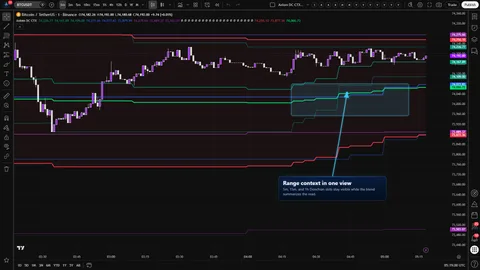
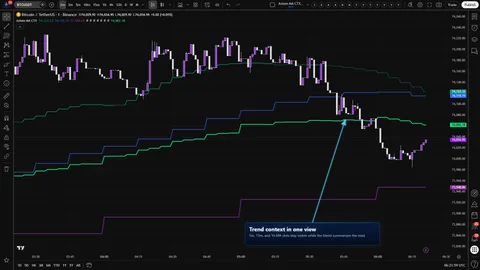
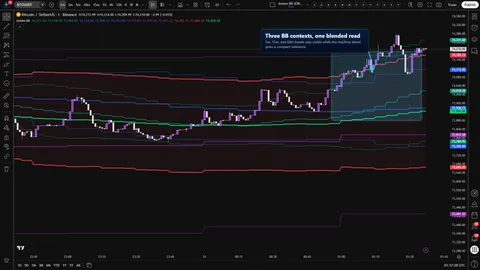
Axiom BB CTX is a multi-context Bollinger Band workbench. Up to ten independent slots run on their own timeframe, source, basis type, length, and deviation. Enabled slots carrying a nonzero weight are combined into a single weighted blended band that you can still take apart slot by slot.

The trust boundary is deliberate and narrow. Repaint behavior is controlled per slot through an On Bar Close? toggle. Alerts fire only on confirmed chart bars. A slot timeframe set below the chart timeframe raises a named runtime error instead of quietly returning misleading values. The blend is a weighted average of what you feed it — not a smarter Bollinger Band — and it will inherit a misconfigured slot's bad read if you let it.

Fit is narrow. It is built for operators who already reweight and inspect contexts and want a compact reference over the top. It is the wrong tool for anyone looking for a buy/sell line — no plot or alert in this indicator is a signal.

Where this version sits

Axiom indicator families use a Base -> CTX -> STR progression when the full set exists. Base is the focused/free version: three chart-symbol slots, one global repaint posture, and the Lite MA surface. CTX expands that same Bollinger Band read into ten slots with optional per-slot tickers, per-slot timing control, deeper Power User controls, and the Pro MA surface. STR sits after CTX where it exists: it keeps the stronger per-slot control pattern, reduces the stack to five slots because of the added computation, and spends that budget on structure around the blended output. This page covers CTX, so choose it when context breadth matters more than STR-style blended-output structure.

Features

The slot set (1–10)

  • Ten independent BB slots, each with its own timeframe, source, basis type, length, deviation, basis trend lookback, and line width.
  • Fixed slot colors (teal, blue, purple, orange, yellow, fuchsia, lime, aqua, silver, maroon) so slot numbering stays visually stable as you reorganize.
  • Enable turns a slot on. Hide Plot suppresses drawing while keeping the slot active in the blend — useful when a slot should steer the blended read without adding another line to an already busy chart.

The blended band

  • Red upper, red fill, red lower, with a lime basis.
  • Built from a weighted average of enabled slots carrying nonzero weight. Weights do not have to sum to 100; the blend divides by the weight actually present.
  • The blended basis trend is set by a weighted majority of the slot trend reads. A tie reads as uptrend.

Safe multi-timeframe and cross-symbol reads

  • Slot data is pulled through a higher-timeframe request using the documented safe-MTF pattern with lookahead_on.
  • The per-slot On Bar Close? toggle decides whether you see the confirmed previous HTF bar or the live HTF bar.
  • A slot can be pointed at another ticker. Its bands are rescaled into the chart symbol's price space using a higher-timeframe close ratio — a translation, not a fundamental conversion.

Power-user basis controls

  • Multiple MA families are selectable per slot through the Axiom MA library. SMA is the default.
  • Certain families — ALMA, KAMA, FRAMA, Jurik, Laguerre, VAMA — use additional per-slot controls (ALMA offset / sigma / floor, KAMA and FRAMA fast / slow, Jurik phase / power, Laguerre alpha, VAMA volatility length). Those controls are visible in the power-user blocks and only affect the curve when the chosen basis type uses them.

Alert surface

  • Per-slot basis trend (uptrend / downtrend).
  • Blended basis trend (uptrend / downtrend).
  • Alignment across all enabled slots (all uptrend / all downtrend).
  • Every alert is gated to confirmed chart bars.
How to use
  1. Add the indicator to a chart whose timeframe is at or below every slot timeframe you plan to use. If any slot is set lower than the chart, the script raises a runtime error that names the offending slot.
  2. Keep the defaults for a first pass — slots 01–03 enabled (5m / 15m / 1h at length 20, deviation 2.0, SMA on close), the blended band on, On Bar Close? on for every slot.
  3. Confirm three nested BBs render cleanly with visible width differences across the timeframes, and that the blended band draws a single set of red bands with a lime basis that sits between them.
  4. Only then start adding slots, changing sources, or pointing a slot at another ticker. One change at a time, so you can see what each one does to the blend.

If you plan to run alerts, leave On Bar Close? ON for every slot whose alert you care about. OFF is for watching the live HTF bar develop — not for firing.

Settings

Settings repeat per slot in the order you encounter them in the panel.

  • Enable BB 0N. Turn slots on only when you know what context you want them to carry. Defaults: 01–03 ON, 04–10 OFF. Enabling all ten on a fresh chart is the most common way to make the tool less useful, not more.
  • Hide BB 0N Plot. OFF by default. Use this when a slot should count in the blend but not draw.
  • Source. Default close. Anything is available, but mixing sources across slots without a reason breaks the comparison you are trying to read.
  • TimeFrame. Defaults 5, 15, 60 for slots 01–03; blank for 04–10. Must be at or above the chart timeframe. Blank means the slot inherits the chart timeframe, which makes it a chart-timeframe BB rather than a higher-timeframe BB — a legitimate choice, but a different one.
  • Length. Default 20. Classical Bollinger lookback; drives both the basis and the deviation calculation.
  • StdDev Mult. Default 2.0. Widen to tolerate more noise; tighten to sit closer to the basis. There is no universally correct value; match the deviation to the kind of move you are trying to see.
  • Type (basis MA). Default SMA. Switching to ALMA, KAMA, FRAMA, Jurik, Laguerre, or VAMA makes the matching power-user parameters matter; the power-user blocks themselves are already present further down the panel.
  • Basis Trend Length. Default 3. A shorter value reacts sooner to the basis turning; a longer value waits for a more committed move. Downstream, per-slot trend alerts, the all-slot alignment alert, and the blend's trend read all read from this.
  • Line Width. Default 2 per slot; 3 for the blended band.
  • Blended Weight. Default 33.3 for 01–03, 0 for 04–10. Weight 0 means the slot is drawn and computed but excluded from the blend.
  • Optional Ticker. Default blank. Set this to pull bands from another symbol; the indicator rescales them into the chart symbol's price space using an HTF close ratio. Expect the comparison to look off when the symbols are scaled differently, when sessions do not line up, or when the second feed is stale.
  • Power-user parameters. Relevant only for MA families that use them. Defaults: ALMA offset 0.85, sigma 6.0, floor OFF; KAMA and FRAMA fast 2 / slow 30; Jurik phase 0 / power 2.0; Laguerre alpha 0.5; VAMA volatility length 20. Do not change these blindly; they reshape the basis in ways that look wrong if you have not spent time with the underlying MA family.
  • On Bar Close? Default ON. The repaint switch. See Alerts and For the geeks.

The blended band has its own Enable, Hide, and Line Width at the bottom of the panel. Hiding the blend also suppresses the fill between its upper and lower.

Alerts

Every published alert is gated by barstate.isconfirmed, which means an alert will not fire until the chart bar is confirmed closed.

  • Per slot (01–10). BB 0N Basis Is Uptrend and BB 0N Basis Is Downtrend. Trend is evaluated by comparing the slot's basis to its value Basis Trend Length bars ago.
  • Blended band. Blended BB Basis Is Uptrend and Blended BB Basis Is Downtrend. These run off the blended basis trend produced by the weighted-majority rule.
  • Alignment. All BB Slot Bases Uptrend and All BB Slot Bases Downtrend. These fire when every currently enabled slot agrees.

Alert text references {{ticker}} and {{interval}}.

There are no band-touch, band-cross, reversion, squeeze, or close-vs-band alerts. The alert surface is narrow on purpose: trend direction and alignment only. If you want touch or cross logic, build it on top of the slot plots.

For the geeks

Four parts of this tool behave differently enough from a textbook MTF BB that they are worth naming.

Safe MTF and the on-bar-close toggle. Higher-timeframe data is requested using the lookahead_on pattern TradingView documents for MTF alignment. The per-slot On Bar Close? toggle decides which HTF bar you read. ON returns the previous confirmed HTF bar's BB values — slower to update, stable on confirmed history. OFF returns the live HTF bar and can repaint until that bar closes. Alerts are gated to confirmed chart bars no matter which mode a slot is in. Verify it by flipping a slot between ON and OFF on a 1-minute chart — the last live bar's BB will react faster on OFF and settle once the higher-timeframe bar closes.

The weighted blend and its trend read. The blend averages the upper, basis, and lower of every enabled slot carrying a nonzero weight. The blended basis trend comes from a weighted majority of the slot trend flags, and a tie reads as uptrend. The blend inherits what you feed it — a misconfigured slot with a heavy weight will drag the blended read with no visible warning. Verify it by disabling every slot except one, setting that slot's weight to any number, and confirming the blended band matches that slot. Then enable a second slot at a larger weight and confirm the blend shifts toward the heavier one.

Cross-symbol bands as a translation. A slot with an optional ticker pulls its BBs from that symbol and rescales them using the ratio of the chart symbol's HTF close to the slot ticker's HTF close at the same target timeframe. That is a translation, not a fundamental conversion. Symbols with very different scales, mismatched sessions, or stale feeds will show a band that looks off — which is the mechanism doing its job, not failing. Verify it by pointing a slot at a comparable instrument with similar pricing and confirming the rescaled bands land near the chart symbol's price rather than the foreign symbol's.

Lower-bound runtime error on slot timeframe. If any enabled slot's timeframe resolves lower than the chart timeframe, the script raises a named runtime error identifying the offending slot. It is a hard stop, not a warning. A lower-timeframe request from a higher-timeframe chart returns misleading values, and the honest response is to refuse to draw until the configuration is corrected.

FAQ

Does this repaint? The per-slot On Bar Close? toggle decides. ON returns the previous confirmed HTF bar's values and will not repaint. OFF returns the live HTF bar and can repaint until that bar closes. Alerts are bar-close gated either way, so an alert on an OFF-mode slot still cannot fire mid chart bar. If alerts matter, stay ON.

One of my slots disappeared, or the script errored on first compile. Why? Its timeframe is likely below the chart timeframe. The script raises a named runtime error in that case because pulling a lower-timeframe value into a higher-timeframe chart produces misleading output. Raise the slot's timeframe, or drop the chart timeframe.

Is the blended band a better Bollinger Band? No. It is a weighted average of the slots you chose to enable at the weights you chose to give them. It inherits the quality of those inputs, including the bad ones. Use it as a compact reference while you still have the underlying slots in view.

My cross-ticker slot looks off — what should I check? Compare the two symbols. The scaling is a ratio of HTF closes and assumes the symbols sit in a comparable price regime, trade on compatible sessions, and carry a fresh feed. Futures versus cash, illiquid sessions, and stale or gapped data are the usual reasons a rescaled band looks wrong. That is the translation telling you the comparison does not hold cleanly — not a defect.

Do I need the CTX trim if I already run the core BB? Probably not, unless you are genuinely stacking timeframes, sources, or cross-symbol studies and want a blended band sitting on top of that. CTX opens the ten-slot context surface. If two or three slots at one timeframe are doing the job, run Base and keep the settings panel cleaner.

Limitations
  • The indicator does not generate trade signals, does not predict direction, and does not score setup quality. Those judgments stay with you.
  • The blend is a weighted average. It has no opinion about which slot deserves more weight and will mirror a bad slot's bad read if that slot carries a heavy weight.
  • Cross-symbol bands are a translated view, not a normalized relative-value measure. Mismatched scales, sessions, or feeds will show in the bands.
  • The alert surface is narrow on purpose: per-slot trend, blended trend, and all-slot alignment. No touch, cross, squeeze, or reversion alerts are published.
  • Exotic MA families (KAMA, FRAMA, Jurik, VAMA) can show warm-up or edge-of-range behavior on early bars while their internal state builds up. Treat the first portion of history accordingly.
Support and training

Documentation and support live at axiomcharts.com. Any channel not linked from there is not an official one.

Disclaimer

This indicator is an analytical tool for charting context. It is not investment advice and is not a recommendation to buy, sell, or hold any instrument. Markets can move against any read the tool produces. You are responsible for your own trade decisions, your own risk management, and your own verification of anything the tool displays.

Related products

If this one is close but not quite right, there may be a better fit nearby for the same kind of chart work, testing need, or workflow gap.

Back to products
Axiom BBindicator
Axiom BB thumbnail

indicator / indicators

Axiom BB

Free

Three Bollinger Band slots and one weighted blended band on a single overlay. Built for operators who want a small, honest BB stack across timeframes without giving up control over confirmed-versus-live higher-timeframe reads.

1m5m15m1H4H1DANY

Crypto / Forex +4 / 1m / 5m +5

Axiom DC CTXindicator
Axiom DC CTX thumbnail

indicator / indicators

Axiom DC CTX

A ten-slot Donchian Channel workbench with a weighted combined channel, per-slot timing control, and optional cross-symbol studies. For operators who want to stack range context across timeframes without giving up the ability to inspect each slot.

1m5m15m1H4H1DANY

Crypto / Forex +4 / 1m / 5m +5

Axiom MA CTXindicator
Axiom MA CTX thumbnail

indicator / indicators

Axiom MA CTX

A ten-slot moving-average workbench with a weighted blended line, safe multi-timeframe reads, and optional cross-symbol studies. Built for operators who want to stack MA context without losing the ability to inspect each slot.

1m5m15m1H4H1DANY

Crypto / Forex +4 / 1m / 5m +5

Weighing a few options against each other?

Tell us what you are trying to accomplish and we will help you narrow it down honestly.