Skip to content

indicator / indicators

Axiom DC CTX

A ten-slot Donchian Channel workbench with a weighted combined channel, per-slot timing control, and optional cross-symbol studies. For operators who want to stack range context across timeframes without giving up the ability to inspect each slot.

Last updated: Jun 1, 2026

Crypto / Forex +4 / 1m / 5m +5

Purchase options

Monthly / Yearly / One-time access

$3.00/ month

14-day free trial

You need a TradingView account for tools that open or run on TradingView.

These tools support analysis, testing, planning, and review. They do not make trading decisions for you.

14-day monthly trial / 14-day yearly trial / 30-day one-time refund window

Refund policy / Access help

Product details

Explore the details to see whether the tool fits the problem you are trying to solve for.

Overview

Stacking Donchian structure across timeframes — and sometimes across symbols — creates a question a single-timeframe read never had to answer: when the contexts disagree, where do you look first, and can you still take any one of them apart on its own?

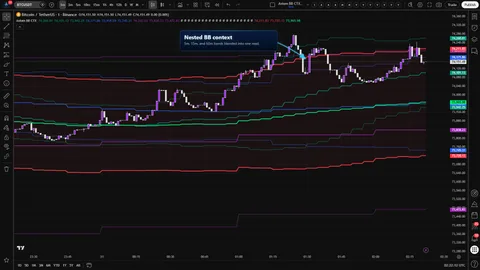
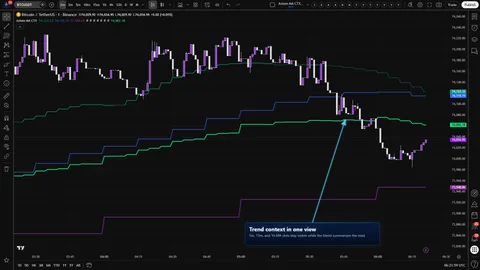
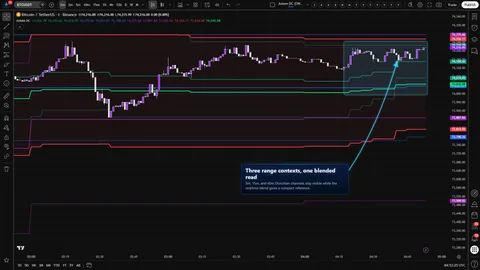
Axiom DC CTX is a multi-context Donchian workbench. Up to ten independent slots run on their own timeframe, length, basis smoothing length, basis MA family, trend lookback, weight, and optional second symbol. Enabled slots combine into one weighted channel. Every slot remains inspectable on its own.

A few boundaries are stated up front rather than hidden. A per-slot On Bar Close? toggle governs whether a slot reads the previous confirmed higher-timeframe bar or the live/current one — that is where repaint lives in an MTF tool. ON is the confirmed-history posture; OFF is responsive, can repaint, and is not historical proof. Alerts are gated to barstate.isconfirmed, so nothing fires before the chart bar closes. A slot timeframe set below the chart timeframe raises a named runtime error that identifies the offending slot, because a lower-timeframe request from a higher-timeframe chart quietly returns a value that looks reasonable and is not. The blended channel is a weighted average; it does not upgrade a bad input, and a misweighted slot will steer the combined line.

Fit is narrow on purpose. The tool is built for operators who already read Donchian structure across more than one frame and want a compact reference while still being able to pick any slot apart. It is the wrong tool for anyone looking for a buy or sell line — nothing it draws or publishes is a signal.

Where this version sits

Axiom indicator families use a Base -> CTX -> STR progression when the full set exists. Base is the focused/free version: three chart-symbol slots, one global repaint posture, and the Lite MA surface. CTX expands that same Donchian read into ten slots with optional per-slot tickers, per-slot timing control, deeper Power User controls, and the Pro MA surface. STR sits after CTX where it exists: it keeps the stronger per-slot control pattern, reduces the stack to five slots because of the added computation, and spends that budget on structure around the blended output. This page covers CTX, so choose it when context breadth matters more than STR-style blended-output structure.

Features

The slot set (1–10)

  • Ten independent Donchian slots, each with its own timeframe, length, basis smoothing length, basis MA family, trend lookback, weight, line width, and optional second ticker.
  • Fixed slot colors (teal, blue, purple, orange, yellow, fuchsia, lime, aqua, silver, maroon) so slot numbering reads the same across sessions.
  • Enable runs a slot and includes it in the blend. Hide Plot keeps the slot counting in the blend while suppressing its drawing — useful when a slot should steer the combined channel without crowding an already busy chart.

Raw bounds, smoothed midpoint

  • The upper and lower lines stay raw Donchian — the highest high and lowest low over the slot's length — with no smoothing applied.
  • Smoothing applies only to the midpoint, through the chosen basis MA family at the chosen basis MA length. The default basis MA length is 1, which leaves the basis as the raw midpoint until you decide to calm it down.
  • This is the Donchian-specific design point: the range edges stay verifiable bar by bar, and the line you read for trend is handled separately.

The blended channel

  • Red upper, red fill, red lower, with a lime basis.
  • A weighted average across enabled slots that carry a nonzero weight. Weights do not have to sum to 100 — the blend divides by the total weight actually present, so the scale is relative.
  • The blended basis trend is a weighted majority of the slot trend reads. A tie reads as uptrend.

MTF posture and cross-symbol reads

  • Slot data is pulled through the higher-timeframe security pattern TradingView documents for MTF alignment.
  • The per-slot On Bar Close? toggle decides whether the slot reads the previous confirmed HTF bar or the live/current one. OFF can repaint and should not be used as a faithful historical read.
  • A slot can be pointed at another symbol. Its upper, basis, and lower get rescaled into the chart symbol's price space using a higher-timeframe close ratio — a translation, not a fundamentals conversion.

Power-user basis controls

  • Multiple MA families are selectable per slot through the Axiom MA library. SMA is the default.
  • The per-slot PU group contains controls for ALMA, KAMA, FRAMA, Jurik, Laguerre, and VAMA (ALMA offset / sigma / floor; KAMA and FRAMA fast / slow; Jurik phase / power; Laguerre alpha; VAMA volatility length). Each control is consumed only when the selected basis type uses it.

Alert surface

  • Per-slot basis trend (uptrend / downtrend) for slots 01–10.
  • Blended basis trend (uptrend / downtrend).
  • Alignment across all enabled slots (all uptrend / all downtrend).
  • Every alert condition is gated to confirmed chart bars.

Diagnostic plots

  • Four hidden plots carry the live count of slots with basis uptrends, basis downtrends, chart closes at/above slot basis, and chart closes below slot basis. They do not draw on the chart and exist for external consumers that want counts without adding ink.
How to use
  1. Add the indicator to a chart whose timeframe is at or below every slot timeframe you plan to use. If a slot is set lower than the chart, the script raises a runtime error that names the offending slot — the check runs immediately, so you see it on the first compile.
  2. Keep the defaults for a first pass: slots 01–03 enabled at 5m / 15m / 1h, length 20, basis MA length 1 on SMA, basis trend length 3, weights 40 / 35 / 25; the blended channel on; On Bar Close? ON for every slot.
  3. Confirm three nested Donchian channels render in their slot colors with visible width differences across the timeframes, and that the blended channel draws red bounds with a lime basis between them.
  4. Only then start changing settings — one slot at a time, one setting at a time — so the effect of each change on the combined read stays visible.

If a slot will drive alerts, leave its On Bar Close? ON. OFF is a live-bar preview mode, not a firing mode.

Settings

Settings repeat per slot in the order you meet them in the panel.

  • Enable DC 0N. Defaults: 01–03 ON, 04–10 OFF. Turn a slot on when you know what Donchian context it is meant to represent. Turning every slot on at equal weight on a fresh chart is the common failure mode — a cleaner three-slot setup is almost always more useful.
  • Hide DC 0N Plot. OFF by default. Use it when a slot should count in the blend but not draw on the chart.
  • TimeFrame. Defaults 5, 15, 60 for slots 01–03; blank for 04–10. Must be at or above the chart timeframe. Blank inherits the chart timeframe, which turns the slot into a chart-timeframe DC rather than an MTF DC — a legitimate choice, but a different one.
  • Length. Default 20. The Donchian lookback. Drives the upper and lower directly, and feeds the midpoint that the basis smooths.
  • Basis MA Length. Default 1. Smoothing length applied only to the midpoint; the upper and lower stay raw for the chosen slot length. At 1 with SMA, the basis is the raw midpoint. Raising it calms the basis without moving the bounds.
  • Type (basis MA). Default SMA. Switching to ALMA, KAMA, FRAMA, Jurik, Laguerre, or VAMA changes how the midpoint behaves and decides which controls in the power-user group matter.
  • Basis Trend Length. Default 3. Shorter reacts sooner to the basis turning; longer waits for a more committed move. Feeds the per-slot trend alerts, the alignment alert, and the blend's weighted-majority trend read.
  • Line Width. Default 2 per slot; 3 for the blended channel.
  • Blended Weight. Defaults 40 / 35 / 25 for slots 01–03, 0 for 04–10. Weight 0 means the slot is drawn and computed but excluded from the blend. A single slot with any nonzero weight while every other slot sits at 0 makes the blended channel match that slot.
  • Optional Ticker. Default blank. Set it to pull Donchian data from another symbol; the indicator rescales that slot's channel into the chart symbol's price space using an HTF close ratio. Expect the comparison to look off when the two symbols sit in different price regimes, when sessions do not overlap, or when the second feed is stale.
  • Power-user parameters. Active only for the MA families that use them. Defaults: ALMA offset 0.85, sigma 6.0, floor OFF; KAMA and FRAMA fast 2 / slow 30; Jurik phase 0 / power 2.0; Laguerre alpha 0.5; VAMA volatility length 20. These reshape the basis in ways that look wrong to anyone who has not spent time with the underlying MA family — change them only when you know what you are changing.
  • On Bar Close? Default ON. The repaint switch. See Alerts and For the geeks for exactly what it controls.

The blended channel has its own Enable, Hide, and Line Width at the bottom of the panel. Hiding the blend also suppresses the fill between its upper and lower.

Alerts

Every published alert is gated by barstate.isconfirmed, so no alert can fire until the chart bar is confirmed closed.

  • Per slot (01–10). DC 0N Basis Is Uptrend and DC 0N Basis Is Downtrend. Uptrend is evaluated as the slot basis being at or above its value Basis Trend Length bars ago; downtrend is evaluated as lower.
  • Blended channel. Blended DC Basis Is Uptrend and Blended DC Basis Is Downtrend. These run off the blended basis trend produced by the weighted-majority rule.
  • Alignment. All DC Slot Bases Uptrend and All DC Slot Bases Downtrend. These fire when every currently enabled slot agrees on direction.

Alert text references {{ticker}} and {{interval}}.

No channel-touch, channel-break, close-vs-basis, mean-reversion, or squeeze alerts are published. The alert surface is narrow on purpose — trend direction and alignment, nothing else. If you want touch or break logic, build it from the slot plots.

For the geeks

Four parts of this tool depart from a textbook MTF Donchian. They are worth naming in plain language so a serious reader does not have to reverse-engineer them from tooltips.

MTF posture and the on-bar-close toggle. Higher-timeframe data is pulled through request.security, and the per-slot On Bar Close? toggle decides which HTF bar the slot reads. ON returns the previous confirmed HTF bar's Donchian values — slower to update, stable on confirmed history. OFF returns the live/current HTF bar, which can revise until that bar closes; historical or reloaded OFF bars should not be treated as a faithful record of what was available live. Alerts are gated to confirmed chart bars either way. Verify by flipping a slot between ON and OFF on a 1-minute chart and watching the last live bar's bounds react sooner on OFF and settle once the HTF bar closes.

Raw bounds, smoothed midpoint. Smoothing an entire Donchian channel blurs the two lines operators actually read it for — the real range high and low across the lookback. This tool leaves those two lines raw for the chosen slot length and smooths only the midpoint through the chosen MA family at the chosen basis MA length. You keep a bar-by-bar read on the range edges and a calmer line for trend. The tradeoff is that a smoothed basis lags during fast range expansions and can visibly drift within the two bounds on those bars. Verify by setting the basis MA length to 1 with SMA and confirming the basis matches the raw midpoint, then raising the length and watching the basis lag into expansion bars.

The weighted blend and its trend read. The blend averages the upper, basis, and lower of every enabled slot that carries a nonzero weight. The blended basis trend is a weighted majority of the per-slot trend flags, and a tie reads as uptrend. The tie rule picks a side, so the blended trend does not flatten during disagreement — which also means the blend inherits every input's noise. One misweighted slot can steer the combined line with no visible warning. Verify by disabling every slot except one, giving it any nonzero weight, and confirming the blended channel matches it. Then enable a second slot at a larger weight and watch the blend shift toward the heavier one.

Cross-symbol bands as a translation. A slot with an optional ticker pulls its Donchian from that symbol and rescales it using the ratio of the chart symbol's HTF close to the slot ticker's HTF close at the same target timeframe. That is a translation — "where would this other symbol's Donchian sit in my chart symbol's price space" — not a fundamentals conversion and not a correlation read. Symbols in very different price regimes, mismatched sessions, or with stale feeds will show a channel that looks off, and that is the mechanism reporting honestly rather than failing. Verify by pointing a slot at a comparably priced instrument and confirming the rescaled channel lands near the chart symbol's price rather than the foreign symbol's.

FAQ

Does this repaint? The per-slot On Bar Close? toggle decides. ON returns the previous confirmed HTF bar's Donchian values and is the posture to use for confirmed history. OFF returns the live/current HTF bar and can repaint until that bar closes; do not use OFF history as proof of what the chart showed live. Alerts are bar-close gated either way, so even a slot running OFF cannot fire an alert mid chart bar. If alerts are part of your workflow, keep those slots on ON.

One of my slots is not drawing, or the script errored on first compile — why? Its timeframe is almost certainly below the chart timeframe. The script raises a named runtime error in that case, because a lower-timeframe request into a higher-timeframe chart returns misleading values. Raise the slot's timeframe to the chart timeframe or higher, or drop the chart timeframe, and the run will resume.

Is the blended channel a smarter Donchian? No. It is a weighted average of the slots you enabled at the weights you gave them, and it carries whatever they carry — including the parts that are not working. Read it as a compact summary while the underlying slots are still visible. Do not read it as a superior range read.

My cross-ticker slot looks wrong — what should I check? Compare the two symbols first. The scaling is a ratio of HTF closes and assumes the two symbols sit in comparable price regimes, trade on compatible sessions, and carry fresh feeds. Futures versus cash, different session hours, illiquid tickers, and stale feeds are the usual suspects. In those cases the translation is telling you the comparison does not hold cleanly — not that the tool is broken.

Do I need the CTX trim if I already run the core DC? Probably not, unless you are actually stacking more than two or three timeframes, running cross-symbol context, or reaching for per-slot MA families. CTX opens the ten-slot context surface and adds inspection surface that costs nothing to ignore and is there when a real question needs it. When a three-slot setup at one timeframe answers the question, Base is the cleaner tool.

Limitations
  • The indicator does not generate trade signals, does not predict direction, and does not score setup quality. Those judgments stay with you.
  • The blended channel is a weighted average. It has no opinion about which slot deserves more weight, and it will mirror a bad slot's read when that slot carries weight.
  • Cross-symbol channels are a translated view. They are not a normalized relative-value measure and not a correlation read. Mismatched scales, sessions, or feeds will show in the channel.
  • The alert surface is narrow on purpose: per-slot trend, blended trend, and all-slot alignment. No channel-touch, channel-break, close-vs-basis, or squeeze alerts are published.
  • Exotic MA families (KAMA, FRAMA, Jurik, VAMA) can show warm-up or edge-of-range behavior on early bars while their internal state builds up. Treat the first portion of history accordingly.
  • Slot timeframes below the chart timeframe stop the script with a runtime error. That is a deliberate guardrail against misleading values, not a limitation to work around.
Support and training

Documentation and support live at axiomcharts.com. Any channel that is not linked from there is not an official one.

Disclaimer

This indicator is an analytical tool for charting context. It is not investment advice and is not a recommendation to buy, sell, or hold any instrument. Markets can move against any read the tool produces. You are responsible for your own trade decisions, your own risk management, and your own verification of anything the tool displays.

Related products

If this one is close but not quite right, there may be a better fit nearby for the same kind of chart work, testing need, or workflow gap.

Back to products
Axiom DCindicator
Axiom DC thumbnail

indicator / indicators

Axiom DC

Free

A three-slot multi-timeframe Donchian Channel overlay with a weighted combined channel. For operators who already read Donchian structure and want a chart-side read stacked with two higher-timeframe reads on the same chart.

1m5m15m1H4H1DANY

Crypto / Forex +4 / 1m / 5m +5

Axiom BB CTXindicator
Axiom BB CTX thumbnail

indicator / indicators

Axiom BB CTX

A ten-slot Bollinger Band workbench with a weighted blended band, safe multi-timeframe reads, and optional cross-symbol studies. Built for operators who want to stack context without giving up the ability to inspect each slot.

1m5m15m1H4H1DANY

Crypto / Forex +4 / 1m / 5m +5

Axiom MA CTXindicator
Axiom MA CTX thumbnail

indicator / indicators

Axiom MA CTX

A ten-slot moving-average workbench with a weighted blended line, safe multi-timeframe reads, and optional cross-symbol studies. Built for operators who want to stack MA context without losing the ability to inspect each slot.

1m5m15m1H4H1DANY

Crypto / Forex +4 / 1m / 5m +5

Weighing a few options against each other?

Tell us what you are trying to accomplish and we will help you narrow it down honestly.