Skip to content

indicator / indicators

Axiom CVD Osc

A three-slot multi-timeframe CVD oscillator with bounded 0..100 slot reads, a weighted composite, and optional post-blend smoothing. The focused/free Base version for clean chart-symbol flow reads.

Last updated: Jun 1, 2026

Crypto / Stocks +3 / 1m / 5m +5

Free access

Free access

Read everything on this page first. Open it on TradingView only when you are clear on what it does and what it does not do.

Open in TradingView

You need a TradingView account for tools that open or run on TradingView.

These tools support analysis, testing, planning, and review. They do not make trading decisions for you.

Refund policy / Access help

Product details

Explore the details to see whether the tool fits the problem you are trying to solve for.

Overview

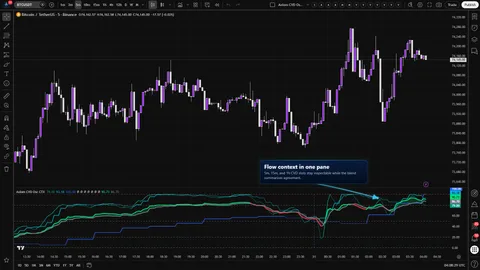
CVD at one timeframe can disagree with CVD at another. Axiom CVD Osc (Base) is a three-slot multi-timeframe CVD oscillator that keeps all three reads on one pane instead of flattening them into a single answer. Each slot runs on its own configured timeframe, its own lower-timeframe precision, and its own Session or Rolling window, mapped to a bounded 0..100 axis. The enabled slots also combine into a single weighted composite, with an optional Master Smoothing pass on top.

Four things to be straight about up front:

  • The CVD here is an OHLCV-based estimate with a wick-aware participation model. It is not footprint, not bid/ask, not tick-level.
  • Repaint is governed by one global On Bar Close? toggle that applies to every slot in this trim. ON reads the previous slot-timeframe bar — stable on confirmed history, slower on the live bar. OFF reads the live slot-timeframe bar — reactive, but can repaint until that bar closes.
  • Every alert is gated to confirmed chart bars. No condition fires mid-bar.
  • The 0..100 axis is a bounded view. It is not a calibrated probability and not a confidence score.

Fit: operators who already use CVD context and want three deliberate reads on one pane plus a weighted summary line.

Misfit: anyone looking for a buy/sell call, footprint-grade delta, cross-symbol substitution, or a pre-tuned "best settings" pack.

Where this version sits

Axiom indicator families use a Base -> CTX -> STR progression when the full set exists. Base is the focused/free version: three chart-symbol slots and one global repaint posture. CTX expands that same CVD logic into ten slots with optional per-slot tickers, per-slot timing control, and deeper Power User controls. STR sits after CTX: it keeps the stronger per-slot control pattern, reduces the stack to five slots because of the added computation, and spends that budget on divergence, Keltner, BBWP, and Donchian structure around the blended CVD output. This page covers Base, so reach for it when the three-slot chart-symbol flow read is enough.

Features

The three-slot stack

  • Three independent CVD slots. Each carries its own enable, hide, blended weight, slot timeframe, lower-timeframe precision, window mode, window size, MA family choice for both CVD and signal, line width, pressure sensitivity, and wick weight.
  • Default load: all three slots on at weight 33.3, timeframes 5 / 15 / 60, SMA on both CVD and signal at length 3.
  • Slot 01 plots teal, 02 aqua, 03 blue. Each slot brightens when its CVD sits above its signal and dims when it drops below. Visual identity per slot is stable from chart to chart.

Wick-aware participation model

  • Pressure Sensitivity controls how decisively the per-bar classifier calls a bar strong or weak.
  • Wick Weight controls how much long rejection at the high or low contributes to the per-bar score.
  • Both knobs are per slot. Pushing either knob to its edge without watching how recent bars read is the most common misuse.

Bounded 0..100 view with Session and Rolling modes

  • Session mode resets cumulative delta at each window anchor and tracks period high / low from that anchor. Dashed vertical markers show each reset on visible Session-mode slots.
  • Rolling mode keeps a sliding lookback at the configured duration and tracks period high / low from that sliding sample. No reset markers in this mode.
  • Both modes map cumulative delta into 0..100 against the period span. Reference levels: 0 (lower boundary), 20 (configurable oversold guide), 50 (midline), 80 (configurable overbought guide), 100 (upper boundary).

Weighted composite and optional Master Smoothing

  • The enabled slots combine into one weighted CVD line and one weighted signal line. The composite divides by the weight actually present, so weights are relative — they do not have to sum to a fixed total.
  • A slot at weight zero is still computed and still plotted (unless hidden) but is excluded from the composite.
  • Master Smoothing applies one optional MA pass over the blended CVD and signal after the blend. It calms the line and trades that calm for lag.

Alert surface

  • Per-slot CVD-vs-signal state for slots 01, 02, 03 — bullish or bearish, six conditions in total.
  • Composite CVD-vs-signal state — bullish or bearish, two conditions.
  • Cross-slot alignment — fires when every enabled slot with a valid read is on the same side of its own signal, two conditions.
  • Ten conditions in total, all gated to confirmed chart bars.
How to use
  1. Add to a chart whose timeframe is at or below every slot timeframe you plan to use. If a slot breaks that rule, the script raises a named runtime error rather than continuing with a bad read.
  2. Leave the three default slots running (5 / 15 / 60, Session window mode, daily window anchor, SMA at length 3 on CVD and signal) and leave the blended display on.
  3. Confirm each slot plot sits inside the 0..100 band and that the blended line tracks somewhere inside the three-slot stack.
  4. Decide on On Bar Close? based on how you plan to use the read. Keep it ON if you are wiring live alerts. Flip it OFF only when faster live-bar reaction matters more than stable last-bar history, and accept the repaint that comes with that trade.

What correct first use should look like:

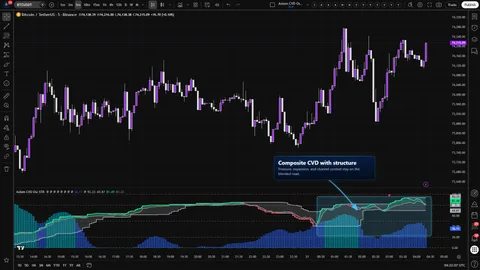
  • Three slot lines render in teal, aqua, and blue. Each line stays between 0 and 100. The 20 and 80 guides read cleanly.
  • The blended CVD plots in lime when above its signal, red when below, with a gray signal line underneath. The shaded fill follows the sign of (blended CVD − blended signal).
  • Dashed vertical markers appear at each session reset for visible Session-mode slots.

The three rules the script enforces, each raised as a named runtime error rather than a silent misread:

  • Slot timeframe must be at or above the chart timeframe.
  • Lower-tf precision must be strictly below the slot timeframe.
  • Window size must be at or above the slot timeframe.
Settings

Per-slot, in user-facing order:

  • Enable CVD 0N. Default ON. Treat enabling and disabling as a deliberate decision about which contexts you want on the pane.
  • Hide CVD 0N Plot. Default OFF. Hide keeps the slot computing and counted in the blend if its weight is nonzero. Useful when a slot should steer the composite without crowding the pane.
  • TimeFrame. Defaults 5, 15, 60. Must be at or above the chart timeframe. Leaving it blank inherits the chart timeframe and turns the slot into an intrabar CVD rather than a true MTF read.
  • Lower TF Precision. Defaults 1, 1, 5. Must be strictly below the slot timeframe. If it is equal to or above the slot timeframe, the script raises a named runtime error. The OHLCV fallback is reserved for missing lower-timeframe data, not for invalid precision settings.
  • Window Mode. Default Session. Session resets at each window anchor; Rolling slides over a fixed lookback.
  • Window. Default D (daily). Session uses it as the reset anchor; Rolling uses it as the lookback size. Must be at or above the slot timeframe.
  • CVD Length / CVD Type. Default 3 / SMA. Smooths the normalized CVD line. The MA family list is shared across CVD, signal, and Master Smoothing.
  • Signal Length / Signal Type. Default 3 / SMA. The line CVD is compared against for color state and alert classification.
  • Line Width. Default 2 per slot.
  • Blended Weight. Default 33.3 on each slot. Weights are relative; the composite divides by the actual total weight present.
  • Pressure Sensitivity. Default 1.50; range 0.25 to 4.0 in 0.05 steps. Higher is more decisive about strong / weak bars; lower keeps more neutrality. Move it without watching how recent bars read, and the line that comes back will not resemble the one you started with.
  • Wick Weight. Default 0.20; range 0.0 to 0.50. Controls how much wick rejection contributes to the per-bar score.

Global and shared:

  • Overbought / Oversold. Defaults 80 / 20. Visual guides only. They do not fire alerts in this trim.
  • Plot Blended CVD/Signal and Blended Line Width. Defaults ON / 3. Toggles the composite and its fill.
  • Master Smoothing. Default OFF; default MA family EMA at length 3 when enabled. Applies one MA pass over the blended CVD and signal. Reduces noise; adds lag.
  • On Bar Close? Global, under the PU group, default ON. The single switch that governs repaint for every slot in this trim. No per-slot override. ON returns the previous slot-timeframe bar's smoothed CVD and signal. OFF returns the live slot-timeframe values. Per-slot repaint governance lives in CTX and STR.
Alerts

Ten conditions, all bar-close gated. Messages reference {{ticker}} and {{interval}}.

  • CVD 01 Is Bullish / CVD 01 Is Bearish — slot 01 CVD vs. its signal.
  • CVD 02 Is Bullish / CVD 02 Is Bearish — slot 02 CVD vs. its signal.
  • CVD 03 Is Bullish / CVD 03 Is Bearish — slot 03 CVD vs. its signal.
  • Blended CVD Is Bullish / Blended CVD Is Bearish — composite CVD vs. composite signal.
  • All CVD Slots Bullish / All CVD Slots Bearish — every enabled slot with a valid read on the same side of its own signal.

What the alert surface is not, in this trim:

  • No overbought or oversold level cross alerts. The 20 / 80 guides are visual only.
  • No session-reset alerts. Session resets draw markers but do not publish a condition.
  • No event-style cross-above / cross-below alerts. The conditions hold while the state holds on a confirmed bar.
  • "Bullish" and "bearish" describe the CVD-vs-signal relationship. They are not directional forecasts.
For the geeks

Four mechanics shape what to trust about the read. Each is described at mental-model level — enough to calibrate, not enough to clone.

Wick-aware participation classifier

Bid/ask delta is not available for most TradingView symbols, so a CVD without real delta has to choose how to estimate per-bar participation. Each intrabar's body direction, where its close sits inside the bar range, and a wick-rejection term combine into an intent score. That score is sorted into participation buckets that move with two operator-facing knobs: Pressure Sensitivity reshapes how readily a bar is classified as strong or weak; Wick Weight scales how much long rejection at the high or low contributes. The slot's CVD is the running sum of those participation reads scaled by volume. Verify: hold pressure sensitivity at its minimum on a chart you know, then push it to its maximum. The slot's CVD line should move from neutral toward decisive in a way you can see.

0..100 normalization with Session and Rolling modes

Raw cumulative delta drifts. Comparing raw cumulative delta across sessions or across timeframes is not meaningful, so each slot's cumulative delta is mapped into a bounded range against the current period's own extremes. Session mode resets at each window anchor and tracks the period high / low from that anchor. Rolling mode keeps the per-bar deltas and the resulting cumulative delta in a sliding lookback at the configured duration, and the period high / low come from that sliding sample. Both modes give up magnitude for cross-slot comparability inside one pane. Verify: switch a slot between Session and Rolling at the same window size on the same symbol and watch how the line behaves at the window edge.

Safe MTF and the global On Bar Close? toggle

Slot values are read with the documented safe-MTF pattern. The toggle decides which slot-timeframe bar the returned values come from. ON returns the previous slot-timeframe bar's smoothed CVD and signal — stable on confirmed history, slower on the live bar. OFF returns the live slot-timeframe values — reactive, but can repaint until that bar closes. In this trim the toggle is global; every slot follows it. Alerts are bar-close gated independently, so a condition cannot fire mid-chart-bar regardless of how the toggle is set. Verify: toggle the switch off on a quiet chart and watch the last live bar update more aggressively while confirmed history holds shape. Toggle it back on and watch the live bar settle on confirm.

Weighted composite and Master Smoothing

The composite is a weighted average of the enabled slots — both CVD and signal — divided by the total weight actually present, not by a fixed total. A slot at weight zero is excluded from the composite even if it is still plotted. Master Smoothing applies one optional MA pass over that blended pair after the blend; it calms the line, and it adds lag. Verify: set two of the three slots to weight zero and confirm the composite tracks the remaining slot. Reintroduce a second slot at a larger weight and watch the composite shift toward it.

FAQ

Does this repaint? The slot-timeframe read can. That is what On Bar Close? is for. ON reads the previous slot-timeframe bar (stable on confirmed history, slower on the live bar). OFF reads the live slot-timeframe bar (reactive, can repaint until that bar closes). The toggle is global in this trim, so it applies to every slot. Alerts are bar-close gated independently — no condition fires mid-chart-bar — but if you wire alerts on a chart with the toggle OFF, what you see live and what you see on confirm can differ.

A slot refused to load with a runtime error. Three rules are enforced as named errors rather than silent misreads, and each error names the slot it is complaining about:

  • Slot timeframe must be at or above the chart timeframe.
  • Lower-tf precision must be strictly below the slot timeframe.
  • Window size must be at or above the slot timeframe.

Match the named slot to its inputs and the offending value will be one of those three.

Is the blended line a smarter CVD? No. It is a weighted average of the slots you enabled at the weights you set. If one heavy-weighted slot is miscalibrated, the composite inherits that miscalibration. Read the composite as a summary of what you weighted, not as a separate read with its own intelligence.

Does Axiom's CVD use real bid/ask data? No. The participation model is an OHLCV estimate with a wick-aware classifier and two operator-facing knobs (Pressure Sensitivity and Wick Weight). It is an estimate, and it is labeled as one. It is not footprint, not bid/ask, not tick-level. Symbols with thin or missing volume produce weak or empty reads.

Base, CTX, or STR — which trim is for me? Base if three slots and a weighted summary on one pane is the answer to your question. CTX if you need ten-slot context breadth, per-slot repaint governance, per-slot ticker substitution, or deeper Power User controls. STR if you also want structure context layered on the blended flow read and can trade CTX's ten slots down to five for that extra computation. Pick by the question, not by the feature count.

Limitations
  • This is not a signal generator. It reports CVD-vs-signal state at slot and composite level. Direction, timing, and sizing are operator decisions.
  • The participation model is an OHLCV estimate, not bid/ask. Symbols where the estimate diverges most from real flow will look noisiest.
  • The 0..100 view is a bounded representation, not a probability. Magnitude is compressed by design.
  • Master Smoothing reduces noise at the cost of lag. It is not a free quality gain.
  • The alert surface is intentionally narrow: per-slot, composite, alignment. No OB / OS level alerts, no session-reset alerts, no event-style cross alerts.
  • Symbols without meaningful volume produce weak or empty reads.
  • On Bar Close? is a single global switch in this trim. Operators who need per-slot repaint governance reach for CTX or STR, depending on whether the job is ten-slot context breadth or five-slot blended-line structure.
Support and training

Documentation, walk-throughs, and support requests live on the AxiomCharts website.

Disclaimer

This indicator is a charting and analysis tool. It does not produce trade advice, does not produce buy or sell signals, and does not guarantee an outcome. Trading involves risk of loss. Verify behavior on your own chart, in your own market, and on the timeframes you actually trade before relying on the read for any decision.

Related products

If this one is close but not quite right, there may be a better fit nearby for the same kind of chart work, testing need, or workflow gap.

Back to products
Axiom CVD Osc STRindicator
Axiom CVD Osc STR thumbnail

indicator / indicators

Axiom CVD Osc STR

A five-slot multi-timeframe CVD oscillator with a weighted composite and optional structure context — divergence, Keltner, BBWP, and Donchian — all built on the composite itself. STR trades CTX's ten-slot breadth for blended-line structure.

1m5m15m1H4H1DANY

Crypto / Stocks +3 / 1m / 5m +5

Axiom CVD Osc CTXindicator
Axiom CVD Osc CTX thumbnail

indicator / indicators

Axiom CVD Osc CTX

A ten-slot CVD oscillator with bounded 0..100 slot reads, a weighted composite, optional master smoothing, and optional per-slot cross-symbol studies. For operators who already read flow and want to stack several honest contexts without losing the ability to inspect each one.

1m5m15m1H4H1DANY

Crypto / Stocks +3 / 1m / 5m +5

Axiom MACD Oscindicator
Axiom MACD Osc thumbnail

indicator / indicators

Axiom MACD Osc

Free

A three-slot multi-timeframe MACD oscillator with each slot normalized into a bounded 0..100 pane, a weight-driven composite, and optional post-blend smoothing. The focused/free Base version of the Axiom MACD Osc family.

1m5m15m1H4H1DANY

Crypto / Forex +4 / 1m / 5m +5

Weighing a few options against each other?

Tell us what you are trying to accomplish and we will help you narrow it down honestly.