Skip to content

indicator / indicators

Axiom CVD Osc STR

A five-slot multi-timeframe CVD oscillator with a weighted composite and optional structure context — divergence, Keltner, BBWP, and Donchian — all built on the composite itself. STR trades CTX's ten-slot breadth for blended-line structure.

Last updated: Jun 1, 2026

Crypto / Stocks +3 / 1m / 5m +5

Purchase options

Monthly / Yearly / One-time access

$3.00/ month

14-day free trial

You need a TradingView account for tools that open or run on TradingView.

These tools support analysis, testing, planning, and review. They do not make trading decisions for you.

14-day monthly trial / 14-day yearly trial / 30-day one-time refund window

Refund policy / Access help

Product details

Explore the details to see whether the tool fits the problem you are trying to solve for.

Overview

The decision this trim is built around: is cumulative volume delta agreeing with chart price right now — not in one context, but across several — in a single bounded read you can lean on without pretending it is bid/ask delta? Different timeframes, optionally a second symbol, optionally a Session anchor on one slot and a Rolling window on another, all on the same 0..100 scale.

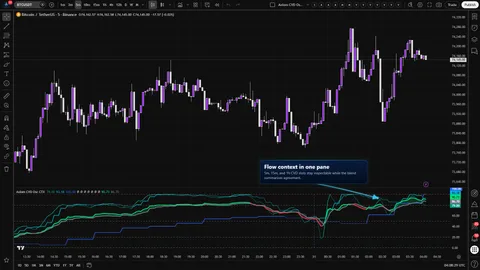
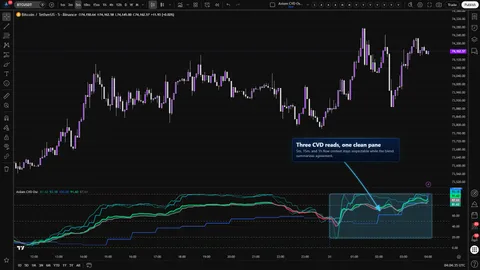
Axiom CVD Osc STR runs up to five independent CVD slots on one pane, combines the enabled slots into a weighted composite, and draws structure context onto that composite line itself — pivot-confirmed divergence against chart price, a Keltner-style envelope, a BBWP column, and a Donchian channel.

A few things to be clear about before you go further:

  • The CVD here is an Axiom-built OHLCV estimate with a wick-aware participation model. It is useful. It is not footprint-grade bid/ask delta.
  • The composite is a weighted average of the enabled slots. Change the weights, change the composite. It is not a calibrated probability model, and it is not smarter than the slots feeding it.
  • Repaint posture is set per slot via the On Bar Close? Power User toggle. ON returns the previous higher-timeframe bar's smoothed values (stable history, slower live edge). OFF returns the live higher-timeframe values (reactive, but can repaint until that bar closes). The composite inherits the less stable posture where the weights sit.
  • The divergence, Keltner, BBWP, and Donchian overlays are context on the composite. They are not standalone trade systems. BBWP in particular is computed on the composite line, not on chart price.
  • Every alert condition is gated on barstate.isconfirmed. No alert fires mid-bar.

Good fit: an operator who already reads multi-timeframe flow, wants five slots instead of three, is willing to weight the blend deliberately, and reads structure layers as context rather than as calls.

Misfit: if you want a buy/sell verdict, footprint-grade bid/ask delta, a best-settings bundle, the full ten-slot CTX workbench, or the clean three-slot Base view, this is the wrong trim for you.

Where this version sits

Axiom indicator families use a Base -> CTX -> STR progression when the full set exists. Base is the focused/free version: three chart-symbol slots and one global repaint posture. CTX expands that same CVD logic into ten slots with optional per-slot tickers, per-slot timing control, and deeper Power User controls. STR sits after CTX: it keeps the stronger per-slot control pattern, reduces the stack to five slots because of the added computation, and spends that budget on divergence, Keltner, BBWP, and Donchian structure around the blended CVD output. Choose STR when blended-line structure matters more than CTX's ten-slot context breadth.

Features

Five independent CVD slots (CVD 01 through CVD 05). Each slot carries its own higher timeframe, lower-TF precision, Session or Rolling window, optional ticker, CVD and signal MA family and length, line width, blended weight, pressure sensitivity, wick weight, and per-slot repaint posture. Why it matters: stacking five contexts on one pane gives you real room to check agreement across timeframes or across correlated symbols without burning a second indicator.

Per-slot Power User block (CVD 0N PU). Holds the On Bar Close? repaint toggle for that slot, plus the advanced parameters for whichever MA family you chose (ALMA offset/sigma/floor, KAMA/FRAMA fast and slow, Jurik phase and power, Laguerre alpha, VAMA volume length) for both the CVD MA and a parallel Signal MA. Why it matters: MA behavior is per-slot, so you can shape decisively per context instead of globally.

Weighted composite with optional Blended Smoothing (Blend Core). Enabled slots combine against total non-zero weight into one composite CVD and signal pair, clamped to 0..100 and drawn in lime/red with a shaded fill. An optional post-blend smoothing pass re-smooths the composite with the MA family and length you pick. Why it matters: you get one anchor line without the math lying about what it is — a weighted average, with lag added on purpose when you turn smoothing on.

Pivot-confirmed divergence against chart price (Blend Div). Compares confirmed chart-price pivot lows and highs against the composite at the same pivot offset. Triangle-up bullish marker at the bottom of the pane, triangle-down bearish marker at the top. Plot On Pivot? back-plots the already-confirmed marker onto the original pivot bar via a negative offset. Why it matters: the marker cannot print before the pivot has confirmed on both sides, so there is no forward-looking claim hiding in the glyph.

Keltner-style envelope on the composite (Blend KC). An envelope drawn on the composite line itself, using the one-bar absolute change as the range input with EMA smoothing and a chosen multiplier. Optional basis, fill, and line width. Why it matters: you see edge context on the line you are actually reading, not on chart price under the pane.

BBWP on the composite (Blend BBWP). Percentile rank of Bollinger Band width, computed on the composite line and labeled Blended BBWP in the plot title. Columns flip color above and below the threshold. Why it matters: expansion and contraction of the composite itself, not of chart price — which is what most BBWP overlays quietly give you.

Donchian channel on the composite (Blend DC). ta.highest and ta.lowest of the composite over the chosen DC length, with a smoothed stepline midpoint basis. Optional fill. Why it matters: a channel extreme on the composite is a different question from a channel extreme on price, and the distinction is the point.

Per-slot session-reset markers. Visible Session-mode slots draw a dashed vertical line in the slot's own color at each confirmed window rollover. If a slot's plot is hidden, its reset marker is hidden too. Why it matters: you can see exactly where a visible slot's accumulator reset, which is load-bearing if you mix Session and Rolling across slots.

Oscillator reference frame. Fixed boundary lines at 0 (green) and 100 (red), a midline at 50, and configurable overbought/oversold guides defaulting to 80/20. The script does not fire alerts off OB/OS crossings — the levels are there for readability.

Diagnostic counts. Active Bullish Count and Active Bearish Count are emitted with display = display.none so the values are available in the data window without crowding the pane.

How to use
  1. Add Axiom CVD Osc STR to a chart with meaningful volume (a 5-minute liquid instrument is a reasonable starting point).
  2. Keep the defaults on the first pass. Slots 01, 02, and 03 are enabled at weight 33.3 on 5-minute, 15-minute, and 60-minute higher timeframes; slots 04 and 05 are off at weight 0.
  3. Confirm the pane draws the composite CVD and signal across the 0..100 scale, with the 80/20 guides visible and the BBWP columns active by default.
  4. Slots 01..03 ship with Hide Plot ON so the composite reads first. Unhide an individual slot's plot only when you want to inspect that slot on its own.
  5. Verify repaint behavior on one slot. Open CVD 01 PU, toggle On Bar Close? OFF, and watch the live-bar plot move before the higher-timeframe bar closes. Toggle it ON and watch the live-bar plot hold the previous higher-timeframe bar's value until that bar confirms. Decide which posture you want — per slot — before you wire alerts.
  6. Verify the guard rails. Set a slot's higher timeframe below the chart timeframe on purpose. The script raises a named runtime.error that identifies the offending slot. Restore a valid timeframe to continue.
  7. Decide whether you want any of the structure layers. Start with one. Divergence is the cheapest to interpret. Keltner, BBWP, and Donchian each answer a different question about the composite — running all four at once on a fresh chart is noise, not signal.

Correct first use looks like this: the composite sits inside the 0..100 band, divergence triangles (if any) appear only on confirmed pivots, the BBWP columns populate once their lookback has had time, and the Donchian upper and lower draw as stepline traces around the composite.

Settings

Per-slot settings apply to CVD 01 through CVD 05.

Per-slot core settings

Enable CVD 0N — default ON for slots 01..03, OFF for slots 04..05. Disabled slots do not contribute to the composite. Do not enable every slot at once without deciding whether their timeframes and windows actually answer different questions.

Hide CVD 0N Plot — default ON for slots 01..03, OFF for slots 04..05. Controls the plot only. Hidden slots still count in the blend. If you want a slot to stop contributing to the composite, disable it, do not hide it.

TimeFrame — the slot's higher timeframe. Must be at or above the chart timeframe (hard error, slot named). Blank uses the chart timeframe. Defaults: 5m (01), 15m (02), 60m (03), blank (04, 05).

Lower TF Precision — the lower timeframe used to sample intrabar OHLCV for the participation classifier. Defaults: "1" on slots 01, 02, 04, and 05; "5" on slot 03. Must be strictly below the slot timeframe (hard error). A precision too close to the slot timeframe collapses the intrabar sample, which makes the classifier fall back to a single-bar estimate.

Window ModeSession resets the accumulator and the period extremes at each window anchor. Rolling keeps a sliding lookback of the same duration. Default Session on every slot. Mixing Session and Rolling across slots is supported — but know which slots reset and which do not.

Window Length: — Session anchor or Rolling lookback. Default "D" on every slot. Must be at or above the slot timeframe (hard error).

Window Boundary: — color for the dashed Session reset marker when that slot is visible. It changes the marker, not the CVD math.

CVD Length, Signal Length — default 3 on every slot. Smoothing length for the slot's CVD line and its signal line respectively. Dropping both to 1 makes the cross more reactive and less meaningful at the same time.

CVD Type, Signal Type — default SMA on every slot. Choose from the Axiom Pro MA library. Some families activate additional parameters in the slot's Power User block; those defaults are sensible, but they are defaults, not recommendations.

Line Width — default 2. Visual only.

Blended Weight — default 33.3 on slots 01..03, 0.0 on slots 04..05. The slot's contribution to the weighted composite. A weight of 0 keeps the slot alive without letting it steer the blend. Change weights deliberately — and remember the change, because the composite you look at tomorrow was composed with the weights you set today.

Pressure Sensitivity — 0.25..4.0 in 0.05 steps, default 1.50. How decisively the participation classifier separates strong from weak bars. Higher is more decisive; lower is more forgiving. Pushed near the max, it will flip hard on mixed prints.

Wick Weight — 0.0..0.50 in 0.05 steps, default 0.20. How much wick rejection biases the participation score. On instruments with structurally long wicks, raising this indiscriminately will read rejection where the instrument prints them by nature.

Optional Ticker — default empty. When set, the slot runs on a different symbol than the chart. Take a moment on this one: a cross-ticker slot still feeds the composite at its weight. If you mix tickers, read the composite as the weighted thing it is, not as a single-instrument read.

Per-slot Power User block (CVD 0N PU)

On Bar Close? — default ON for every slot. This is the repaint switch, exposed per slot in this trim. ON returns the previous higher-timeframe bar's smoothed CVD and signal from inside the security expression. OFF returns the live higher-timeframe values and will repaint until that bar closes. Note: unlike the Base trim's single global toggle, STR lets you set this slot by slot. The composite inherits the least stable posture where the weights sit. If you run OFF on several weighted slots and wire live alerts on top, the read feeding your alert gate can reshape before the next confirmed bar evaluates.

Advanced MA parametersCVD ALMA Floor Offset?, CVD ALMA Offset, CVD ALMA Sigma, CVD KAMA/FRAMA Fast, CVD KAMA/FRAMA Slow, CVD Jurik Phase, CVD Jurik Power, CVD Laguerre Alpha, CVD VAMA Vol Length, plus a parallel Signal ... block with the same knobs. They activate when the selected CVD Type or Signal Type uses them.

Oscillator reference levels

Overbought Level, Oversold Level — defaults 80.0 and 20.0, step 0.1. The dashed guide lines. The script does not fire alerts off these crossings; the levels are readability aids.

Blend core (Blend Core)

Plot Blend — default ON. Toggles the composite CVD and Signal plots.

Line Width — default 3. Width of both composite lines.

Enable Smoothing — default OFF. Turns on the post-blend smoothing pass.

Smooth Type — default EMA. The MA family used for the post-blend pass.

Smooth Len — default 3. Length for the post-blend pass. Smoothing buys calmer shape in exchange for lag. That is the tradeoff, on purpose.

Blend Divergence (Blend Div)

Show Div — default ON.

Pivot Len — default 20. Used as both left and right pivot strength. Higher values confirm later but filter weaker pivots.

Plot On Pivot? — default OFF. OFF plots the marker on the confirmation bar. ON back-plots the already-confirmed marker onto the original pivot bar via a negative offset. The back-plot is cosmetic placement, not a forward-looking signal.

Blend Keltner (Blend KC and Blend KC PU)

Show Keltner — default OFF. Toggles the envelope on the composite.

KC Length / KC Mult: — defaults 20 and 2.0. Envelope construction on the composite.

Basis Type: / Basis Len: — defaults EMA and 20. MA family and length for the envelope basis.

Show Basis, Show Fill, Line Width: — defaults OFF, ON, 2.

Blend KC PU holds the advanced MA parameters for the basis.

Blend BBWP (Blend BBWP and Blend BBWP PU)

Show BBWP — default ON. Toggles the columns.

Length: — default 20. BB basis and width window computed on the composite.

Lookback: — default 252. Percentile-rank depth. The columns are not stable until this lookback has populated.

Threshold: — default 50.0. Color switch between below-threshold and above-threshold columns.

Basis Type: — default SMA. MA family for the BB basis on the composite.

Blend BBWP PU holds the advanced MA parameters for the basis.

Blend Donchian (Blend DC and Blend DC PU)

Show DC — default ON. Toggles the channel.

DC Len: — default 20. Lookback for the high and low extraction on the composite.

Basis Type: / Basis Len: — defaults SMA and 1. MA family and length that smooth the midpoint.

Show Basis, Show Fill, Line Width: — defaults OFF, ON, 2.

Blend DC PU holds the advanced MA parameters for the midpoint basis.

Blend Smooth PU (Blend Smooth PU)

Advanced MA parameters for the post-blend smoothing pass — same knob set as the per-slot PU blocks.

Alerts

Sixteen alert conditions, every one gated on barstate.isconfirmed:

  • CVD 01 Is Bullish / CVD 01 Is Bearish — slot 01 CVD vs signal.
  • CVD 02 Is Bullish / CVD 02 Is Bearish.
  • CVD 03 Is Bullish / CVD 03 Is Bearish.
  • CVD 04 Is Bullish / CVD 04 Is Bearish.
  • CVD 05 Is Bullish / CVD 05 Is Bearish.
  • Blended CVD Is Bullish / Blended CVD Is Bearish — composite vs composite signal.
  • All CVD Slots Bullish / All CVD Slots Bearish — every enabled slot agreeing.
  • Blended CVD Bullish Divergence / Blended CVD Bearish Divergence — pivot-confirmed disagreement between chart-price pivots and the composite at the same pivot offset. These additionally require the divergence layer to be enabled.

No alert fires mid-chart-bar. No overbought/oversold level alerts. No Keltner, BBWP, or Donchian alerts. No session-reset alerts. Alert messages reference {{ticker}} and {{interval}}.

For the geeks

Six mechanics drive the read. Short version of each, with a path to verify it yourself.

Wick-aware OHLCV participation classifier. When bid/ask delta is not available, something has to decide whether a bar's volume leaned toward buyers or sellers. The classifier looks at body position, close location inside the bar range, and a wick-rejection bias, then buckets the result into participation classes and multiplies intrabar volume by that class. Pressure sensitivity and wick weight are per-slot inputs because instruments differ. Tradeoff: more bars get classified with intent than a naive up-vs-down rule would produce, in exchange for two inputs you are expected to tune. Verify by raising pressure sensitivity on a slot and watching bars flip between decisive and weak classes.

Bounded 0..100 normalization via Session or Rolling window. Raw cumulative CVD drifts and cannot be compared across sessions, symbols, or timeframes on one pane. Session mode resets the accumulator and the period extremes at each anchor. Rolling mode keeps a sliding lookback of the same duration. Both rescale the slot into 0..100 against the period high and low. The scale bounds readability. It does not manufacture probability. Verify by swapping a slot between Session and Rolling and watching the reset markers appear or disappear.

Safe-MTF pattern with per-slot On Bar Close?. Multi-timeframe reads quietly repaint on the live higher-timeframe bar unless repaint posture is explicit. The script enforces timeframe and window rules at compile time with named runtime errors (slot timeframe at or above chart timeframe; lower-TF precision strictly below slot timeframe; window at or above slot timeframe) and exposes On Bar Close? per slot. ON returns the previous higher-timeframe bar's smoothed values from inside the security expression. OFF returns the live values. Alerts and divergence are additionally gated on confirmed bars. ON does not remove every dimension of repaint from the read; it is one tradeoff, not a guarantee.

Weighted composite of enabled slots with optional Blended Smoothing. Enabled slots are averaged against the total of their non-zero weights and clamped to 0..100. An optional post-blend smoothing pass re-smooths the composite CVD and signal with a chosen MA family and length. The composite is a weighted average. It is not smarter than the slots feeding it. Change the weights and the composite moves the direction your reweighting predicts; verify by doing exactly that on one slot.

BBWP on the composite line, not on chart price. Bollinger Band width is computed on the composite CVD, percentile-ranked against the chosen lookback, and clamped to 0..100. The plot title says Blended BBWP on purpose — so you never have to wonder whether the columns are expansion of price or expansion of the composite. Percentile ranks only become stable once the lookback has fully populated.

Pivot-confirmed divergence between chart price and the composite. Confirmed chart-price pivots (computed with matched left-and-right pivot strength) are compared against the composite at the same pivot offset. A marker cannot print before the pivot has confirmed on both sides. Plot On Pivot? only repositions the already-confirmed marker back to the original pivot bar via a negative offset. Confirmation-gated divergence is later than eyeball divergence, on purpose.

Safe-to-disclose boundary: this section describes what each mechanic is, why it exists, the tradeoff, and how you can verify it in the data window and on the chart. Exact thresholds, bucket multipliers, score-weighting coefficients, clamp sequencing, and pseudocode are out of scope on purpose.

FAQ

Is this true CVD or an estimate? An estimate. The participation classifier runs on OHLCV with a wick-aware bias, and the resulting signed delta is accumulated and normalized to 0..100. It is honest enough to stack across timeframes and symbols, and it is not footprint-grade bid/ask delta. If your process requires true bid/ask prints, this indicator is not the tool.

Why does the pane move on the live bar before the higher-timeframe bar closes? Because at least one of your slots has On Bar Close? OFF (its Power User toggle). OFF reads the live higher-timeframe bar and can reshape until that bar closes. ON returns the previous higher-timeframe bar's smoothed values — stable on confirmed history, slower on the live edge. Decide the posture you want per slot before you attach alerts. The composite inherits the least stable posture where the weights sit.

Does hiding a slot's plot remove it from the composite? No. Hide Plot controls visibility only. If a slot is enabled, it contributes to the weighted composite regardless of whether you see its line. If you want a slot to stop feeding the blend, disable it, do not hide it.

How is this different from the Base and CTX trims? Base gives you three CVD reads on one pane with a single global repaint toggle. CTX expands that same CVD read to ten slots with optional per-slot tickers, per-slot timing, and deeper Power User controls. STR sits after CTX: five slots with the same stronger per-slot control pattern, plus optional structure layers drawn on the composite itself — divergence versus chart price, Keltner envelope, BBWP column, and Donchian channel. It is the right version when you have decided you want structure context on the blended read more than CTX's ten-slot breadth.

Should I enable divergence, Keltner, BBWP, and Donchian at the same time? Not on day one. Each answers a different question about the composite, and running them all at once on a fresh chart will give you a crowded pane and the temptation to read a standalone trade system that was never built. Turn on one layer, work with it, add the next only when you can articulate what it is telling you that the previous one did not.

Limitations
  • The CVD here is an OHLCV-based estimate with a wick-aware participation model. It is not footprint-grade bid/ask delta. Any process that requires real bid/ask prints needs a different source.
  • Repaint posture is per slot. On Bar Close? ON is stable on confirmed history and slower on the live bar; OFF is reactive and can repaint until the higher-timeframe bar closes. Running OFF on weighted slots and wiring live alerts on top will give you a read that can reshape before your next confirmed-bar evaluation.
  • The composite is a weighted average of the enabled slots. Miscalibrated weights produce a miscalibrated composite. There is no hidden calibration that corrects for a weighting choice you forgot you made.
  • Divergence, Keltner, BBWP, and Donchian are structure context on the composite. They are not standalone signals. Treating any one of them as a trade trigger is the most common misuse of this trim.
  • BBWP columns do not produce a valid percentile until the lookback has fully populated. Short chart histories can leave the column absent rather than merely "immature."
  • Hidden slots still count in the blend. Hide Plot is a visibility toggle, not an exclusion toggle.
  • Runtime errors are guard rails, not bugs. The script will refuse to run when a slot timeframe is below the chart timeframe, when lower-TF precision is not strictly below the slot timeframe, or when the window is smaller than the slot timeframe. Read the error message — it names the slot.
  • The indicator runs on any TradingView symbol that carries volume. On symbols with weak or absent volume, the reads will be weak or absent too. That is a volume-data problem, not a tool defect.
Support and training

Documentation, setup walkthroughs, and support live on the AxiomCharts website. If you want help wiring the trim into the way you already read flow, that is the place to start.

Disclaimer

This indicator is a visualization and analysis aid. It is not financial advice, it does not predict future prices, and it does not guarantee any outcome. Any trading decision you make while using it is yours. Trade responsibly, size accordingly, and never risk capital you cannot afford to lose.

Related products

If this one is close but not quite right, there may be a better fit nearby for the same kind of chart work, testing need, or workflow gap.

Back to products
Axiom CVD Oscindicator
Axiom CVD Osc thumbnail

indicator / indicators

Axiom CVD Osc

Free

A three-slot multi-timeframe CVD oscillator with bounded 0..100 slot reads, a weighted composite, and optional post-blend smoothing. The focused/free Base version for clean chart-symbol flow reads.

1m5m15m1H4H1DANY

Crypto / Stocks +3 / 1m / 5m +5

Axiom CVD Osc CTXindicator
Axiom CVD Osc CTX thumbnail

indicator / indicators

Axiom CVD Osc CTX

A ten-slot CVD oscillator with bounded 0..100 slot reads, a weighted composite, optional master smoothing, and optional per-slot cross-symbol studies. For operators who already read flow and want to stack several honest contexts without losing the ability to inspect each one.

1m5m15m1H4H1DANY

Crypto / Stocks +3 / 1m / 5m +5

Axiom MACD Osc STRindicator
Axiom MACD Osc STR thumbnail

indicator / indicators

Axiom MACD Osc STR

A five-slot multi-timeframe MACD oscillator with a weighted MACD/signal/histogram composite and optional structure context — divergence, Keltner, BBWP, and Donchian — all built on the composite itself. STR trades CTX's ten-slot breadth for blended-line structure.

1m5m15m1H4H1DANY

Crypto / Forex +4 / 1m / 5m +5

Axiom MA Osc STRindicator
Axiom MA Osc STR thumbnail

indicator / indicators

Axiom MA Osc STR

A five-slot multi-timeframe MA-stretch oscillator with a weighted composite and optional structure context — divergence, Keltner, BBWP, and Donchian — all built on the composite itself. STR trades CTX's ten-slot breadth for blended-line structure.

1m5m15m1H4H1DANY

Crypto / Forex +4 / 1m / 5m +5

Weighing a few options against each other?

Tell us what you are trying to accomplish and we will help you narrow it down honestly.