Skip to content

indicator / indicators

Axiom MACD Osc

A three-slot multi-timeframe MACD oscillator with each slot normalized into a bounded 0..100 pane, a weight-driven composite, and optional post-blend smoothing. The focused/free Base version of the Axiom MACD Osc family.

Last updated: Jun 1, 2026

Crypto / Forex +4 / 1m / 5m +5

Free access

Free access

Read everything on this page first. Open it on TradingView only when you are clear on what it does and what it does not do.

Open in TradingView

You need a TradingView account for tools that open or run on TradingView.

These tools support analysis, testing, planning, and review. They do not make trading decisions for you.

Refund policy / Access help

Product details

Explore the details to see whether the tool fits the problem you are trying to solve for.

Overview

If you work a primary, a confirm, and a context timeframe, you have probably stared at three MACDs on three panes and tried to decide whether they are actually leaning the same way. Each pane has its own scale. Each timeframe has its own natural range. The comparison is approximate at best, and on a bad day it is misleading.

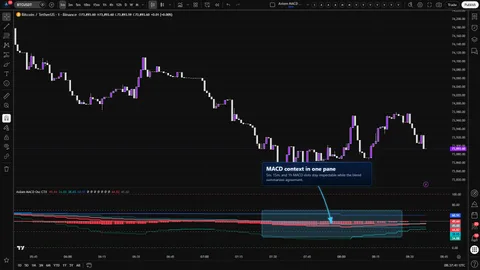
Axiom MACD Osc (Base) puts up to three independent MACD slots on one bounded 0..100 pane and combines the enabled slots into a single weight-driven composite. The slots are yours to configure — source, timeframes, lengths, MA types, weights — and each slot is normalized against its own ATR so the three reads share an axis without flattening their character. A single global On Bar Close? switch sets the repaint posture for every slot, so the tradeoff is one deliberate choice instead of three quiet ones.

Where this version sits

Axiom indicator families use a Base -> CTX -> STR progression when the full set exists. Base is the focused/free version: three chart-symbol slots, one global repaint posture, and the smaller MA/filter surface where that family uses one. CTX expands that same MACD logic into ten slots with optional per-slot tickers, per-slot timing control, deeper Power User controls, and the broader MA/filter surface. STR sits after CTX: it keeps the stronger per-slot control pattern, reduces the stack to five slots because of the added computation, and spends that budget on divergence, Keltner, BBWP, and Donchian structure around the blended MACD output. This page covers Base, so reach for it when the three-slot chart-symbol MACD read is enough.

Who it is for

  • MTF traders who already read MACD across a stacked timeframe set and want those reads on a shared axis.
  • Operators who prefer per-slot readouts they can interrogate over a single composite number they cannot.

Who it is not for

  • Anyone looking for a MACD signal, a buy/sell flag, or a reversal trigger.
  • Anyone who needs ten-slot context breadth — that is CTX, not Base.

Trust boundary, stated upfront

  • This is a momentum interpretation tool on a normalized pane. It is not a signal service.
  • On Bar Close? is your lever. ON uses the previous slot-timeframe bar's confirmed values — slower, stable once that slot bar has closed. OFF uses the live slot-timeframe values — faster, and the read can change until that slot bar closes. That tradeoff is yours to set.
  • The dashed overbought and oversold lines are reference levels for your framework. They are not reversal triggers and the tool does not treat them as entries.
Features
  • Three independent MACD slots, each running on its configured timeframe through TradingView's higher-timeframe request machinery, with per-slot source, fast and slow lengths, MA types, signal length, and a line-width knob. Each slot's plot colors against its own signal line so you can read vs-signal posture directly off the color. The global On Bar Close? switch decides whether those slot reads use previous confirmed slot-bar values or live in-progress slot-bar values.
  • A bounded 0..100 pane shared by every slot. Each slot's MACD, signal, and histogram are normalized against an ATR on that slot's configured-timeframe context, so the three lines sit on one axis without fighting over units.
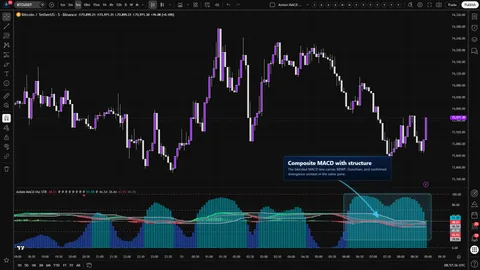
  • A weight-driven composite built from the enabled slots. The blended fast and slow pair plots with a translucent regime-colored fill between them. The blended histogram plots as columns around the 50 midline.
  • Optional Master Smoothing, applied once on top of the blended values. Calmer pane, more lag. It does not rescue a badly-chosen stack.
  • Per-slot Hide Plot — separate from Enable. Hide keeps the slot computing and contributing to the blend and to alerts; it only removes the line from the pane. Disable turns the slot off entirely.
  • Reference lines at 0, your oversold level, 50, your overbought level, and 100. The edges are the pane's hard boundaries; the OB and OS lines are dashed references for your own framework.
  • Ten alert conditions covering per-slot state, composite state, and cross-slot alignment. All ten fire only on confirmed bars.
How to use
  1. Add the indicator to the chart timeframe you actually trade on.
  2. Leave the defaults: slot 01 at 5-minute, slot 02 at 15-minute, slot 03 at 60-minute, each with 12 / 26 / 9 EMA, equal weights at 33.3, ATR Length 14, ATR Sensitivity 1.0, OB 70, OS 30, Master Smoothing off, On Bar Close? on.
  3. Watch one session. Confirm the per-slot lines and the blended pair stay inside the 0..100 pane and that the 50 line reads as equilibrium rather than a trigger.
  4. Toggle On Bar Close? off for a few bars. Notice the faster reaction on live HTF bars, and notice that the values can move until the HTF bar closes. Flip it back on for a confirmed read and compare.
  5. Set one slot's weight to 0 with its Enable still on. The slot's plot stays; the blend stops being steered by it. That pattern is how you keep a timeframe visible without letting it vote.

One guardrail is worth stating out loud: slot timeframes must be greater than or equal to the chart timeframe. If you put a slot below the chart, the script raises a clean runtime error naming the slot. That is by design. If you see it, it is the tool telling you the stack is wrong, not the tool breaking.

Settings

Per slot (the same pattern repeats across slot 01, 02, and 03)

  • Enable MACD NN — turns the slot on. When off, it does not plot, does not contribute to the blend, and does not fire its alerts.
  • Hide MACD NN Plot — hides the line, but the slot still computes, still moves the blend, and still fires its alerts. Good for decluttering when you want a slot to steer the composite without being on screen. Easy to confuse with Enable; the distinction matters.
  • Source — the price series the MACD reads on this slot. Change deliberately. Mixing sources across slots changes what you are comparing.
  • TimeFrame — the higher timeframe the slot runs on. An empty value inherits the chart. Setting a slot below the chart timeframe triggers the runtime-error guardrail named above.
  • Fast Length / Slow Length — standard MACD lengths for this slot. Fast must stay strictly less than Slow or the script raises a clean runtime error naming the slot.
  • MACD MA Type / Signal MA Type — the MA shapes used inside the MACD and for the signal line. Change if your process specifically calls for it; otherwise leave them alone.
  • Signal Length — smoothing length for the slot's signal line.
  • Line Width — cosmetic.
  • Blended Weight — how hard this slot pulls on the composite. A weight of 0 keeps the slot's plot and alerts while removing it from the blend. Leaving all three at 33.3 produces an equal-weight composite; change it when you want a primary-dominant read.

Pane normalization and reference

  • ATR Length — lookback for the ATR used to normalize each slot. Longer steadies the pane, shorter makes it twitchier.
  • ATR Sensitivity — how hard normalized values push toward the pane edges. Turning it up concentrates action near 0 and 100 and can make the pane look more decisive than the underlying data supports. That feeling is a tell, not a feature.
  • Overbought / Oversold Level — move the dashed references to match your framework. The script does not fire any alert directly from these levels.

Display

  • Plot Blended K/D and Plot Blended Histogram — toggle the composite visuals. The slots remain whether or not the composite is drawn.
  • Blended Line Width — cosmetic for the composite pair.

Master Smoothing (applied after the blend)

  • Enable Master Smoothing / Master MA Type / Master Length — one smoothing pass on the blended fast, slow, and histogram. It calms the pane and can change blend-alert timing. It does not fix a stack whose timeframes or weights were wrong to begin with.

Repaint posture (global)

  • On Bar Close? — the single repaint switch for all three slots. ON returns each slot's previous closed HTF bar — slower, stable once the HTF bar has closed. OFF returns the live HTF read — faster, and each slot's values can move until the HTF bar closes. This is the most consequential setting in the tool. Pick it on purpose.
Alerts

Ten alert conditions, every one of them gated on a confirmed bar. No intrabar firing. Every alert reports state or alignment, not an entry.

  • MACD 01 Is Bullish / MACD 01 Is Bearish — slot 01's MACD vs its signal on a confirmed bar.
  • MACD 02 Is Bullish / MACD 02 Is Bearish — same rule, slot 02.
  • MACD 03 Is Bullish / MACD 03 Is Bearish — same rule, slot 03.
  • Blended MACD Is Bullish / Blended MACD Is Bearish — the composite's state on a confirmed bar.
  • All MACD Slots Bullish / All MACD Slots Bearish — every enabled slot is leaning the same way on a confirmed bar. Hidden slots still count because Hide does not disable the slot.

Two things worth calling out:

  • There is no dedicated flip or crossover alert. What you get is steady-state bullish/bearish reports and the two alignment alerts. If you need a cross signal, build it on top.
  • The On Bar Close? switch governs the higher-timeframe read each slot returns. It does not gate the alerts. Alert gating is always bar confirmation.
For the geeks

A short mental model, because this is not textbook MACD and you deserve to know how it is not.

  • Each slot computes a standard MACD, signal, and histogram inside its own higher-timeframe context. The MACD math itself is the familiar fast MA minus slow MA with a signal smoothing pass — nothing fancy.
  • Before those three numbers reach the pane, each one is normalized against an ATR on the same context and mapped through a bounded S-shaped function into 0..100. That mapping is what makes cross-timeframe comparison honest: a slot's move is scaled against its own volatility rather than fighting a slot on a different timeframe for room on the axis.
  • The composite is a weight-driven average of the enabled slots' bounded values — computed for the MACD, signal, and histogram separately. Master Smoothing, when on, is one additional MA pass over those three composite series. The 50 line is the pane's equilibrium, not a midpoint you are meant to trade against.

Two quick ways to feel the pane yourself: push ATR Sensitivity up and down and watch how aggressively values crowd the edges or collapse toward the middle — that is the sensitivity knob doing exactly what its name says. Then set one slot's weight to zero with its Enable still on. The slot's plot stays exactly where it was; the blend no longer listens to it. If both of those behave the way the description just told you, the pane is wired right.

What this description does not try to do: turn the indicator into pseudocode. The exact curve formula and low-level request wiring are implementation details; the description exists to help you read the tool, not to hand you a cloneable recipe.

FAQ
  • Does this repaint? On defaults, no — On Bar Close? is on, and each slot returns the previous slot-timeframe bar's confirmed values. If you turn On Bar Close? off, each slot returns the live slot-timeframe read and can move until that slot bar closes. Both modes are valid; the difference is speed versus stability, and the choice is yours. To verify in a minute: load the indicator on a 1-minute chart, watch a 5-minute slot under ON, flip to OFF, and watch the plot now track the in-progress 5-minute bar.

  • Can I run a slot on a timeframe lower than my chart? No, and the script will tell you so out loud. If any enabled slot's timeframe is below the chart's, the script raises a clean runtime error naming the offending slot. That is a guardrail, not a bug. Move the slot up or move your chart down.

  • Are the dashed overbought and oversold lines reversal triggers? No. They are reference levels for your framework, placed where you want them. The tool does not fire any alert off those levels, and it does not treat 70 or 30 as a trade decision. If you want to treat them as triggers in your own system, that is your prerogative — just do it knowing the tool is not making that call for you.

  • What is the blend actually doing? Is it a vote? It is a weight-driven average of each enabled slot's bounded MACD, signal, and histogram — computed one number at a time. A slot with weight 0 is present as a plot and in its per-slot alerts but is silent in the composite. Equal weights produce an equal-weight read; tilt the weights when you want a primary-dominant stack.

  • Will Hide Plot stop a slot from moving the composite? No — Hide only removes the line from the pane. The slot still computes, still steers the blend, and still fires its alerts. If you want the slot truly out of the picture, turn Enable off.

Limitations
  • This is interpretation, not a signal service. It does not forecast reversals, does not call entries, and cannot remove whipsaw. No setting combination changes that.
  • The MACD math inside each slot is textbook. The normalization and the composite are the differentiators. If you walked in hoping for a proprietary MACD, this is not that — and that is the point.
  • On Bar Close? = OFF can change a slot's read until that slot's current bar closes. That is the meaning of repaint in this mode, disclosed as a tradeoff rather than hidden as a quirk.
  • No dedicated flip or crossover alert. Alerts are state and alignment reports, gated on confirmed bars.
  • Slot timeframes below the chart timeframe raise a clean runtime error by design. Fast Length greater than or equal to Slow Length also raises one. Treat both as the tool telling you the configuration is invalid.
  • The pane is symbol-agnostic and runs on any instrument TradingView supports. It does not include footprint-grade micro-structure; what you see is MACD on a price source, normalized by ATR.
Support and training

Support questions and onboarding help go through the AxiomCharts support channel. Setup notes, calibration walkthroughs, and deeper operator guides live on the AxiomCharts documentation site. If a question is not answered inside the description, the documentation is almost always the faster path; if it is not answered there either, bring it to support and we will write it down.

Disclaimer

Axiom MACD Osc (Base) is an analytical indicator for TradingView. It does not constitute financial, investment, or trading advice, and nothing in the pane, the alerts, or this description should be read as a recommendation to buy, sell, or hold any instrument. Markets involve real risk, including the loss of capital. You remain responsible for your own research, your own risk controls, and every decision you make on live money. Past behavior of any pattern visible in the pane is not a guarantee of future behavior.

Related products

If this one is close but not quite right, there may be a better fit nearby for the same kind of chart work, testing need, or workflow gap.

Back to products
Axiom MACD Osc STRindicator
Axiom MACD Osc STR thumbnail

indicator / indicators

Axiom MACD Osc STR

A five-slot multi-timeframe MACD oscillator with a weighted MACD/signal/histogram composite and optional structure context — divergence, Keltner, BBWP, and Donchian — all built on the composite itself. STR trades CTX's ten-slot breadth for blended-line structure.

1m5m15m1H4H1DANY

Crypto / Forex +4 / 1m / 5m +5

Axiom MACD Osc CTXindicator
Axiom MACD Osc CTX thumbnail

indicator / indicators

Axiom MACD Osc CTX

Ten independent MACD slots, one bounded 0..100 pane, a weight-gated blend, and an honest repaint switch per slot. Multi-timeframe and multi-symbol context without the stacked-MACD clutter.

1m5m15m1H4H1DANY

Crypto / Forex +4 / 1m / 5m +5

Axiom RSI Oscindicator
Axiom RSI Osc thumbnail

indicator / indicators

Axiom RSI Osc

Free

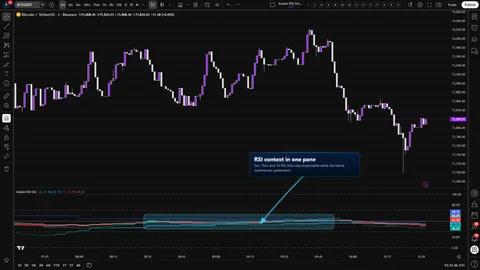
Three independent RSI slots, one native 0..100 pane, a weight-gated blend, and a single global repaint switch. Multi-timeframe RSI context without stacked-RSI clutter.

1m5m15m1H4H1DANY

Crypto / Forex +4 / 1m / 5m +5

Weighing a few options against each other?

Tell us what you are trying to accomplish and we will help you narrow it down honestly.