Skip to content

indicator / indicators

Axiom DC

A three-slot multi-timeframe Donchian Channel overlay with a weighted combined channel. For operators who already read Donchian structure and want a chart-side read stacked with two higher-timeframe reads on the same chart.

Last updated: Jun 1, 2026

Crypto / Forex +4 / 1m / 5m +5

Free access

Free access

Read everything on this page first. Open it on TradingView only when you are clear on what it does and what it does not do.

Open in TradingView

You need a TradingView account for tools that open or run on TradingView.

These tools support analysis, testing, planning, and review. They do not make trading decisions for you.

Refund policy / Access help

Product details

Explore the details to see whether the tool fits the problem you are trying to solve for.

Overview

On any given bar, a multi-timeframe Donchian reader is working one question: does the chart-side read agree with the higher-timeframe read, and if not, what does a weighted summary look like before you act on it? Three separate overlays can answer that, but they leave the averaging to your eyes.

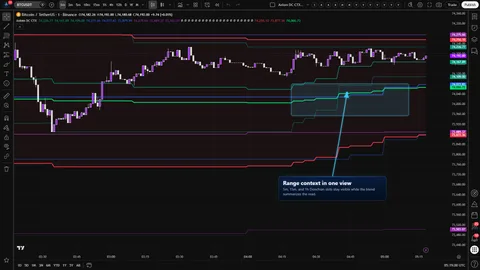
Axiom DC is a three-slot Donchian Channel overlay. Each slot runs on its own timeframe with its own length, basis smoothing, and weight. The enabled slots combine into a single weighted channel drawn in the chart symbol's price space — a glance-level summary you can always pull apart by opening the individual slots back up.

A few boundaries up front, because this is where most MTF Donchians quietly misbehave:

  • On Bar Close? is a single global toggle. ON uses the confirmed higher-timeframe close read. OFF uses the live higher-timeframe bar and can repaint until that bar closes. In this base trim, the toggle is global across all three slots. Per-slot control is a CTX-trim feature.
  • Alerts are gated to confirmed chart bars regardless of the toggle. No alert fires mid-bar.
  • If any slot's timeframe is set below the chart timeframe, the script raises a named runtime error identifying the offending slot. Not a warning — a hard stop.
  • The combined channel is a weighted average of the enabled slots. It is not a smarter Donchian, and it inherits the quality of whatever you feed it.
Where this version sits

Axiom indicator families use a Base -> CTX -> STR progression when the full set exists. Base is the focused/free version: three chart-symbol slots, one global repaint posture, and the Lite MA surface. CTX expands that same Donchian read into ten slots with optional per-slot tickers, per-slot timing control, deeper Power User controls, and the Pro MA surface. STR sits after CTX where it exists: it keeps the stronger per-slot control pattern, reduces the stack to five slots because of the added computation, and spends that budget on structure around the blended output. This page covers Base, so reach for it when the three-slot chart-symbol read is enough.

Not for anyone looking for a buy/sell signal, a setup score, or a "best settings" pack. It draws structure. Acting on what the structure says is operator work.

Features

The three-slot set

  • Three independent Donchian slots (DC 01 / 02 / 03), each with its own timeframe, length, basis MA family, basis smoothing length, trend lookback, line width, and blend weight.
  • Each slot draws an upper, a smoothed basis, and a lower line in a fixed slot color — teal, blue, and purple.
  • Enable DC 0N controls whether the slot is computed and counted in the blend. Hide DC 0N Plot suppresses the drawing while keeping the slot in the blend, so a slot can steer the combined channel without adding visual weight to the chart.
  • Upper and lower are the raw highest high and lowest low for the slot's length. Only the midpoint is smoothed by the chosen basis MA at the chosen length.

The combined channel

  • Enabled slots with nonzero weights combine into a single weighted channel: a red upper, a red lower, and a lime basis between them, with a fill across the two bounds.
  • Weights are relative. They do not have to sum to 100. Use zero or positive weights; zero is the supported way to keep a slot visible while removing it from the blend.
  • A weight of 0 keeps the slot computed and plotted on the chart but drops it out of the blend — useful when you want to see a slot without letting it influence the summary.

Safe multi-timeframe behavior

  • One global On Bar Close? switch controls the higher-timeframe read for every slot.
  • ON takes Donchian values from the previous, confirmed higher-timeframe bar via a documented lookahead_on pattern. Slower to react on the developing higher-timeframe bar; stable on confirmed history.
  • OFF reads the live higher-timeframe bar under the same pattern. Faster to react; values can revise until that higher-timeframe bar closes.
  • Slot timeframes below the chart timeframe raise a named runtime error instead of returning misleading values.

The alert surface

  • Ten alert conditions covering per-slot basis trend (uptrend and downtrend for slots 01 / 02 / 03), the blended basis trend (uptrend and downtrend), and alignment across all enabled slots (all uptrend, all downtrend).
  • Every condition is gated to barstate.isconfirmed. No condition can fire mid-chart-bar.
  • Alert messages reference {{ticker}} and {{interval}}.
  • There are no channel-touch, channel-break, close-vs-basis, mean-reversion, or squeeze alerts in base. The alert surface is narrow on purpose and every condition has a literal meaning.
How to use

The shortest correct path:

  1. Add the indicator to a chart whose timeframe is at or below every slot timeframe you plan to use. The default 5 / 15 / 60-minute slots render cleanly on a 1m chart.
  2. Leave the three default slots on (length 20, basis MA length 1, SMA, trend length 3, weights 40 / 35 / 25) and leave the blended channel on.
  3. Confirm that the three slot channels draw in teal, blue, and purple and that the combined channel shows red bounds with a lime basis between them.
  4. If you will be acting on alerts, keep On Bar Close? ON so the higher-timeframe read is confirmed.

What correct looks like on first run:

  • Three nested channels, each visibly wider or narrower than the others depending on its higher-timeframe length.
  • A combined channel with a single red upper, a single red lower, a filled region between them, and a lime basis sitting inside that region.
  • Toggling On Bar Close? changes whether slots read the previous confirmed higher-timeframe bar or the live forming one. ON and OFF are not historically identical; OFF can resolve differently after the higher-timeframe bar closes.
  • Setting any slot's timeframe below the chart timeframe raises a named runtime error at the top of the script output that identifies the offending slot.

If any of those four checks fails, stop and look at settings before you read anything into the stack.

Settings

Listed in the order the input panel presents them, with what changes and what to watch.

  • Enable DC 0N. Default ON for all three slots. Turn a slot off when its higher-timeframe context is not informing the read you are actually making. A disabled slot neither draws nor counts in the blend.
  • Hide DC 0N Plot. Default OFF. Use it when a slot should steer the combined channel without drawing on the chart. Hidden slots still compute and still count in the blend.
  • TimeFrame. Defaults 5 / 15 / 60 (minutes). Must be at or above the chart timeframe. Lowering a slot below the chart timeframe is a hard error that names the offending slot — not a warning to ignore.
  • Length. Default 20. Drives the raw upper and lower directly. Raising it produces a wider, slower channel. Lowering it produces a tighter, noisier one.
  • Basis MA Length. Default 1. Smoothing length applied only to the midpoint. At length 1 with the default SMA, the basis is the raw midpoint. Raising it produces a calmer basis without changing the raw Donchian bounds. Expect the basis to lag during fast range expansions — calmer midpoint, more visible delay.
  • Type. Default SMA. Selects the basis MA family. Base uses the Lite moving-average library: SMA, EMA, RMA, WMA, VWMA, and SWMA. SWMA uses TradingView's fixed SWMA behavior rather than the user length. The power-user MA parameter block (ALMA / KAMA / Jurik / Laguerre / VAMA knobs) is a CTX-trim feature and is not exposed here.
  • Basis Trend Length. Default 3. Minimum 1. A slot's basis reads "uptrend" when it is at or above its own value this many bars back. Shorter reacts sooner; longer waits for a more committed move. Feeds the trend-count plots and the alignment alerts.
  • Line Width. Default 2 per slot, 3 for the combined channel.
  • Blended Weight. Defaults 40 / 35 / 25. Weights are relative; they do not have to sum to 100. Keep them zero or positive; the input does not give you a friendly guardrail against negative-weight nonsense. The most common misuse is leaving all three at equal weights and then reading the combined line as if it were authoritative. If one slot matters more to your method, weight it that way. If one slot does not matter, set it to 0 or disable it.
  • Blended DC — Enable / Hide Plot / Line Width. Defaults ON / OFF / 3. Disabling the blend does not change the slot plots. Hiding the blend suppresses its filled region as well.
  • On Bar Close? Default ON. Global repaint switch. See Alerts and For the geeks below.
Alerts

Ten alert conditions, all gated to barstate.isconfirmed:

  • Per slot, basis trend: DC 01 Basis Is Uptrend, DC 01 Basis Is Downtrend, DC 02 Basis Is Uptrend, DC 02 Basis Is Downtrend, DC 03 Basis Is Uptrend, DC 03 Basis Is Downtrend.
  • Blended basis trend: Blended DC Basis Is Uptrend, Blended DC Basis Is Downtrend.
  • Alignment across enabled slots with valid bases: All DC Slot Bases Uptrend, All DC Slot Bases Downtrend.

"Uptrend" here has one specific meaning: the slot's basis is at or above its own value Basis Trend Length bars ago. It is not a signal, a setup, or a forecast. It is a self-comparison on the basis line.

What the alert surface does not include:

  • No channel-touch alerts.
  • No channel-break alerts.
  • No close-vs-basis or close-vs-bound alerts.
  • No mean-reversion or squeeze alerts.

If you want any of those, the chart-side alert surface in TradingView can be wired against the published plots, but that is operator work and is not part of this indicator's built-in alert set.

For the geeks

Three details are worth understanding at a mental-model level before you trust the output.

Safe multi-timeframe and the global on-bar-close toggle

Pulling higher-timeframe values onto a lower-timeframe chart is a place where Pine scripts routinely mislead their authors. Axiom DC uses a single global toggle, On Bar Close?, to govern which higher-timeframe value is returned. ON returns the previous completed higher-timeframe bar's Donchian values. OFF returns the live higher-timeframe bar, which can revise until that bar closes. Both modes apply the documented lookahead_on pattern so alignment stays consistent inside the security call. No public output pretends the higher-timeframe bar is closed when it is not. Alerts are separately gated to confirmed chart bars regardless of the toggle. Verification path: compare the same forming higher-timeframe window under both settings; ON should step from the prior closed window, while OFF can move with the live window and can resolve differently after that window closes.

Raw bounds with a smoothed midpoint

Smoothing an entire Donchian channel blurs the levels you actually want to read — the range high and the range low. Axiom DC keeps the upper and lower lines raw (highest high and lowest low for the slot's length) and smooths only the midpoint through the chosen basis MA family at the chosen length. The tradeoff: the basis lags the raw midpoint, and on fast range expansions it will drift inside the channel rather than track the center in real time. Verification path: set basis MA length to 1 with SMA and confirm the basis lands on the raw midpoint; raise the length and watch the basis calm down while the upper and lower stay put.

The blend and the majority-vote trend read

The combined channel accumulates weighted uppers, weighted bases, and weighted lowers across enabled slots with nonzero weights, then divides by the total contributing weight. During early warmup, missing slot values can be zero-filled so the composite stays numeric; do not use the blend or blended alerts until the contributing slot lines have actually come in. The combined trend flag is decided by a weighted-majority read over the per-slot basis-trend flags: when the uptrend-weighted total is at or above the downtrend-weighted total, the combined trend reads as uptrend. A tie reads as uptrend, not as a neutral state. The blend inherits the quality of every slot it is fed; one misweighted slot will steer the combined channel without any visible warning. Verification path: disable two slots and set the remaining one to any nonzero weight — after warmup, the blend will match that slot. Re-enable a second slot with a larger weight and watch the blend shift toward the heavier input.

FAQ

Does this repaint? How does On Bar Close? actually work?

With On Bar Close? ON, the higher-timeframe Donchian values come from the previous completed higher-timeframe bar, so the values stay stable once that bar has closed. With OFF, the higher-timeframe values come from the live bar and can revise until that bar closes. In either mode, every alert is gated to confirmed chart bars, so no alert can fire mid-chart-bar. If you are acting on alerts, leave the toggle ON. If you want a faster look at the developing higher-timeframe bar and accept that it can revise, use OFF.

One of my slots is not rendering. What happened?

Almost always: the slot's timeframe has been set below the chart timeframe. When that happens, the script raises a named runtime error at the top of the script output identifying the offending slot, rather than returning a misleading value. Fix the slot timeframe so it is at or above the chart timeframe, and the slot will render again.

Is the combined channel a smarter Donchian?

No. The combined channel is a weighted average of whatever the enabled slots are producing on the current bar. It inherits the quality of the slots it is fed. If one slot is misweighted or set to an inappropriate length, the combined line will be pulled along with it, without any visible warning on the chart. Treat it as a glance-level summary you can always pull apart, not an authority.

Why is the basis smoothed but the upper and lower are not?

Because the upper and lower are meant to show the actual range — the highest high and lowest low for the slot's length. Smoothing those would blur the levels you are trying to read. The midpoint is where smoothing earns its keep: it gives you a basis calm enough to read trend against without distorting the bounds. The cost is that on fast range expansions the basis will visibly lag inside the channel rather than sit at the exact center.

Base, CTX, or STR — which version do I need?

  • If the question is "how do the chart-side and two higher-timeframe Donchian reads line up on this bar, and what does a weighted summary look like?", Base answers it.
  • If you need more than three slots, per-slot repaint control, cross-symbol studies, or the power-user basis MA parameter block, reach for CTX.
  • If you also want structure-expansion overlays on top of the blended read, reach for STR where the STR version exists.

The versions answer different questions. Base is focused, CTX is context breadth, and STR is blended-output structure.

Limitations
  • The indicator draws structure. It does not signal, score setups, or forecast direction.
  • The combined channel inherits the quality of every slot it is fed. Misweight a slot and the combined line follows.
  • Base is single-symbol. Every slot runs on the chart's symbol. Cross-symbol studies are a CTX-trim feature and are not available here.
  • The tool reads the chart's high and low series. On synthetic chart types such as Heikin-Ashi, Renko, or range bars, the Donchian bounds describe that synthetic chart data rather than standard candle highs and lows.
  • The blend is meant for zero-or-positive weights after contributing slots have valid data. All-zero, negative, or early-warmup configurations can produce a numeric blended line that should not be treated as a usable read.
  • Exotic basis MA families can show early-bar behavior that looks off until the lookback window is fully seated. That is the MA family catching up, not a repaint of the bounds.
  • The alert surface is narrow by design: per-slot basis trend, blended basis trend, and alignment. It is not a full bank of channel-touch, channel-break, or mean-reversion alerts.
  • "Uptrend" in every alert name means one specific thing: the basis is at or above its own value Basis Trend Length bars ago. It is not a setup, a setup score, or a directional forecast.
Support and training

Support and product documentation live on the AxiomCharts website. Reach us there rather than through channels this indicator does not advertise.

Disclaimer

This indicator is a charting tool for multi-timeframe Donchian context. It does not provide trading advice, trade signals, setup scoring, or any representation about future market behavior. Past price behavior is not a reliable indicator of future results. Any decision to act on what you see on the chart is yours, and you are responsible for sizing, risk, and verification before committing real capital. By using this indicator, you accept that the authors and AxiomCharts are not liable for any outcomes — including losses — that result from your use of it.

Related products

If this one is close but not quite right, there may be a better fit nearby for the same kind of chart work, testing need, or workflow gap.

Back to products
Axiom DC CTXindicator
Axiom DC CTX thumbnail

indicator / indicators

Axiom DC CTX

A ten-slot Donchian Channel workbench with a weighted combined channel, per-slot timing control, and optional cross-symbol studies. For operators who want to stack range context across timeframes without giving up the ability to inspect each slot.

1m5m15m1H4H1DANY

Crypto / Forex +4 / 1m / 5m +5

Axiom BBindicator
Axiom BB thumbnail

indicator / indicators

Axiom BB

Free

Three Bollinger Band slots and one weighted blended band on a single overlay. Built for operators who want a small, honest BB stack across timeframes without giving up control over confirmed-versus-live higher-timeframe reads.

1m5m15m1H4H1DANY

Crypto / Forex +4 / 1m / 5m +5

Axiom MAindicator
Axiom MA thumbnail

indicator / indicators

Axiom MA

Free

A three-slot moving-average overlay with a weighted blended line, honest multi-timeframe reads, and alerts gated to confirmed bars. Built for operators who pick their MA contexts on purpose and want to inspect every slot that shapes the blend.

1m5m15m1H4H1DANY

Crypto / Forex +4 / 1m / 5m +5

Weighing a few options against each other?

Tell us what you are trying to accomplish and we will help you narrow it down honestly.