Skip to content

indicator / indicators

Axiom MA Osc STR

A five-slot multi-timeframe MA-stretch oscillator with a weighted composite and optional structure context — divergence, Keltner, BBWP, and Donchian — all built on the composite itself. STR trades CTX's ten-slot breadth for blended-line structure.

Last updated: Jun 1, 2026

Crypto / Forex +4 / 1m / 5m +5

Purchase options

Monthly / Yearly / One-time access

$3.00/ month

14-day free trial

You need a TradingView account for tools that open or run on TradingView.

These tools support analysis, testing, planning, and review. They do not make trading decisions for you.

14-day monthly trial / 14-day yearly trial / 30-day one-time refund window

Refund policy / Access help

Product details

Explore the details to see whether the tool fits the problem you are trying to solve for.

Overview

There is a point where three MA-stretch reads stop carrying the question. The second timeframe agrees, the third adds nuance, and a fourth read — a different higher timeframe, a correlated symbol, a different MA family — starts to matter. Once the stack carries that weight, the next questions shift. Is the composite disagreeing with chart price at a confirmed pivot? Where does it sit relative to its own volatility band? Is its width expanding? Is it pressing a recent range extreme? That is the shape of the work STR is built for.

Axiom MA Osc STR runs up to five independent MA-stretch slots on one pane, each with its own higher timeframe, source, baseline and slow-line MA family, optional cross-symbol ticker, and weight. The enabled slots combine into a weighted composite Fast-and-Slow pair on a bounded 0..100 scale. Four optional structure layers sit on top, each drawn from the composite Fast line itself rather than from chart price underneath: pivot-confirmed divergence against chart price, a Keltner-style envelope, a Bollinger Band Width Percentile column, and a Donchian channel.

Trust boundaries belong at the top.

  • The 0..100 scale is a bounded view of stretch. It is not a probability of mean reversion and it does not carry a calibration claim.
  • Repaint posture is exposed per slot through On Bar Close?. ON returns the previous higher-timeframe bar's Fast and Slow — stable on confirmed history, slower on the live bar. OFF returns the live higher-timeframe values and can repaint until that bar closes. The composite inherits the less stable posture where the weights sit.
  • Divergence markers only print after the pivot has confirmed on both sides. Plot On Pivot? repositions an already-confirmed marker onto the original pivot bar via a negative plot offset — cosmetic placement, not a forward-looking signal.
  • Divergence, Keltner, BBWP, and Donchian are context layers on the composite. They are not standalone signal engines and are not presented as such.

Fit: operators who already read multi-timeframe MA structure, want five slots rather than three, and want structure context drawn from the composite Fast line itself. Misfit: operators looking for a buy/sell verdict, a calibrated reversion score, a universal best-settings bundle, the full ten-slot CTX workbench, or the cleanest three-slot Base read.

Where this version sits

Axiom indicator families use a Base -> CTX -> STR progression when the full set exists. Base is the focused/free version: three chart-symbol slots, one global repaint posture, and the Lite MA/filter surface. CTX expands that same MA-stretch logic into ten slots with optional per-slot tickers, per-slot timing control, deeper Power User controls, and the Pro MA/filter surface. STR sits after CTX: it keeps the stronger per-slot control pattern, reduces the stack to five slots because of the added computation, and spends that budget on divergence, Keltner, BBWP, and Donchian structure around the blended Fast line. Choose STR when blended-line structure matters more than CTX's ten-slot context breadth.


Features

Five independent MA-stretch slots

  • Slots MA 01 through MA 05, each with its own enable state and independent plot-visibility toggle.
  • Per-slot controls: source, higher timeframe, baseline MA length and family, slow-line length and family, line width, blended weight, and an optional ticker override that runs the slot on a different symbol.
  • Slots 01, 02, 03 ship enabled at 5m, 15m, and 60m with EMA-20 baselines, EMA-3 slow lines, and equal weights of 33.3. Slots 04 and 05 ship off at weight 0, waiting for a deliberate choice.
  • Each enabled, non-hidden slot draws its Fast line in a fixed color: teal, aqua, blue, orange, yellow. Bright when Fast sits above its Slow (or above 50 when the Slow value is unavailable), dim when below.
  • Slots 01 through 03 ship with Hide Plot ON so the first screen reads the composite. Unhide a slot when you need to inspect how it is voting.
  • A hidden slot still contributes to the composite at its weight. Hiding is not the same as disabling.

The weighted composite and Blended Smoothing

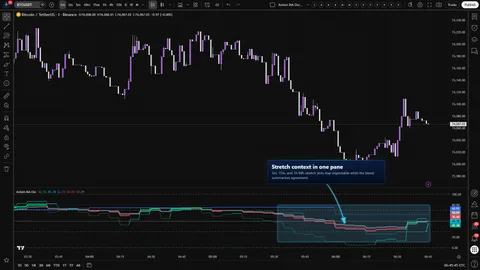
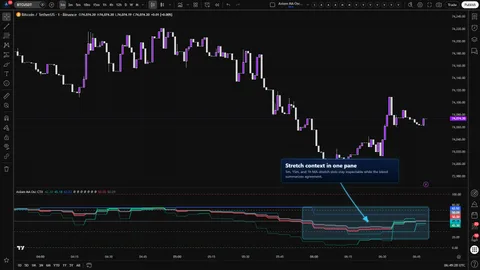
  • Blended Fast and Blended Slow plot in lime/red against a gray Slow, with a shaded fill between them that tracks the sign of Fast minus Slow.
  • The composite is a weighted average of the enabled slots' Fast and Slow values against the total non-zero weight. Weights do not need to sum to 100; the active contributing weight is the denominator.
  • Enable Smoothing (default OFF) applies one post-blend MA pass to the composite with a chosen family and length, then re-clamps the result to 0..100. It trades responsiveness for calmer shape — lag, on purpose.

The structure layer on the composite

Four optional, independent layers, each drawn from the composite Fast line itself:

  • Blended Divergence (default ON). Pivot-confirmed disagreement between chart price and the composite Fast line at the same pivot offset. Bullish markers appear as triangle-ups near the pane floor, bearish as triangle-downs near the pane ceiling. Plot On Pivot? back-plots an already-confirmed marker to the original pivot bar.
  • Blended Keltner (default OFF). A Keltner-style envelope drawn from the composite Fast, with its own basis MA family, length, and multiplier. Upper and lower are clamped to 0..100 so the envelope stays legible when the composite presses an edge.
  • Blended BBWP (default ON). Columns are the percentile rank of Bollinger Band width on the composite Fast line — not on chart price. The plot title Blended BBWP is explicit about that. Columns recolor above and below a configurable threshold.
  • Blended Donchian (default ON). Upper and lower of the composite Fast over a configurable lookback, drawn with a stepline basis, all clamped to 0..100.

The oscillator frame

  • Reference lines at 0 (green lower boundary), oversold (dashed, default 30), midline (50), overbought (dashed, default 70), and 100 (red upper boundary).
  • The overbought/oversold guides are operator-adjustable and readability-only. The script does not fire alerts off a level cross.

The alert surface

  • Sixteen alertcondition entries in four classes: per-slot Fast-vs-Slow state, composite Fast-vs-Slow state, cross-slot alignment, and pivot-confirmed divergence.
  • Every condition is barstate.isconfirmed-gated; nothing fires mid-chart-bar.
  • The divergence alerts additionally require the divergence layer to be enabled.

Validation in code

A named runtime.error fires if a slot's timeframe is below the chart timeframe, and the error identifies the offending slot by label. The guard rail prevents a silent misread on the security request.

Diagnostic output

Two display.none plots expose Active Bullish Count and Active Bearish Count across enabled slots. The values are available in the data window and inside alert message composition without crowding the pane.


How to use

The shortest correct setup path:

  1. Add Axiom MA Osc STR to a chart whose timeframe is at or below every slot timeframe you intend to use — for example, a liquid instrument on 5m.
  2. Keep the three default-enabled slots (5m, 15m, 60m at equal 33.3 weights, EMA-20 baselines, EMA-3 slow lines).
  3. Confirm the composite Fast and Slow print inside the 0..100 band, with BBWP columns along the zero line, Donchian traces walking around the composite, and no Keltner envelope unless you turn it on.
  4. Leave slots 01 through 03 hidden at the start. The composite is the first read; unhide a slot when you want to inspect how it is voting.
  5. For any slot that will drive a live alert, leave its On Bar Close? toggle ON. Alerts are confirmed-bar gated in every case, but the read itself will be slower on the live bar in ON mode and reactive-but-repainting in OFF mode.

What correct first use looks like:

  • The composite sits between 0 and 100 at all times, rising into the overbought guide and falling into the oversold guide without spilling beyond either bound.
  • BBWP columns recolor as the composite's band width crosses your threshold. The column label in the data window reads Blended BBWP, not any chart-price BBWP variant.
  • Donchian upper and lower draw as stepline traces around the composite.
  • If a confirmed pivot on chart price disagrees with the composite at the same offset, a triangle marker prints on the confirmation bar. Toggling Plot On Pivot? moves that marker back to the original pivot bar.
  • Setting any slot's timeframe below the chart timeframe raises a named runtime error that points at the offending slot.

A note on the optional ticker. Pointing a slot at another symbol changes what that slot is measuring — stretch on the substituted instrument, computed against its own baseline MA and ATR, then mapped into the shared 0..100 pane. That is a deliberate study choice, not a translation of chart-symbol stretch. Feed quality, liquidity, and session profile travel with the substituted symbol.


Settings

Per slot (user-facing order)

  1. Enable MA 0N — turn the slot on or off. Default ON for slots 01 through 03, OFF for 04 and 05. Enabling a fourth and fifth slot should be a considered choice about what the new slots represent.
  2. Hide MA 0N Plot — visual-only; the slot still contributes to the composite at its weight. Default ON for slots 01 through 03, OFF for 04 and 05.
  3. Source — the price series the slot reads. Defaults to close. When Ticker is set, the source is read from that symbol.
  4. Timeframe — the slot's higher timeframe. Must be at or above the chart timeframe; below raises a named runtime error. Blank collapses to a chart-timeframe read. Running several slots at the same higher timeframe and calling that agreement "confluence" is not what confluence is.
  5. Length — lookback for the baseline MA. Default 20 on slots 01 through 03, 21 on slots 04 and 05.
  6. Type — MA family for the baseline. EMA, SMA, ALMA, KAMA, FRAMA, Jurik, Laguerre, and VAMA are routed through the Axiom MA library; family-specific parameters live in the slot's Power User block.
  7. Slow Length — length for the Slow line, which is the chosen slow MA family applied to the Fast magnitude series. Default 3.
  8. Slow Type — MA family for the Slow line. Same menu as the baseline; the Slow ... parameters in the Power User block are consumed when the chosen family needs them.
  9. Line Width — visual-only per-slot width.
  10. Weight — the slot's contribution to the composite. Default 33.3 on slots 01 through 03, 0 on slots 04 and 05. Weights are relative; a weight of 0 keeps the slot computed and plotted but excludes it from the blend.
  11. Ticker — optional symbol override. Leave blank to use the chart symbol. When set, the slot's baseline MA and ATR are computed on the override symbol.

Per-slot Power User block — the two knobs that matter most

  • On Bar Close? — the per-slot repaint switch, and the knob STR exposes that Base does not. Default ON. ON returns the previous higher-timeframe bar's Fast and Slow from inside the security expression — stable on confirmed history, slower on the live bar. OFF returns the live higher-timeframe Fast and Slow — reactive, but can repaint on that bar until it closes. A mixed configuration is possible because the switch is per slot; the composite inherits the least stable posture where the weights sit. If several heavy-weight slots run OFF, the composite behaves the way OFF behaves, even though it is one line.
  • Family-specific knobs. Base ALMA Off, Base ALMA Sig, Base ALMA Floor?, Base KF Fast, Base KF Slow, Base Jurik Ph, Base Jurik Pow, Base Lag Alpha, Base VAMA Len. And the parallel Slow ... block, with the same knobs for the slow-line family. Each is consumed only when the chosen family uses it. Pick a family first; tune second.

Oscillator reference levels

  • ATR Length — how far back ATR looks when the slot measures price-vs-baseline distance. Default 14. Higher is steadier; lower is touchier.
  • ATR Sensitivity — scales the normalized distance before the sigmoid clamps the read into 0..100. Default 1.0. Pushing to the extremes piles readings near 0 and 100; the pile-up is visual compression, not sharpened signal.
  • Overbought Level — dashed upper guide, default 70. Readability only.
  • Oversold Level — dashed lower guide, default 30. Readability only.

Blend core

  • Plot Blend — toggles the composite Fast and Slow plots. Default ON.
  • Line Width — width of both composite lines. Default 3.
  • Enable Smoothing — the post-blend smoothing pass. Default OFF. When ON, the composite Fast and Slow are re-smoothed and re-clamped to 0..100. It adds lag in exchange for calmer shape.
  • Smooth Type / Smooth Len — MA family and length for the post-blend pass. Defaults EMA / 3.
  • Advanced parameters for the smoothing pass live in Blend Smooth PU, following the same "consumed when needed" rule as the per-slot blocks.

Blend Divergence (Blend Div)

  • Show Div — default ON.
  • Pivot Len — the pivot strength used as both left and right. Default 20. Higher confirms later and filters weaker pivots.
  • Plot On Pivot? — default OFF. OFF places the marker on the confirmation bar; ON back-plots it onto the original pivot bar via a negative plot offset. Either way, the marker is already confirmed when it appears.

Blend Keltner (Blend KC)

  • Show Keltner — default OFF. Toggles the envelope.
  • KC Length and KC Mult — envelope construction on the composite Fast. Defaults 20 and 2.0.
  • Basis Type / Basis Len — MA family and length for the envelope basis. Defaults EMA / 20.
  • Show Basis, Show Fill, Line Width — visual controls.
  • Advanced MA parameters live in Blend KC PU.

Blend BBWP (Blend BBWP)

  • Show BBWP — default ON.
  • Length — the BB basis and standard-deviation window on the composite Fast, kept matched. Default 20.
  • Lookback — the number of prior width readings ranked. Default 252.
  • Threshold — the color switch between the below-threshold and above-threshold columns. Default 50.
  • Basis Type — MA family for the BB basis on the composite. Default SMA.
  • Advanced MA parameters live in Blend BBWP PU.

Blend Donchian (Blend DC)

  • Show DC — default ON.
  • DC Len — lookback for the high/low extraction on the composite Fast. Default 20.
  • Basis Type / Basis Len — MA family and length that smooth the midpoint. Defaults SMA / 1.
  • Show Basis, Show Fill, Line Width — visual controls.
  • Advanced MA parameters live in Blend DC PU.

What to avoid

  • Enabling every slot and every structure layer on a fresh chart and reading the resulting pane as a standalone system.
  • Reweighting the composite unevenly, moving on, and then reading the composite as if every slot still had equal say.
  • Hiding a slot's plot and assuming the slot has been removed from the composite. It has not.
  • Running several slots with On Bar Close? OFF and firing live alerts on the composite.
  • Treating the 70/30 guides as action thresholds. The script does not act on them.

Alerts

Sixteen alertcondition entries ship with this indicator. All are gated by barstate.isconfirmed, and alert messages reference {{ticker}} and {{interval}}.

Per-slot Fast-vs-Slow state:

  • MA Osc 01 Is Bullish / MA Osc 01 Is Bearish
  • MA Osc 02 Is Bullish / MA Osc 02 Is Bearish
  • MA Osc 03 Is Bullish / MA Osc 03 Is Bearish
  • MA Osc 04 Is Bullish / MA Osc 04 Is Bearish
  • MA Osc 05 Is Bullish / MA Osc 05 Is Bearish

Composite Fast-vs-Slow state:

  • Blended MA Osc Is Bullish
  • Blended MA Osc Is Bearish

Cross-slot alignment across enabled slots:

  • All MA Osc Slots Bullish
  • All MA Osc Slots Bearish

Pivot-confirmed divergence between chart price and the composite Fast line at the same pivot offset (require the divergence layer to be enabled):

  • Blended Bullish Divergence
  • Blended Bearish Divergence

What the alert surface is not:

  • There are no overbought/oversold level-cross alerts. The 70/30 lines are readability guides.
  • There are no Keltner, BBWP, or Donchian alerts. Those layers are structure context on the composite; they are not signal streams.
  • "Bullish" and "Bearish" describe the Fast-vs-Slow relationship on the slot or composite at a confirmed bar. They are not forecasts and they are not entries.

For the geeks

The bounded stretch read

Each slot expresses source-minus-baseline in ATR units, scales the ratio by ATR Sensitivity, and passes it through a clamped sigmoid that lands inside 0..100. The bounding is what makes a 5m slot on one instrument comparable to a 60m slot on another without a price-space rescale. The honest tradeoff: at the extremes, magnitude is compressed on purpose — two readings of 95 and 99 are not a calibrated distance apart. Verify by nudging ATR Sensitivity up and watching the read pile closer to the pane edges without leaving the band.

The per-slot Fast-and-Slow pair

Every slot carries a Fast line (the bounded stretch read) and a Slow line built by running the chosen slow MA family on the Fast magnitude series, then clamping to 0..100. The separation means Fast can be reactive and Slow can be calmer, or the reverse, and the two can come from different MA families. That is the classification axis for MA Osc 0N Is Bullish and MA Osc 0N Is Bearish. Verify by changing a slot's Slow Type at a fixed length and watching the Slow respond differently while Fast holds steady.

Safe-MTF and per-slot On Bar Close?

Higher-timeframe reads go through request.security with the safe-MTF pattern, and every slot exposes its own On Bar Close? toggle. ON returns the previous higher-timeframe bar's Fast and Slow from inside the security expression — stable on confirmed history, slower on the live bar. OFF returns the live higher-timeframe values and can repaint on that bar until it closes. A mixed configuration is a real option because STR exposes the switch per slot; the composite inherits the least stable posture where the weights sit. Alerts are confirmed-bar gated regardless of the toggle. The slot-timeframe rule is enforced in code and fails loudly with a named runtime error rather than a silent misread. Verify by flipping a single slot's toggle and watching only the live chart bar's last value move.

The weighted composite and Blended Smoothing

The composite is a weighted average of enabled slots that produced a Fast value on the current bar, divided by the active contributing weight rather than by a fixed 100. Adding or removing a slot changes the relative meaning of every remaining weight. A weight of 0 keeps the slot on the pane and out of the composite. Enable Smoothing applies one more MA pass to the composite Fast and Slow and re-clamps the result. It reduces noise and adds lag on purpose. Verify by setting every weight to zero except one, confirming the composite tracks that slot, and then raising a second weight and watching the composite drift.

BBWP on the composite — not on chart price

Bollinger Band width here is computed on the composite Fast line itself. The result is percentile-ranked across the configured lookback and plotted with the title Blended BBWP to make that explicit. This is the right construction when the question is expansion and contraction of the blended stretch read; it would be the wrong construction if the question were chart-price volatility. Verify by hovering the BBWP plot in the data window and confirming the series label.

Pivot-confirmed divergence

Divergence is constructed from chart-price pivots with matched left-and-right strength. A newly confirmed price pivot is compared against the previous confirmed price pivot, and the composite Fast at the same pivot offset is compared against the composite at the previous offset. A marker cannot print until the pivot has confirmed on both sides. Plot On Pivot? takes an already-confirmed marker and positions it on the original pivot bar via a negative plot offset — that is placement, not prediction. Confirmation-gated divergence is later than eyeball divergence, on purpose. Verify by toggling Plot On Pivot? on a historical marker and watching it move between the confirmation bar and the pivot bar without changing what the marker says.

FAQ

Does a reading near 100 mean mean reversion is likely?

No. The 0..100 scale is a bounded view of stretch — how far the slot's source has pulled away from its baseline in ATR-calibrated terms. Instruments and regimes regularly sit at a pane edge for long stretches without reverting. The scale is not a probability and it does not carry a calibration claim.

Why does the pane move on the live chart bar before the higher-timeframe bar closes?

Repaint posture is controlled per slot by On Bar Close?. OFF returns the live higher-timeframe Fast and Slow and can reshape until that bar closes — that reshape is the visible motion. ON returns the previous higher-timeframe bar's confirmed Fast and Slow, which is stable on history and slower on the live bar. Alerts are confirmed-bar gated either way, so no alert fires mid-chart-bar. If a slot is going to drive a live alert, leave that slot ON.

Does hiding a slot's plot remove it from the composite?

No. Hide Plot is a visual control. The slot still runs, still produces Fast and Slow, and still contributes to the weighted composite at whatever weight is set. To take a slot out of the blend, set its weight to 0 or turn the slot off.

How is STR different from the Base and CTX trims?

Base runs three MA-stretch slots with one global On Bar Close? switch and no structure layer. CTX expands that same read to ten slots with per-slot tickers, per-slot timing, and deeper Power User controls. STR sits after CTX: five slots with the same stronger per-slot control pattern, plus four optional structure layers drawn from the composite Fast line itself — pivot-confirmed divergence, a Keltner-style envelope, a BBWP column, and a Donchian channel. If three slots is enough, Base is cleaner. If ten-slot context breadth is the real ask, CTX is the version. If structure on the blended line is the point, STR is the version.

Should I enable divergence, Keltner, BBWP, and Donchian all at once?

Not as a default. Each layer answers a different question. Divergence asks whether chart price is disagreeing with the composite at a confirmed pivot. Keltner asks where the composite sits relative to its own volatility band. BBWP asks whether the composite's band width is expanding or contracting relative to its recent history. Donchian asks whether the composite is pressing a recent range extreme. Enabling all four on a fresh chart makes the pane louder, not clearer. Pick the layer that answers the question the setup is actually asking.


Limitations
  • The indicator does not generate trade signals. It reports per-slot and composite Fast-vs-Slow state and optional structure context on the composite. Direction and sizing remain operator decisions.
  • The 0..100 scale is a bounded view of stretch. It is not a probability, a score, or a calibrated reversion gauge. Magnitude is compressed at the extremes on purpose.
  • Per-slot On Bar Close? is a posture choice with two tradeoffs: ON is stable on history and slower on the live bar; OFF is reactive and can repaint until the higher-timeframe bar closes. The composite inherits the less stable posture where the weights sit.
  • The composite is a weighted average of enabled slots with non-zero weights. Miscalibrated weights produce a miscalibrated composite.
  • Blended Smoothing reduces noise and explicitly adds lag. It is not a free quality gain.
  • Structure layers are context on the composite. Divergence, Keltner, BBWP, and Donchian are not standalone trade systems, and the indicator does not treat them as such.
  • BBWP percentile rank becomes stable only once the lookback has fully populated. Early bars carry a ranking that has not yet seen enough width history.
  • Cross-symbol studies inherit the feed quality, liquidity, and session profile of the substituted symbol. The slot measures stretch on that instrument, not a translation of chart-symbol stretch.
  • The runtime error on a slot whose timeframe is below the chart timeframe is a guard rail, not a bug. It prevents a silent misread on the security request.
  • The alert surface is intentionally narrow. Sixteen conditions, all confirmed-bar gated. There are no overbought/oversold level-cross alerts and no Keltner, BBWP, or Donchian alerts.

Support and training

Documentation and training live on the AxiomCharts website, alongside the rest of the Axiom MA Osc family. Support requests should go through the channels listed there. We do not run support channels outside of those listed routes.


Disclaimer

Axiom MA Osc STR is an analysis tool. It is not financial advice, not a trading signal, and not a forecast. Trading involves risk, and past behavior of any market is not a reliable guide to future behavior. Use this indicator inside your own process, with your own risk controls, on your own account. You are responsible for the trades you place.

Related products

If this one is close but not quite right, there may be a better fit nearby for the same kind of chart work, testing need, or workflow gap.

Back to products
Axiom MA Oscindicator
Axiom MA Osc thumbnail

indicator / indicators

Axiom MA Osc

Free

A three-slot MA-stretch oscillator with bounded 0..100 slot reads, a weighted composite, and an optional post-blend smoothing pass. The focused/free Base version for operators who want a small-surface MTF stretch read.

1m5m15m1H4H1DANY

Crypto / Forex +4 / 1m / 5m +5

Axiom MA Osc CTXindicator
Axiom MA Osc CTX thumbnail

indicator / indicators

Axiom MA Osc CTX

A ten-slot MA-stretch oscillator with bounded 0..100 slot reads, a weighted composite, optional master smoothing, and optional per-slot cross-symbol studies. For operators who already read moving averages as structure and want to stack several legible stretch contexts without losing the ability to inspect each one.

1m5m15m1H4H1DANY

Crypto / Forex +4 / 1m / 5m +5

Axiom MACD Osc STRindicator
Axiom MACD Osc STR thumbnail

indicator / indicators

Axiom MACD Osc STR

A five-slot multi-timeframe MACD oscillator with a weighted MACD/signal/histogram composite and optional structure context — divergence, Keltner, BBWP, and Donchian — all built on the composite itself. STR trades CTX's ten-slot breadth for blended-line structure.

1m5m15m1H4H1DANY

Crypto / Forex +4 / 1m / 5m +5

Weighing a few options against each other?

Tell us what you are trying to accomplish and we will help you narrow it down honestly.