Skip to content

indicator / indicators

Axiom MACD Osc CTX

Ten independent MACD slots, one bounded 0..100 pane, a weight-gated blend, and an honest repaint switch per slot. Multi-timeframe and multi-symbol context without the stacked-MACD clutter.

Last updated: Jun 1, 2026

Crypto / Forex +4 / 1m / 5m +5

Purchase options

Monthly / Yearly / One-time access

$3.00/ month

14-day free trial

You need a TradingView account for tools that open or run on TradingView.

These tools support analysis, testing, planning, and review. They do not make trading decisions for you.

14-day monthly trial / 14-day yearly trial / 30-day one-time refund window

Refund policy / Access help

Product details

Explore the details to see whether the tool fits the problem you are trying to solve for.

Overview

The decision this pane is built to help with is narrow: is momentum aligned enough across the timeframes and symbols you care about to act on — and are you reading that alignment on confirmed higher-timeframe bars, or on a live read that can still shift? Three stacked MACD studies on three separate panes can answer that, eventually, if you can hold the scale differences in your head and remember which higher-timeframe bar has actually closed. This pane is the version of that work that does not pretend the underlying MACDs are directly comparable.

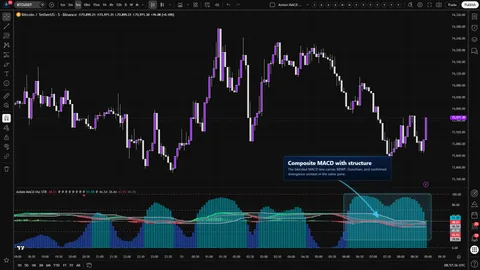
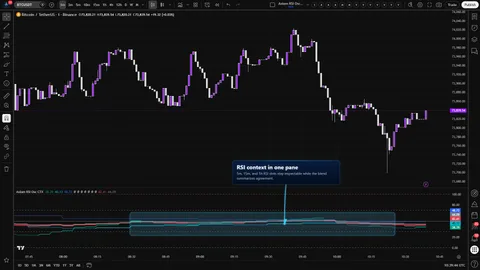
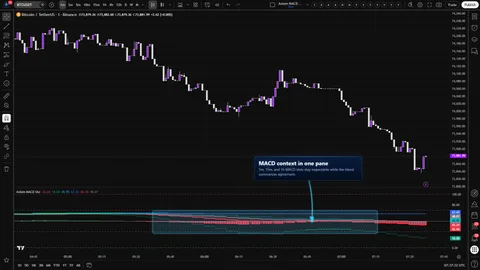
Axiom MACD Osc CTX runs up to ten independent MACD slots inside one bounded pane and lets you decide how they speak to each other. Each slot carries its own source, MA family, fast and slow lengths, signal length, timeframe, and — if you want it — a second symbol. The slots are mapped into a shared 0..100 space so you can read them against one another without the usual scale-mismatch fog. A weight-gated blend of MACD, signal, and histogram sits on top of a 50 midline so agreement, disagreement, and stretched conditions show up in the same glance.

The CTX trim gives you more room for slots — it does not give you more confidence. It is a context surface for traders already thinking in stacks, not a verdict engine. The trust boundary lives in three places: the per-slot repaint switch, the fact that the blend is a context read rather than a score, and the normalized axis the overbought and oversold guides ride on.

Good fit

  • Multi-timeframe MACD users who are done stacking three separate panes.
  • Swing and intraday traders who want a handful of carefully weighted slots plus optional correlated-symbol context.
  • Traders willing to make the repaint-versus-lag call slot by slot.

Misfit

  • Anyone looking for a binary buy or sell call.
  • Scalpers who will not tolerate any higher-timeframe lag.
  • Readers who would rather not learn a normalized axis.
Where this version sits

Axiom indicator families use a Base -> CTX -> STR progression when the full set exists. Base is the focused/free version: three chart-symbol slots, one global repaint posture, and the smaller MA/filter surface where that family uses one. CTX expands that same MACD logic into ten slots with optional per-slot tickers, per-slot timing control, deeper Power User controls, and the broader MA/filter surface. STR sits after CTX: it keeps the stronger per-slot control pattern, reduces the stack to five slots because of the added computation, and spends that budget on divergence, Keltner, BBWP, and Donchian structure around the blended MACD output. This page covers CTX, so choose it when ten-slot context breadth matters more than STR-style blended-line structure.

Features
  • Ten independent MACD slots. Each slot is its own study — source, MA type, fast length, slow length, signal length, signal MA type, timeframe, and an optional ticker. You keep every slot inspectable; nothing is buried inside a score.
  • Shared 0..100 pane with a 50 midline. Slots are mapped through an ATR-referenced transform so different timeframes and symbols fit the same vertical space. The midline keeps the pane reading like centered momentum instead of an abstract index.
  • Weight-gated blend. A single blended MACD, signal, and histogram ride on top of the slots, weighted by whatever you set each slot's Blended Weight to. Zero-weight and empty slots drop out of the blend cleanly; the slots still plot so you can still see what the blend is leaving out.
  • Optional correlated-symbol context. Any slot can be pointed at a different ticker for context — a rate, an index, a related pair. This is a context read, not a prediction.
  • Repaint switch per slot. On Bar Close? is exposed on every slot. ON waits for the higher-timeframe bar to close and uses its confirmed values; OFF uses the live higher-timeframe bar and can move until that bar closes. The tradeoff is yours to make, slot by slot.
  • Adjustable overbought and oversold guides. Default 70 and 30, sitting on the normalized axis, with the hard 0 and 100 boundary lines drawn in so you can see when the pane is being pushed against its cap.
  • Optional master smoothing pass. One final smoothing pass across the blend when you want steadier lines and will accept the added lag.
  • Runtime safety rails. Slot timeframes must be greater than or equal to the chart timeframe; Fast Length must be less than Slow Length. Violate either and the tool refuses to run rather than quietly producing nonsense.
  • 24 confirmed-bar alerts. Per-slot bullish and bearish state, blended bullish and bearish state, and an all-slots-agree alert on each side. Every alert fires on confirmed chart bars.
How to use
  1. Add Axiom MACD Osc CTX to a chart in its own pane.
  2. Start on a timeframe you actually trade. Leave the defaults: slots 01, 02, and 03 enabled at 5, 15, and 60, each weighted 33.3. Slots 04 through 10 stay off until you have a reason to turn them on.
  3. Confirm three slot plots render in color, a blended MACD and signal line sit near the middle of the pane, and the blended histogram expands and contracts around 50.
  4. Pick one slot on a higher timeframe and toggle On Bar Close? off and back on. With OFF you should see the line react sooner on the live higher-timeframe bar. With ON it should hold steady until that bar confirms. Decide which behavior you want, per slot.
  5. Right-click the indicator name, add an alert, and pick one of the per-slot or blended alert conditions to confirm the routing works the way you expect.

Correct first use looks like this: slot plots stay inside 0..100 without hugging the edges, the blended histogram visibly breathes around 50, slot colors flip cleanly when a slot's MACD crosses its own signal, and switching On Bar Close? on a higher-timeframe slot changes when the slot updates without warping the overall shape.

Settings

Per slot

  • Enable MACD 0X — slot on or off. Off removes the slot from everything, including the blend.
  • Hide MACD 0X Plot — keeps the slot computing and contributing to the blend without drawing its line. Useful when the chart is already busy and a slot only needs to steer.
  • Source — the price series the MACD reads. If Optional Ticker is set, the source is read on that symbol.
  • TimeFrame — blank means the chart timeframe. Any value you do set must be greater than or equal to the chart timeframe. The tool enforces this with a runtime error.
  • Fast Length, Slow Length, Signal Length — the three MACD lengths. Fast must be less than Slow; this is also enforced.
  • MACD MA Type, Signal MA Type — pick the MA family used for the fast and slow MAs and for the signal line. EMA is the default for both.
  • Line Width — slot plot thickness.
  • Blended Weight — how much this slot steers the blend. Set it to 0 when you want the slot plotted for reference but not pulling the blend around.
  • Optional Ticker — a symbol override for the slot. Blank means the chart symbol.

Per slot — Power User

  • On Bar Close? — the repaint-versus-lag call. ON waits for the higher-timeframe bar to confirm, which is slower but honest. OFF uses the live higher-timeframe bar, which is faster but can move until that bar closes. Leave ON unless you have a specific, disciplined reason to read the live bar.
  • ALMA, KAMA, FRAMA, Jurik, Laguerre, and VAMA parameters expose only when the corresponding MA type is selected. Defaults are sensible for each family.

Oscillator group

  • ATR Length — how far back ATR looks when slot values are mapped into the pane. Higher is steadier, lower is touchier.
  • ATR Sensitivity — pushes values harder toward the edges. Raising this to make readings look cleaner is the most common self-inflicted distortion in this pane. If every slot pins at 0 or 100, you are past the useful range and the agreement you are seeing is a side effect of the dial, not the market.
  • Overbought Level, Oversold Level — guides at 70 and 30 by default. They sit on the normalized axis, not on raw MACD values.

Display

  • Plot Blended K/D — shows or hides the blended MACD and signal lines.
  • Plot Blended Histogram — shows or hides the blended histogram.
  • Blended Line Width — thickness of the blended MACD and signal.

Master smoothing

  • Enable Master Smoothing — off by default. When on, adds a final smoothing pass to the blend. Expect lag.
  • Master MA Type, Master Length, and the per-family Master params — tune the final pass if you turn it on.

What to avoid

  • Flipping On Bar Close? off on every slot and reading the flicker as a signal.
  • Stacking all ten slots at equal weights before deciding which timeframe should lead.
  • Cranking ATR Sensitivity until readings pin at the edges and then treating the pin as confirmation.
  • Pointing Optional Ticker at an unrelated asset and treating a crossover there as a prediction of the chart symbol.
  • Hiding both the blended K/D and the blended histogram and still reading the slots as if the blend were telling the story.
Alerts

Twenty-four alerts are compiled in the current source, and every one of them is gated on barstate.isconfirmed. They fire on confirmed chart bars and they describe a current state at bar close. There are no cross, flip, midline, or threshold alerts in this build.

  • MACD 01 Is Bullish through MACD 10 Is Bullish — the slot's MACD is above its signal on a confirmed chart bar.
  • MACD 01 Is Bearish through MACD 10 Is Bearish — the slot's MACD is below its signal on a confirmed chart bar.
  • Blended MACD Is Bullish — blended MACD is above the blended signal on a confirmed chart bar.
  • Blended MACD Is Bearish — blended MACD is below the blended signal on a confirmed chart bar.
  • All MACD Slots Bullish — every enabled slot is bullish on a confirmed chart bar.
  • All MACD Slots Bearish — every enabled slot is bearish on a confirmed chart bar.

Bar-close gating on the chart timeframe does not cancel intra-bar movement inside a higher-timeframe slot if that slot has On Bar Close? OFF. The alert is honest about the chart bar; the slot's own read can still be live.

For the geeks

Two pieces of this tool are not stock MACD, and both are worth naming so you know what you are reading.

Shared axis via ATR-referenced normalization. Raw MACD values live on different scales across timeframes and across symbols. Without normalization, one slot would always dominate the pane, and the blend would be steered by whichever slot happened to have the largest raw values. Each slot's MACD, signal, and histogram are scaled against an ATR computed on that slot's symbol and timeframe, then mapped through a bounded transform into 0..100. ATR Sensitivity controls how hard values are pushed toward the edges of that space. The transform is monotonic — direction is preserved — but magnitudes are compressed, and the 0..100 axis is not raw price units and is not a probability. To verify it on your own chart, leave ATR Sensitivity at 1.0 and watch the slots stay inside the band without pinning; raise sensitivity and watch them crowd the edges.

Weight-gated blend. Once the slots share a scale, the blend is a weighted average across them. Slots with zero weight still plot for reference but do not move the blend, and slots returning na are ignored. If the total effective weight is zero, the blend is na rather than an average of nothing. To verify, set slot 01 to weight 100 and the rest to 0 — the blend should track slot 01. Set slot 01 back to 0 and the blend should step to whatever is left.

What not to assume from this: that a normalized reading is a probability, that the blend is a verdict, or that adding more slots makes the story more reliable. The normalization makes slots visually comparable. What the slots mean is still on you.

FAQ

Why does a slot jump when the higher-timeframe bar closes? Because On Bar Close? is OFF on that slot. OFF uses the live higher-timeframe bar, and live bars can keep moving until they close. Turn that slot's On Bar Close? ON if you want the line to update only on confirmed higher-timeframe bars.

What does the blended line actually mean? It is a weighted average across the slots you chose to weight. It is a compact context read, not a verdict. A strong blended value can still sit on top of one loud slot and two neutral ones — which is why the slot plots remain visible. If the blend and the slots disagree, the disagreement is the information.

Can I read the overbought and oversold levels the same way as on a normal MACD? Not quite. Those guides sit on the normalized 0..100 axis, not on raw MACD values. They are useful as stretch markers relative to this pane, but they are not interchangeable with the 0 line on a standard MACD.

Does pointing a slot at a correlated symbol predict the chart? No. A cross-asset slot is context — how that other symbol is leaning right now in its own MACD terms — not a leading signal for the chart symbol. If you catch yourself treating it as predictive, scale its Blended Weight down until you stop.

Are there cross or flip alerts? Not in this build. The compiled alerts describe current state at bar close — bullish or bearish — per slot, for the blend, and for the all-slots case. If you need an alert on the moment of change, build it on top of the state alerts rather than assuming one ships with the tool.

Limitations
  • Slots with On Bar Close? OFF can repaint until the higher-timeframe bar closes. That is not a bug; it is the tradeoff the switch exists to expose.
  • Readings sit on a normalized axis. The axis is useful for comparing slots in one pane and not useful as a raw MACD number.
  • The blend is a weighted average. It is only as honest as the weights you set, and it will quietly carry whatever bias you brought from the last chart you calibrated against.
  • Cross-asset slots provide context, not predictive power. Nothing in the math makes one symbol's MACD a leading signal for another.
  • No alert currently fires on flips, crosses, midline touches, or threshold breaks. Build those externally if you need them.
  • The tool runs whichever MA families your installed version of AxiomCharts/AxiomMovingAverageLibraryPro exposes.
  • Session behavior follows ordinary TradingView rules. Twenty-four-hour symbols and session-based symbols will read differently around session boundaries.
Support and training

Documentation, guides, and support routes live at axiomcharts.com. Start there if you need a deeper walkthrough of slot weighting, the repaint tradeoff, or how Base, CTX, and STR differ in the Axiom MACD Osc family.

Disclaimer

This indicator is a research and charting tool. It does not generate financial advice, recommendations, or predictions. Markets involve real risk, including the risk of losing more than you intended to. Test any setup on your own charts, at your own risk, and make your own decisions. Past behavior of any reading in this pane does not guarantee future behavior.

Related products

If this one is close but not quite right, there may be a better fit nearby for the same kind of chart work, testing need, or workflow gap.

Back to products
Axiom MACD Oscindicator
Axiom MACD Osc thumbnail

indicator / indicators

Axiom MACD Osc

Free

A three-slot multi-timeframe MACD oscillator with each slot normalized into a bounded 0..100 pane, a weight-driven composite, and optional post-blend smoothing. The focused/free Base version of the Axiom MACD Osc family.

1m5m15m1H4H1DANY

Crypto / Forex +4 / 1m / 5m +5

Axiom MACD Osc STRindicator
Axiom MACD Osc STR thumbnail

indicator / indicators

Axiom MACD Osc STR

A five-slot multi-timeframe MACD oscillator with a weighted MACD/signal/histogram composite and optional structure context — divergence, Keltner, BBWP, and Donchian — all built on the composite itself. STR trades CTX's ten-slot breadth for blended-line structure.

1m5m15m1H4H1DANY

Crypto / Forex +4 / 1m / 5m +5

Axiom RSI Osc CTXindicator
Axiom RSI Osc CTX thumbnail

indicator / indicators

Axiom RSI Osc CTX

Ten independent RSI slots, one native 0..100 pane, a weight-gated blend, and an honest repaint switch per slot. Multi-timeframe and multi-symbol context without stacked-RSI clutter.

1m5m15m1H4H1DANY

Crypto / Forex +4 / 1m / 5m +5

Weighing a few options against each other?

Tell us what you are trying to accomplish and we will help you narrow it down honestly.