Skip to content

indicator / indicators

Axiom RSI Osc CTX

Ten independent RSI slots, one native 0..100 pane, a weight-gated blend, and an honest repaint switch per slot. Multi-timeframe and multi-symbol context without stacked-RSI clutter.

Last updated: Jun 1, 2026

Crypto / Forex +4 / 1m / 5m +5

Purchase options

Monthly / Yearly / One-time access

$3.00/ month

14-day free trial

You need a TradingView account for tools that open or run on TradingView.

These tools support analysis, testing, planning, and review. They do not make trading decisions for you.

14-day monthly trial / 14-day yearly trial / 30-day one-time refund window

Refund policy / Access help

Product details

Explore the details to see whether the tool fits the problem you are trying to solve for.

Overview

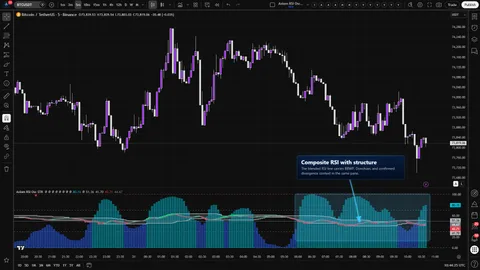
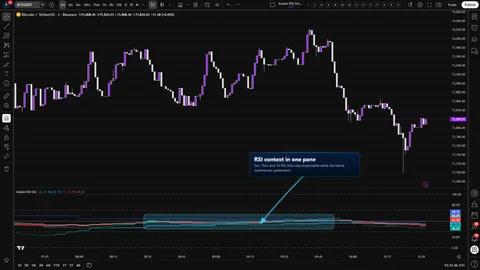
One bounded pane. Up to ten RSI slots, each on its own timeframe, each optionally pointed at a different symbol, and a weighted blend drawn on top so you can see where the stack agrees and where it argues with itself.

The decision the pane is built around is narrow: is RSI aligned enough across the timeframes you actually trade to act on, or is one loud slot carrying the read? The CTX trim opens up to ten slots without lending you any extra conviction — more surface to compare, not more certainty. RSI stays on its native 0..100 axis. The 50 midline is where it has always been. The 70 and 30 guides land where you expect them, and both are user-adjustable.

Three pieces carry the trust burden, and the tool names each of them. Every slot has its own On Bar Close? switch — the repaint control, set per slot. The blended line is a weighted average you shape yourself; it is a context read, not a verdict. An optional master smoothing pass trades reactivity for calm, and you decide which of the two you need for a given session.

This fits multi-timeframe RSI users who are willing to choose weights deliberately and want one honest pane in place of three stacked RSI studies. It does not fit buy/sell-signal shoppers, scalpers who refuse any repaint exposure on a higher-timeframe read, or anyone who wants the pane to call it for them.

Where this version sits

Axiom indicator families use a Base -> CTX -> STR progression when the full set exists. Base is the focused/free version: three chart-symbol slots, one global repaint posture, and the smaller MA/filter surface where that family uses one. CTX expands that same RSI logic into ten slots with optional per-slot tickers, per-slot timing control, deeper Power User controls, and the broader MA/filter surface. STR sits after CTX: it keeps the stronger per-slot control pattern, reduces the stack to five slots because of the added computation, and spends that budget on divergence, Keltner, BBWP, and Donchian structure around the blended RSI output. This page covers CTX, so choose it when ten-slot context breadth matters more than STR-style blended-line structure.

Features
  • Ten independent RSI slots. Each slot runs its own source, RSI length, RSI smoothing, signal length, signal smoothing, MA family choices, width, weight, and optional symbol override. Turn on as few or as many as the decision needs.
  • Multi-timeframe per slot. Set a slot's timeframe directly. A runtime guard refuses any slot whose timeframe is lower than the chart — the pane will not pretend to look inside a higher-timeframe bar.
  • Optional cross-symbol studies. Point a slot at any ticker TradingView can serve. Treat it as context on a correlated instrument — never as a lead on the chart symbol.
  • Native 0..100 axis with the levels you already read. Solid 0 and 100 boundaries, solid 50 midline, dashed overbought and oversold guides at user-set levels (defaults 70 and 30). Nothing is rescaled. RSI stays RSI.
  • Weight-gated blended RSI and signal. A weighted average across enabled, non-zero-weight slots with usable RSI values, drawn as its own RSI-and-signal pair over the stack. Set a slot's weight to zero to keep its plot visible without letting it steer the blend.
  • Per-slot plot visibility. Hide a slot's line while keeping its math alive. If the slot is enabled and its weight is non-zero, it still contributes to the blend; if its weight is zero, it stays out of the blend.
  • Optional master smoothing pass. One extra smoothing pass over the blended RSI and blended signal, with the full MA palette available. Off by default.
  • Slot lean at a glance. Every slot's plot color dims when that slot's RSI sits below its own signal, so a busy stack still reads quickly.
How to use

The shortest path to a correct first look:

  1. Add Axiom RSI Osc CTX to the chart. It draws in its own pane.
  2. Start on a timeframe you actually trade from — a 1-minute chart is a calm place to eyeball the default stack.
  3. Leave the defaults alone on the first pass. Slots 01, 02, and 03 are enabled on the 5, 15, and 60 timeframes, each carrying a Blended Weight of 33.3. Slots 04 through 10 are off, with weight 0.
  4. Confirm three slot lines moving inside 0..100, a blended RSI and blended signal drawn on top, and the 50 midline, 70 guide, and 30 guide all present.
  5. Flip On Bar Close? ON and OFF on one higher-timeframe slot during a replay. OFF reacts sooner on the forming bar. ON holds the confirmed value in place and updates when the higher-timeframe bar closes.
  6. Right-click the indicator name, pick Add alert, and verify that the per-slot and blended alerts show up as expected.

What correct first use looks like: each slot's RSI moves inside 0..100 at the pace you would expect on its timeframe, the blended line sits between the active slots rather than outside them, each slot's color flips on the bar where its RSI crosses its own signal, and the higher-timeframe slot visibly pauses when On Bar Close? is ON.

Settings

Settings are organized the way you actually use them. The defaults are a working starting point, not a recommendation — tune toward the decision you are trying to make.

Per-slot basics (01 through 10). Enable turns the slot on. Hide Plot keeps the slot computing without drawing its line. It still contributes to the blend only when its weight is non-zero — useful when a slot should steer the blend but the pane is already crowded. Source picks the price series. TimeFrame sets the slot's timeframe; blank inherits the chart. RSI Length (default 14), RSI Smoothing (default 3), Signal Length (default 3), and their matching Type selectors choose how raw RSI is shaped into a visible RSI line and a calculated signal value for that slot. Line Width sets thickness. Blended Weight decides how much that slot steers the blend (defaults 33.3 on slots 01 to 03, 0 on 04 to 10). Optional Ticker swaps the symbol for that slot only.

Per-slot Power User. On Bar Close? is the repaint switch. ON returns the previous confirmed higher-timeframe bar — slower, honest. OFF returns the live higher-timeframe bar — faster, exposed to intra-bar movement until that bar closes. Defaults to ON on every slot. Below that sit the family-specific parameters for ALMA, KAMA, FRAMA, Jurik, Laguerre, and VAMA, exposed for both the RSI smoothing and the signal smoothing. Only the selected family reads these inputs.

Oscillator. Overbought Level and Oversold Level drive the dashed guides. Defaults 70 and 30. Move them where your read sits, not where a textbook says they should be.

Display. Plot Blended RSI/Signal toggles the blended pair. Blended Line Width sets its thickness (default 3 so it reads clearly over the stack).

Master smoothing. Enable Master Smoothing adds one smoothing pass to both blended lines after blending. Master MA Type and Master Length control the pass, with per-family parameters exposed as needed. Default EMA, length 3, and off.

What to watch out for. Three habits quietly hollow out what this pane is worth: flipping On Bar Close? OFF on every slot to chase speed, loading slots 04 through 10 at equal weight without deciding which timeframes actually belong in the decision, and cranking master smoothing until the blend finally crosses the midline. The tool permits all three because each has an honest use — just notice when convenience is standing in for judgment.

Alerts

Every alert is gated on confirmed chart bars and reports a current state at the close of that bar — not a flip, not a cross, not a threshold touch. Twenty-four alerts ship with the script:

  • RSI 01 Is Bullish through RSI 10 Is Bullish — the slot's RSI sits above its signal on a confirmed chart bar.
  • RSI 01 Is Bearish through RSI 10 Is Bearish — the slot's RSI sits below its signal on a confirmed chart bar.
  • Blended RSI Is Bullish and Blended RSI Is Bearish — the blended RSI sits above or below the blended signal on a confirmed chart bar.
  • All RSI Slots Bullish and All RSI Slots Bearish — every enabled slot with an available RSI value is leaning the same way on a confirmed chart bar.

Two honest notes. First, the in-file header mentions flip alerts and midline and threshold crosses. Those are not compiled in the current build; if that changes in a future version, it will appear here first. Second, the bar-close gate applies to the chart bar. It does not cancel intra-bar movement on a slot whose On Bar Close? is OFF — the underlying state can still shift before the chart bar confirms.

For the geeks

Two pieces of the math are worth naming plainly so the blend does not get read as more than it is.

The blend is a weight-gated weighted average. When the script builds the blended RSI and blended signal, it walks the active slots and asks two questions about each: is its weight greater than zero, and is its value a real number? A slot that answers no to either is skipped entirely. Slots that answer yes contribute in proportion to their weight. If every effective weight sums to zero, the blend returns empty instead of a cosmetic placeholder — the pane shows nothing rather than lying about agreement. The quickest way to feel this on your own chart: set slot 01's Blended Weight to 100 and every other slot's weight to 0. The blend should track slot 01 exactly. Then set every weight to 0 and confirm the blend goes blank.

Master smoothing is one extra MA pass over the already-blended values. Turning it on runs the blended RSI and blended signal through the MA family and length you choose, then clamps the result back into 0..100. Less noise, more lag. If you care about where the blend crosses the midline, turn master smoothing on for a session and compare where the same cross lands with it off. That is the cost, visible on your own chart.

Neither piece is a verdict. Both are reads. The slots remain underneath, inspectable.

FAQ

Why did a slot jump when the higher-timeframe bar closed? That slot has On Bar Close? set to OFF. OFF uses the live higher-timeframe bar, which can keep changing until it confirms. Flip the slot to ON if you want the line to wait; keep it OFF if you are trading faster than the higher timeframe and you are accepting the exposure knowingly.

What does the blended line actually mean? It is a weighted average of the enabled slots that have non-zero weight and usable RSI values, drawn for comparison. It is not a score and not a signal. Inspect the slots underneath it before acting on the blend. If the slots disagree but the blend looks calm, believe the slots.

Can I still read 70 and 30 the way I read them on a normal RSI? Yes. Every slot keeps RSI in its native 0..100 range, and the guides are drawn at the levels you set (defaults 70 and 30). Nothing is rescaled. If you are coming from a tool that normalizes its axis, this pane does not — what you see is RSI, not a look-alike.

Does pointing a slot at a correlated symbol predict the chart symbol? No. A slot with Optional Ticker set to another instrument is a read on that instrument — use it to compare, not to lead. Correlations move and break, and the tool does not know which is happening on any given bar.

Are there flip, cross, or midline alerts? Not in the current build. The compiled alerts describe current state on a confirmed chart bar — bullish or bearish per slot, bullish or bearish on the blend, and all-slots-agreeing in either direction. If flip and cross alerts ship later, they will appear in the alert list above.

Limitations
  • Higher-timeframe repaint is a switch, not a guarantee. Each slot reads with lookahead enabled, which is only safe because On Bar Close? holds the previous confirmed higher-timeframe value. OFF accepts intra-bar movement until the higher-timeframe bar confirms. That is a choice the tool puts in your hands, not a flaw it tries to hide.
  • The blend is context, not conclusion. A weighted average can sit cleanly on one side of the midline while a single heavy slot carries it. The per-slot plots exist so you do not read the blend without reading the stack.
  • Cross-symbol slots are context on that symbol. Alignment on a related ticker is information, not leadership. Correlated does not mean predictive.
  • Alerts are bar-close gated on the chart. They fire on confirmed chart bars and report state at that moment. They do not restrain a slot whose On Bar Close? is OFF from moving before the chart bar confirms.
  • Session handling is TradingView-native. Session-based instruments and 24/7 instruments behave the way TradingView serves them. No session filter is applied inside this script.
  • The moving-average palette comes from a pinned library version. What you see in the MA dropdowns tracks the installed library build. The copy here stays generic on purpose so the tool reads honestly as the library evolves.
Support and training

Support and training both live on the AxiomCharts website. If a direct link has not opened yet, start at the site and we will route you from there.

Disclaimer

Axiom RSI Osc CTX is an analysis and context tool. It does not place trades, manage positions, or deliver forecasts, and nothing it draws should be read as financial advice or a recommendation to buy or sell any instrument. Markets can move against any read from this pane, and past behavior of any series shown here does not imply future behavior. You are responsible for your own risk management, your own execution, and your own decisions.

Related products

If this one is close but not quite right, there may be a better fit nearby for the same kind of chart work, testing need, or workflow gap.

Back to products
Axiom RSI Oscindicator
Axiom RSI Osc thumbnail

indicator / indicators

Axiom RSI Osc

Free

Three independent RSI slots, one native 0..100 pane, a weight-gated blend, and a single global repaint switch. Multi-timeframe RSI context without stacked-RSI clutter.

1m5m15m1H4H1DANY

Crypto / Forex +4 / 1m / 5m +5

Axiom RSI Osc STRindicator
Axiom RSI Osc STR thumbnail

indicator / indicators

Axiom RSI Osc STR

Five independent RSI slots, a weight-gated blend, and pivot divergence, Keltner, BBWP, and Donchian context computed on that blend — all inside RSI's native 0..100 frame.

1m5m15m1H4H1DANY

Crypto / Forex +4 / 1m / 5m +5

Axiom Stoch Osc CTXindicator
Axiom Stoch Osc CTX thumbnail

indicator / indicators

Axiom Stoch Osc CTX

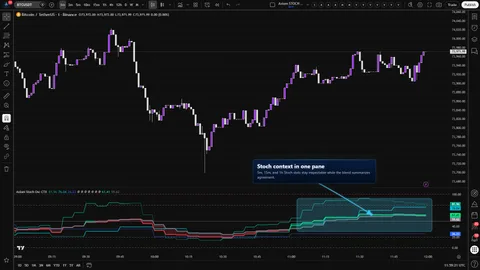
Ten independent Stochastic slots, one native 0..100 pane, a weight-gated blend, configurable K and D MA families per slot, and an honest repaint switch per slot. Multi-timeframe and multi-symbol context without the stacked-Stoch clutter.

1m5m15m1H4H1DANY

Crypto / Forex +4 / 1m / 5m +5

Weighing a few options against each other?

Tell us what you are trying to accomplish and we will help you narrow it down honestly.