Skip to content

indicator / indicators

Axiom RSI Osc STR

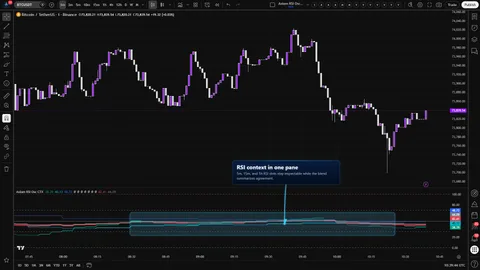
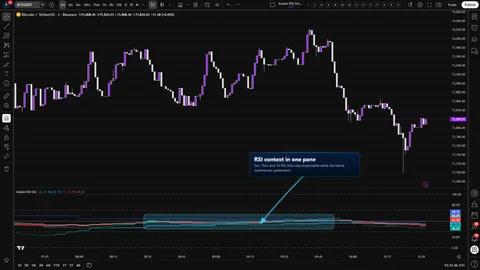
Five independent RSI slots, a weight-gated blend, and pivot divergence, Keltner, BBWP, and Donchian context computed on that blend — all inside RSI's native 0..100 frame.

Last updated: Jun 1, 2026

Crypto / Forex +4 / 1m / 5m +5

Purchase options

Monthly / Yearly / One-time access

$3.00/ month

14-day free trial

You need a TradingView account for tools that open or run on TradingView.

These tools support analysis, testing, planning, and review. They do not make trading decisions for you.

14-day monthly trial / 14-day yearly trial / 30-day one-time refund window

Refund policy / Access help

Product details

Explore the details to see whether the tool fits the problem you are trying to solve for.

Overview

If you already read RSI across more than one timeframe, you know the read that is hardest to call: the stack is partly aligned, price is making a second attempt at a high, and you need to see whether momentum is expanding, compressing, or pulling away — without squeezing another pane in and without giving up the 0..100 frame you already read fluently.

Axiom RSI Osc STR is built for that read. Up to five independent RSI slots, each with its own source, MA family, lengths, timeframe, and optional symbol override, feed a weight-gated blend. Around that blended line sit four structure features: pivot-confirmed divergence against chart price, a Keltner envelope, BBWP columns, and a Donchian channel. Every one of those features is computed on the blended RSI itself. None of them sit on price.

Where this version sits

Axiom indicator families use a Base -> CTX -> STR progression when the full set exists. Base is the focused/free version: three chart-symbol slots, one global repaint posture, and the smaller MA/filter surface where that family uses one. CTX expands that same RSI logic into ten slots with optional per-slot tickers, per-slot timing control, deeper Power User controls, and the broader MA/filter surface. STR sits after CTX: it keeps the stronger per-slot control pattern, reduces the stack to five slots because of the added computation, and spends that budget on divergence, Keltner, BBWP, and Donchian structure around the blended RSI output. Choose STR when blended-line structure matters more than CTX's ten-slot context breadth.

STR fits a multi-timeframe RSI reader who wants the stack to stay legible and the structure to sit on the oscillator where the decision lives. It is not the right trim if you want arrows to enter on, if you refuse any higher-timeframe repaint exposure, or if you want a chart-price BBWP — those reads belong in other tools.

Two costs you need to own before you turn it on. First, divergence, Keltner, BBWP, and Donchian all read from the same blended series — stacking them is not the same as having four independent confirmations. Second, each slot has its own On Bar Close? switch: ON waits for the higher-timeframe bar to close and keeps history honest; OFF reacts on the live higher-timeframe bar and can repaint until that bar confirms. The switch is per slot on purpose. Pick your exposure slot by slot.

The trim widens what you can see around the blended read. It does not make the reading louder than it deserves.

Features

Five independent RSI slots. Each slot takes its own source, RSI length, RSI smoothing MA family, signal length, signal smoothing MA family, timeframe, and optional symbol override. Slots 01–03 are on by default at 5 / 15 / 60 minutes with their plotted lines hidden so the pane opens on the blended read. Slots 04–05 are off by default and plot visibly when enabled. Slot lines fade when RSI sits below its signal, so per-slot lean is legible without a legend.

Weight-gated blend. The blend is a weighted average across the active slots, driven by each slot's Blended Weight. Zero-weight slots still plot — they just do not steer. na slots (usually higher timeframe still warming up) are skipped. If the effective weight is zero across the board, the blend goes blank on purpose rather than faking a value. The blend produces both a blended RSI and a blended signal line, with a colored fill between them for lean.

Pivot-confirmed divergence on the blended RSI. Divergence compares chart-price pivots to the blended RSI at the same symmetric lookback. Bullish triangles print when price makes a lower pivot low and the blended RSI makes a higher pivot low. Bearish triangles print the inverse. Plot On Pivot? is a marker-placement toggle — off puts the triangle on the confirmation bar; on back-plots it onto the original pivot bar. The underlying logic does not change.

Keltner envelope on the blended RSI. Upper and lower bands built on a user-chosen basis filter (MA family plus length) with a configurable multiplier. All lines clamp to 0..100. This is an envelope on the oscillator, not on price.

BBWP columns on the blended RSI. A Bollinger Band Width Percentile read computed on the blended RSI and ranked against that line's own recent history on a 0..100 scale. Column color flips at a user-set threshold. These columns report compression and expansion of the blended RSI line — not of chart price.

Donchian channel on the blended RSI. Rolling high, low, and smoothed midpoint of the blended RSI over a configurable lookback, drawn as a stepline and clamped to 0..100. Anchors the blended read to its own recent high/low envelope.

Optional post-blend smoothing. One extra MA-family pass after the blend, clamped back to 0..100. The tradeoff is explicit: less noise, more lag. When this pass is on, every downstream structure feature — divergence, Keltner, BBWP, Donchian — inherits from the smoothed series.

Native 0..100 frame. Solid 0 and 100 boundary lines, solid 50 midline, dashed overbought and oversold guides at user-chosen levels (70 and 30 by default). If you read RSI, this axis already speaks your language.

16 alerts. Per-slot state, blended state, slot alignment, and blended divergence. Detail in the Alerts section below.

How to use
  1. Add Axiom RSI Osc STR to your chart. It opens in its own pane.
  2. Leave the defaults for a first pass — slots 01 / 02 / 03 enabled at 5 / 15 / 60, slot plots hidden, blend visible, BBWP and Donchian on, Keltner off, blend smoothing off, divergence on.
  3. Confirm the blended RSI and signal pair draws inside 0..100, and the midline, OB, and OS guides appear where you expect.
  4. Open Replay. Toggle On Bar Close? ON and OFF on one slot and watch the higher-timeframe behavior: ON settles on confirmed bars; OFF can move mid-bar and resolve on close.
  5. Point one slot at a different timeframe or symbol and adjust Blended Weight to see how the blend actually shifts — this is the fastest way to build intuition for weight-gating.
  6. Right-click the indicator name → Add alert → pick a per-slot, blended, alignment, or divergence alert to confirm the routing you intend to use.

Correct first use looks like this: the blended line sits roughly between the active slots; color flips on the bar where the blended RSI crosses its blended signal; BBWP columns move with the blended RSI's own compression and expansion; Donchian upper and lower track the blended RSI's highs and lows, not price's; divergence triangles only appear on confirmed pivots.

Settings

Slots and the blend

Each slot owns its own source, timeframe, symbol, RSI length, RSI smoothing, signal smoothing, line width, blended weight, and per-slot repaint switch. Start at the timeframes you actually trade. When you want a slot to show a line without influencing the blend, set its Blended Weight to 0 rather than disabling it — zero-weight still plots. When you want it out entirely, disable it. Hide RSI 0X Plot keeps the slot computing in the blend without drawing the slot line.

Expansion features

  • Divergence. Pivot Len sets both the left and right pivot strength. Longer values mean later confirmations and fewer weak pivots. Plot On Pivot? only moves the marker — it does not change when divergence is detected.
  • Keltner. KC Length drives the range smoothing. KC Mult controls how far the bands sit from the basis. Basis Type and Basis Len pick the basis filter's MA family and length. All lines clamp to 0..100.
  • BBWP. Length drives the BB basis and the width window on the blended RSI. Lookback (252 by default) is the history window the current width is ranked against. Threshold colors the columns above and below the cutoff. Read the columns as a measure of the blended RSI's own volatility, not the chart's.
  • Donchian. DC Len sets the high/low lookback on the blended RSI. The basis is an MA-family smoother on the midpoint; Basis Len of 1 keeps the midpoint as the raw midline.

Blend smoothing

Enable Smoothing adds one MA-family pass after the blend and clamps the output back to 0..100. This is not a noise fix — it is a reactivity trade. When it is on, Keltner, BBWP, and Donchian all read from the smoothed series. Turn it on knowingly.

Repaint switch (per slot)

On Bar Close? lives in each slot's Power User group. ON returns the previous confirmed higher-timeframe value and keeps history stable. OFF returns the live higher-timeframe value, reacts sooner, and can repaint until that bar closes. The switch is per slot because different timeframes deserve different exposure choices.

Power User MA families

Each slot's smoothing, the blend smoothing, the Keltner basis, the BBWP basis, and the Donchian basis all share the same MA palette (SMA, EMA, RMA, WMA, HMA, DEMA, TEMA, ALMA, KAMA, FRAMA, Jurik, Laguerre, VAMA, and others). Each MA type exposes its own parameters inside the per-slot or per-feature Power User subgroup; those values only take effect when the matching MA type is selected.

Common misuse to avoid

  • Turning on divergence, Keltner, BBWP, and Donchian at once and treating the overlay as four confirmations. They share one blended series.
  • Flipping every slot's On Bar Close? OFF to shave reaction time, then trading before the higher-timeframe bar confirms.
  • Raising blend smoothing until the midline cross "looks cleaner" and acting on the now-late cross.
  • Pointing Optional Ticker at an unrelated symbol and reading a turn there as a lead on your chart symbol.
  • Keeping slot 04 or 05 plots visible on top of the three hidden default slots and losing track of which line is steering the blend.
Alerts

The script ships 16 alertcondition entries. All state alerts evaluate on confirmed chart bars; both divergence alerts fire when the divergence flag becomes true at pivot confirmation.

  • Per-slot state (10 alerts): RSI 01 Is Bullish through RSI 05 Is Bullish, and RSI 01 Is Bearish through RSI 05 Is Bearish. Each reports whether that slot's RSI sits above or below its slot signal on the close of the chart bar.
  • Blended state (2 alerts): Blended RSI Is Bullish and Blended RSI Is Bearish. Same shape, applied to the blended RSI and blended signal pair.
  • Slot alignment (2 alerts): All RSI Slots Bullish and All RSI Slots Bearish. These report that every enabled slot agrees at the close of the chart bar.
  • Blended divergence (2 alerts): Blended RSI Bullish Divergence and Blended RSI Bearish Divergence. These fire when a confirmed chart-price pivot pairs with the opposite direction on the blended RSI at the same lookback.

These are current-state alerts. They do not fire flips, crosses, or threshold events. Divergence is the only exception: its firing coincides with pivot confirmation.

Alignment alert scope — publish-time note. The source contains an open alignment-counter behavior under the slot-05 branch that causes All RSI Slots Bullish and All RSI Slots Bearish to miss their trigger when slot 05 is enabled. Until this is resolved, treat those two alerts as reliable for up to four enabled slots. If you have five slots enabled and need alignment alerts, hold off on those two specifically. Per-slot, blended, and divergence alerts are unaffected.

For the geeks

Two mechanics deserve a direct explanation so the pane is not misread.

The blend is weight-gated, not averaged. The blend walks the active slots and builds a weighted average from their Blended Weight values. Zero-weight slots still plot on the pane — they just contribute nothing to the blend. na slots (usually higher timeframes that have not printed enough bars yet) are skipped. If the total active weight is zero, the blend returns na on purpose rather than faking a number. This means two things you can verify: set slot 01 to weight 100 and the rest to 0, and the blend should track slot 01 exactly; set every weight to 0 and the blend should go blank while the individual slots continue to plot.

The structure features sit on the blended RSI, not on price. Divergence compares chart-price pivots to the blended RSI at the same symmetric lookback. Keltner, BBWP, and Donchian are all computed on the blended RSI line. That design is deliberate — the decision you are making lives on the oscillator, so the range, volatility rank, and channel context belong there too. The consequence is that layering divergence + Keltner + BBWP + Donchian does not produce four independent confirmations. They read from the same series and share the same blend weighting and the same smoothing (when blend smoothing is on). Use them as context; do not use their coincidence as confidence.

You can verify both behaviors on one chart. Disable every expansion feature, then re-enable them one at a time and watch where each one anchors. Then flip blend smoothing on and watch each expansion feature settle differently — that is the smoothed blend feeding through.

FAQ

Is BBWP here a price-volatility reading? No. BBWP is computed on the blended RSI line and ranked against that line's own recent width history. A spike in BBWP means the blended RSI's volatility is unusually compressed or expanded — it does not describe chart-price volatility. If you need a price-volatility read, use a BBWP on price in its own pane.

Why do divergence triangles appear a few bars late when Plot On Pivot? is off? Divergence uses symmetric pivot detection (Pivot Len bars on each side), which means a pivot is only known after Pivot Len bars confirm. With Plot On Pivot? off, the triangle prints on that confirmation bar — Pivot Len bars after the actual pivot. Turn the toggle on and the triangle back-plots onto the original pivot bar. The detection logic is identical either way; only the placement moves.

If I turn on divergence, Keltner, BBWP, and Donchian, am I stacking four confirmations? No. All four read from the same blended RSI. They can help you see range, volatility rank, channel placement, and pivot divergence in one pane, but their coincidence is not independent evidence. Treat them as different views of the same read, not as separate votes.

Why did my blended line suddenly go flat or blank? Two likely reasons. Every enabled slot may have returned na (common right after adding the indicator or after changing a higher-timeframe setting). Or every active slot's Blended Weight is zero. Either way the blend intentionally returns na rather than drawing a misleading value. Raise at least one weight above zero or wait for the slots to print enough data.

Do the "All RSI Slots" alerts actually cover all five slots? Currently, reliably, up to four. There is an open alignment-counter behavior in the source under the slot-05 branch that prevents those two alerts from firing correctly when slot 05 is enabled. Until that is resolved, keep slot 05 disabled if you depend on the alignment alerts, or use the per-slot bull/bear alerts instead.

Limitations
  • Expansion features (Divergence, Keltner, BBWP, Donchian) all feed from the same blended RSI. They are useful context; they are not independent confirmations.
  • On Bar Close? OFF exposes repaint until the higher-timeframe bar closes. The tradeoff is intentional and lives on each slot.
  • Divergence is always at least Pivot Len bars late in logic, regardless of marker placement. Plot On Pivot? only moves where the triangle is drawn.
  • Slot timeframe must be greater than or equal to the chart timeframe. Setting a slot below the chart timeframe triggers a runtime error by design — the tool refuses to look inside a higher-timeframe bar.
  • BBWP here ranks the blended RSI's own volatility, not chart-price volatility.
  • Blend smoothing trades reactivity for calm and the expansion features inherit from the smoothed series.
  • Alignment alerts (All RSI Slots Bullish, All RSI Slots Bearish) are reliable for up to four enabled slots until the slot-05 alignment-counter behavior is resolved. Per-slot, blended, and divergence alerts are unaffected.
  • A slot pointed at a different symbol via Optional Ticker adds context. It is not cross-asset leadership.
Support and training

Documentation, walkthroughs, and support live at axiomcharts.com.

Disclaimer

Axiom RSI Osc STR is an analysis and research tool. It is not financial advice, not a trading signal service, and not a substitute for your own testing and judgment. Past behavior of any indicator on historical data is not a forecast of future performance. Trade at your own risk and only with capital you can afford to lose.

Related products

If this one is close but not quite right, there may be a better fit nearby for the same kind of chart work, testing need, or workflow gap.

Back to products
Axiom RSI Oscindicator
Axiom RSI Osc thumbnail

indicator / indicators

Axiom RSI Osc

Free

Three independent RSI slots, one native 0..100 pane, a weight-gated blend, and a single global repaint switch. Multi-timeframe RSI context without stacked-RSI clutter.

1m5m15m1H4H1DANY

Crypto / Forex +4 / 1m / 5m +5

Axiom RSI Osc CTXindicator
Axiom RSI Osc CTX thumbnail

indicator / indicators

Axiom RSI Osc CTX

Ten independent RSI slots, one native 0..100 pane, a weight-gated blend, and an honest repaint switch per slot. Multi-timeframe and multi-symbol context without stacked-RSI clutter.

1m5m15m1H4H1DANY

Crypto / Forex +4 / 1m / 5m +5

Axiom Stoch Osc STRindicator
Axiom Stoch Osc STR thumbnail

indicator / indicators

Axiom Stoch Osc STR

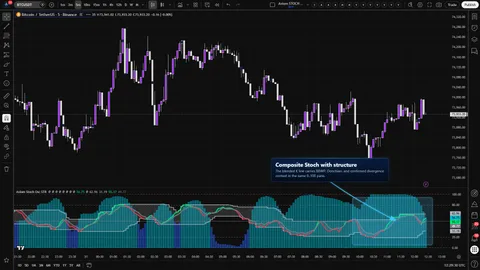
Five independent Stochastic slots, a weight-gated blend of the slot K and D lines, and pivot divergence, Keltner, BBWP, and Donchian context computed on the blended K — all inside Stoch's native 0..100 frame. STR trades CTX's ten-slot breadth for blended-line structure.

1m5m15m1H4H1DANY

Crypto / Forex +4 / 1m / 5m +5

Axiom MACD Osc STRindicator
Axiom MACD Osc STR thumbnail

indicator / indicators

Axiom MACD Osc STR

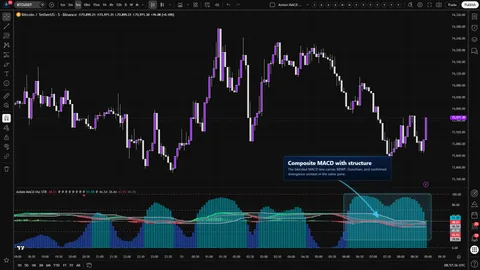
A five-slot multi-timeframe MACD oscillator with a weighted MACD/signal/histogram composite and optional structure context — divergence, Keltner, BBWP, and Donchian — all built on the composite itself. STR trades CTX's ten-slot breadth for blended-line structure.

1m5m15m1H4H1DANY

Crypto / Forex +4 / 1m / 5m +5

Weighing a few options against each other?

Tell us what you are trying to accomplish and we will help you narrow it down honestly.