Skip to content

indicator / indicators

Axiom Stoch Osc CTX

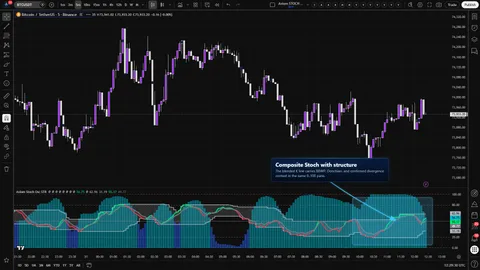
Ten independent Stochastic slots, one native 0..100 pane, a weight-gated blend, configurable K and D MA families per slot, and an honest repaint switch per slot. Multi-timeframe and multi-symbol context without the stacked-Stoch clutter.

Last updated: Jun 1, 2026

Crypto / Forex +4 / 1m / 5m +5

Purchase options

Monthly / Yearly / One-time access

$3.00/ month

14-day free trial

You need a TradingView account for tools that open or run on TradingView.

These tools support analysis, testing, planning, and review. They do not make trading decisions for you.

14-day monthly trial / 14-day yearly trial / 30-day one-time refund window

Refund policy / Access help

Product details

Explore the details to see whether the tool fits the problem you are trying to solve for.

Overview

One bounded pane. Up to ten Stochastic slots. A shared 0..100 frame so every slot reads like the Stoch you already trust, and a weight-gated blend on top so you can see whether the slots you care about are actually leaning the same direction.

This is the CTX trim of the Axiom Stochastic oscillator. It exists for traders who already think in Stoch stacks — short, medium, higher — and have hit the limit of eyeballing three separate panes. It also fits traders who want a correlated symbol on screen as context: a pair, an index, a rate, priced into the same 0..100 space as the chart symbol.

The CTX trim opens room. It does not hand out confidence. Ten slots make it easier to compare a deliberate stack and easier to bury the read under noise. A few trust boundaries are worth stating before anything else:

  • Each slot has its own On Bar Close? switch. ON waits for the higher-timeframe bar to close and reports the confirmed value. OFF uses the live bar and can repaint until that bar closes. Neither choice is wrong. Picking one per slot is the trader's call, and the cost of getting it wrong shows up fastest on the highest-timeframe slot in the stack.
  • The blended K and D are a weight-gated weighted average across enabled slots with non-zero weight and usable K values, not a verdict. One heavily weighted slot can carry the pane. The individual slot plots stay visible so disagreement stays visible.
  • The 80 and 20 guides are stretched-condition markers. They are not buy and sell lines, especially in a trend.

If you want a binary call, this is not the tool. If you want a workbench for multi-timeframe Stoch comparison on your own symbol and on optional correlated symbols, it is.

Where this version sits

Axiom indicator families use a Base -> CTX -> STR progression when the full set exists. Base is the focused/free version: three chart-symbol slots, one global repaint posture, and the smaller MA/filter surface where that family uses one. CTX expands that same Stochastic logic into ten slots with optional per-slot tickers, per-slot timing control, deeper Power User controls, and the broader MA/filter surface. STR sits after CTX: it keeps the stronger per-slot control pattern, reduces the stack to five slots because of the added computation, and spends that budget on divergence, Keltner, BBWP, and Donchian structure around the blended K line. This page covers CTX, so choose it when ten-slot context breadth matters more than STR-style blended-line structure.

Features
  • Ten independent Stochastic slots. Each slot has its own source, K length, K smoothing, D smoothing, MA family on K, MA family on D, timeframe, and optional ticker. Slots 01–03 ship enabled with equal blended weight; 04–10 are off by default so the pane starts legible.
  • Native 0..100 Stoch frame. Every slot K, every slot D, the blended K, and the blended D land inside the same bounded space, anchored by a 50 midline and closed off by hard lines at 0 and 100.
  • Configurable MA family on K and D per slot. K is a textbook %K passed through a user-chosen MA family; D is that result passed through another user-chosen MA family. Some MA families open extra Power User parameters so the trader can tune how the slot breathes instead of accepting SMA as the only option.
  • Weight-gated blended K and D. A weighted average across enabled, non-zero-weight slots that have usable K values. Slots can be visible without steering the blend, or hidden while still steering it if Hide Plot is on.
  • Translucent K/D fill. The band between blended K and blended D flips color with lean, so the pane can be scanned without parsing two lines.
  • User-adjustable overbought and oversold guides. Defaults are 80 and 20. They are guides, not triggers.
  • Optional master smoothing on the blend. One final MA pass on the blended K and D. Off by default. On when the trader wants one more layer of calm and understands it adds lag.
  • Runtime safety guard. Slot timeframes must be greater than or equal to the chart timeframe. The script stops rather than silently pretending to look inside a higher-timeframe bar.
  • 24 confirmed-bar alerts. Per-slot state, blended state, and an all-slots-agree read. See the Alerts section for the honest list.
How to use
  1. Add Axiom Stoch Osc CTX to the chart. It will open in its own pane.
  2. Start on a timeframe you actually trade so the defaults can be judged against real bars.
  3. Leave slots 01–03 enabled with their default weights of 33.3 and slots 04–10 off. That gives a short / medium / higher stack ready to read.
  4. Confirm three slot K lines draw in color, blended K and blended D sit inside 0..100, the K/D fill flips color on crosses, and the midline and 80/20 guides are visible.
  5. Toggle On Bar Close? on one of the higher-timeframe slots off and on while watching a replay across a higher-timeframe bar boundary. That one action is the fastest way to see the lag-versus-repaint tradeoff on your own chart, on your own symbol, at a speed you can stop and study.
  6. Right-click the indicator name → Add alert → pick one of the 24 alerts (per-slot bullish or bearish, blended bullish or bearish, or the all-slots-agree alerts).

What correct first use looks like

  • Slot K lines stay inside 0..100 and read like ordinary Stoch — no pinning, no compression.
  • Blended K and blended D track roughly between the slots rather than living at one extreme.
  • The K/D fill flips color on the bar where blended K crosses blended D.
  • Switching On Bar Close? to ON on a higher-timeframe slot visibly delays reaction on the live bar without changing the shape of the historical line.
Settings

Per slot

  • Enable Stoch 0X — turn a slot on or off. An off slot stops computing and is removed from the blend. Defaults: slots 01–03 on, 04–10 off.
  • Hide Stoch 0X Plot — keep a slot computing and contributing to the blend, but hide its plot. Useful when a slot should steer the blend on a chart that is already busy.
  • Source — which price series the slot reads. If Optional Ticker is set, the source is read on that symbol.
  • TimeFrame — the slot's higher timeframe. Blank means the chart timeframe. Anything lower than the chart timeframe raises a runtime error by design.
  • K Length — the ta.stoch lookback for raw %K. Default 14. Higher is calmer, lower is twitchier.
  • K Smoothing, K Type — smoothing length and MA family applied to raw %K to produce slot K. Default 3, SMA.
  • D Length, D Type — smoothing length and MA family applied to K to produce slot D. Default 3, SMA.
  • Line Width — slot K plot thickness. Default 2.
  • Blended Weight — how strongly the slot steers the blend. Default 33.3 on slots 01–03, 0 on 04–10. Set a slot to weight 0 when you want it plotted but not steering anything.
  • Optional Ticker — symbol override for the slot. Blank means the chart symbol. See the FAQ for why this is context, not prediction.

Per slot — Power User

  • On Bar Close? — the repaint-versus-reactivity switch. ON returns the previous higher-timeframe bar's confirmed values. OFF uses the live higher-timeframe bar. Neither is a fault. Pick deliberately.
  • ALMA / KAMA / FRAMA / Jurik / Laguerre / VAMA parameters — exposed for K and D. They are only read when the matching MA family is selected.

Oscillator group

  • Overbought Level (default 80), Oversold Level (default 20) — drive the dashed guides. Move them if your market or timeframe has a different habit. They are guides either way.

Display group

  • Plot Blended K/D — show or hide the blended K, blended D, and K/D fill. On by default.
  • Blended Line Width — thickness of the blended lines. Default 3.

Master smoothing

  • Enable Master Smoothing — apply one final MA pass to the blended K and D after weighting. Off by default.
  • Master MA Type, Master Length (plus ALMA / KAMA / FRAMA / Jurik / Laguerre / VAMA Master parameters) — tune the final pass. Default EMA, length 3. Master smoothing adds lag. It does not add information.

Misuse worth avoiding

  • Setting On Bar Close? OFF on every slot and trading the flicker before the higher-timeframe bar closes.
  • Piling all ten slots on a chart with equal weights and treating the blend as a verdict.
  • Turning master smoothing on by default for a cleaner-looking line, then trading the lag.
  • Weighting the noisiest slot heaviest because it looks the most active.
  • Pointing Optional Ticker at an unrelated symbol and acting on crossovers there as if they predict the chart.
Alerts

There are 24 alert conditions in this build. All of them fire on confirmed chart bars, and all of them describe current state at bar close rather than flip events or threshold crosses.

  • Stoch 01 Is BullishStoch 10 Is Bullish — slot K is above slot D on a confirmed chart bar.
  • Stoch 01 Is BearishStoch 10 Is Bearish — slot K is below slot D on a confirmed chart bar.
  • Blended Stoch Is Bullish — blended K is above blended D on a confirmed chart bar.
  • Blended Stoch Is Bearish — blended K is below blended D on a confirmed chart bar.
  • All Stoch Slots Bullish — every enabled slot is bullish on a confirmed chart bar.
  • All Stoch Slots Bearish — every enabled slot is bearish on a confirmed chart bar.

Two honest notes. First, the confirmed-chart-bar gate means an alert only fires once the chart bar closes — it does not cancel intra-bar movement on a slot whose On Bar Close? is OFF. If that slot's underlying higher-timeframe bar is still live, the state it reports can still change. Second, there are no flip, cross, midline, or 80/20 threshold alerts in this build. If that is what you need, use the visible blended pair or plotted K lines where they are enough, and build the rest externally; per-slot D is internal, so per-slot K/D cross logic has to be reproduced rather than read as a plotted line.

For the geeks

Two pieces of this tool are not textbook Stochastic and are worth naming.

The per-slot K and D smoothing chain. Each slot starts with a textbook %K from ta.stoch. That raw %K is passed through a user-chosen MA family at the slot's K smoothing length to produce K. K is passed through another user-chosen MA family at the slot's D smoothing length to produce D. Both stay inside the native 0..100 Stoch space. The point is to keep the scale you already read while letting the slot breathe the way you prefer — EMA on K reacts sooner; a zero-lag family on D changes the cross cadence; SMA on both reads like traditional Stochastic. To verify it on your own chart, flip K Type from SMA to EMA on one slot and watch how much earlier K moves on the same bar.

The weight-gated blend with optional master smoothing. The blended K is a weighted average of the enabled slots' K values, with zero-weight slots and slots without usable K skipped cleanly. Blended D follows the same eligible slots; once K exists, D has a K fallback while its own smoothing catches up. If total effective weight is zero, the blend returns nothing and the K/D fill disappears. That is the design, not a bug. When master smoothing is on, the blended K and D each pass through one more MA stage before plotting. The tradeoff is the obvious one: the blend looks calmer; it also lags. To verify, set slot 01 weight to 100 and the others to 0 — the blend should track slot 01. Then set slot 01 to 0 — the blend should step to the weighted mean of the remaining slots. Flip master smoothing on and confirm the blend gets smoother and later.

None of these mechanics are hidden, and none of them are a verdict. They give the native Stoch frame more room to work across timeframes. The interpretation on the bar in front of you is still a trader's call.

FAQ

Why does a slot jump when the higher-timeframe bar closes? Because that slot's On Bar Close? is OFF. OFF uses the live higher-timeframe bar, which can move until it closes. ON returns the previous bar's confirmed values. Pick per slot based on whether you need reactivity on that timeframe or honesty about history.

My blended K and D just disappeared. Is something broken? Probably not. The blend goes to na when the total effective weight across eligible slots is zero — every enabled slot has weight 0, or every non-zero-weight enabled slot lacks a usable K value. Set at least one enabled slot's blended weight above zero and wait for enough history, and the lines come back.

Should I treat an overbought or oversold reading as a trade signal? No. The 80 and 20 guides flag stretched conditions. In a strong trend they can sit pinned for a long time without the trend ending. They are context, not triggers.

Does pointing a slot at a correlated symbol predict the chart? No. Optional Ticker lets you study another symbol's Stoch in the same pane as context — a related pair, an index, a rate. It does not make that slot a leading signal for the chart symbol. Treat it as one more voice in the room.

Why are there no flip or cross alerts? This build compiles current-state alerts only — is the slot bullish right now on a confirmed chart bar, is the blend bullish right now, are all the slots aligned right now. Flip, cross, midline, and threshold-cross alerts are not in this source even though an earlier internal note mentioned them. We describe what ships, not what an old header said.

Limitations
  • Repaint is a switch, not a promise. Each slot pulls higher-timeframe data with a lookahead call that is only safe because of the per-slot On Bar Close? setting. OFF can repaint until the higher-timeframe bar closes. ON cannot. Historical replay ≠ live behavior on a slot that is set to OFF.
  • The blend is context, not a verdict. A weighted average can look clean while one heavily weighted slot carries it. Keep the individual slot plots in view, or at least keep them computing.
  • 80 and 20 are guides. They are not sell and buy signals. In a strong trend they stretch and stay there.
  • Alerts are bar-close gated on the chart timeframe. They describe state, not cross events. The confirmed-chart-bar gate does not cancel intra-bar motion on a slot whose On Bar Close? is OFF.
  • Slot timeframe must be greater than or equal to the chart timeframe. A lower slot timeframe raises a runtime error on purpose. The tool will not pretend to look inside a bar.
  • Optional Ticker is context, not prediction. Cross-asset behavior changes with regime. Do not treat a correlated slot as a leading signal.
  • Session behavior follows TradingView. 24/7 symbols and session-based symbols will behave differently around RTH boundaries. That is ordinary Pine behavior, not an indicator choice.
  • Library dependency. This indicator imports AxiomCharts/AxiomMovingAverageLibraryPro/1 for the MA family selections on K, D, and master smoothing. If that library version is ever unavailable on TradingView, the script will not compile until it is restored or updated.
Support and training

Documentation, training materials, and support live on the AxiomCharts website.

Disclaimer

This indicator is an analysis tool. It does not predict price, guarantee outcomes, or place trades. Nothing here is financial advice. You are responsible for every decision made on your chart — the sizing, the entry, the exit, and the call to walk away. Test on replay, test on paper, and confirm the tool behaves the way you expect on your symbol and timeframe before risking capital.

Related products

If this one is close but not quite right, there may be a better fit nearby for the same kind of chart work, testing need, or workflow gap.

Back to products
Axiom Stoch Oscindicator
Axiom Stoch Osc thumbnail

indicator / indicators

Axiom Stoch Osc

Free

Three independent Stochastic slots, one native 0..100 pane, a weight-gated blended K and D pair, and a single global repaint switch. Multi-timeframe Stoch context without stacked-Stoch clutter.

1m5m15m1H4H1DANY

Crypto / Forex +4 / 1m / 5m +5

Axiom Stoch Osc STRindicator
Axiom Stoch Osc STR thumbnail

indicator / indicators

Axiom Stoch Osc STR

Five independent Stochastic slots, a weight-gated blend of the slot K and D lines, and pivot divergence, Keltner, BBWP, and Donchian context computed on the blended K — all inside Stoch's native 0..100 frame. STR trades CTX's ten-slot breadth for blended-line structure.

1m5m15m1H4H1DANY

Crypto / Forex +4 / 1m / 5m +5

Axiom RSI Osc CTXindicator
Axiom RSI Osc CTX thumbnail

indicator / indicators

Axiom RSI Osc CTX

Ten independent RSI slots, one native 0..100 pane, a weight-gated blend, and an honest repaint switch per slot. Multi-timeframe and multi-symbol context without stacked-RSI clutter.

1m5m15m1H4H1DANY

Crypto / Forex +4 / 1m / 5m +5

Weighing a few options against each other?

Tell us what you are trying to accomplish and we will help you narrow it down honestly.