Skip to content

indicator / indicators

Axiom Stoch Osc

Three independent Stochastic slots, one native 0..100 pane, a weight-gated blended K and D pair, and a single global repaint switch. Multi-timeframe Stoch context without stacked-Stoch clutter.

Last updated: Jun 1, 2026

Crypto / Forex +4 / 1m / 5m +5

Free access

Free access

Read everything on this page first. Open it on TradingView only when you are clear on what it does and what it does not do.

Open in TradingView

You need a TradingView account for tools that open or run on TradingView.

These tools support analysis, testing, planning, and review. They do not make trading decisions for you.

Refund policy / Access help

Product details

Explore the details to see whether the tool fits the problem you are trying to solve for.

Overview

Axiom Stoch Osc is a single-pane, multi-timeframe Stochastic oscillator built for traders who already read %K and %D by feel and want a short stack of timeframes in one clean view instead of three stacked Stoch studies.

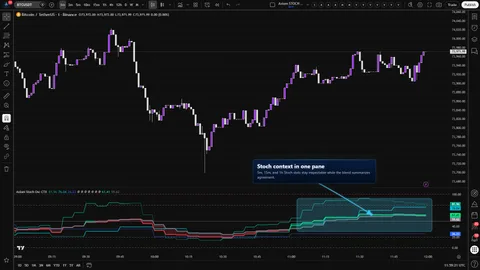
The pane runs three independent Stochastic slots in parallel, each with its own source, MA families for K and D, K length, K smoothing, D length, and timeframe. Every slot stays on Stoch's native 0..100 axis, anchored by a 50 midline and user-adjustable overbought and oversold guides — default 80 and 20. A weight-gated blended K and D pair sits over the stack as a compact context read that the trader shapes, not a score handed back to them.

Where this version sits

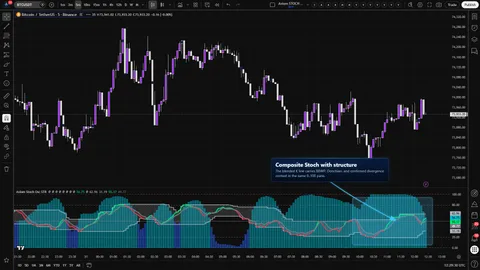
Axiom indicator families use a Base -> CTX -> STR progression when the full set exists. Base is the focused/free version: three chart-symbol slots, one global repaint posture, and the smaller MA/filter surface where that family uses one. CTX expands that same Stochastic logic into ten slots with optional per-slot tickers, per-slot timing control, deeper Power User controls, and the broader MA/filter surface. STR sits after CTX: it keeps the stronger per-slot control pattern, reduces the stack to five slots because of the added computation, and spends that budget on divergence, Keltner, BBWP, and Donchian structure around the blended K line. This page covers Base, so reach for it when the three-slot chart-symbol Stochastic read is enough.

Base is built for one practical read: are the two or three timeframes you care about actually aligned, or is one slot carrying the story while the others disagree? Every slot stays visible next to the blend so you can answer that without collapsing the stack into a single number.

Trust boundary in plain terms:

  • A single global On Bar Close? switch governs repaint posture for every slot at once. ON waits for each higher-timeframe bar to close and is honest. OFF uses the live higher-timeframe value and can change until that bar closes.
  • The blend is a weight-gated weighted average of the active slots. It is context you shape with your weights, not a verdict.
  • Optional master smoothing adds one post-blend MA pass. It trades reactivity for calm — the blend crosses the midline later.
Features
  • Three independent Stochastic slots on a native axis. Each slot has its own source, timeframe, K length, K smoothing, D length, MA type for K, and MA type for D. Each slot's %K stays inside Stoch's native 0..100 range — no rescaling.
  • Multi-timeframe stacking in one pane. Default stack is 5, 15, and 60. Set slot timeframes to whatever your setup actually uses. A runtime safety rail refuses any slot timeframe lower than the chart timeframe.
  • Weight-gated blended K and D pair. A compact combined read across the active slots. Weights are independent per slot, zero-weight slots stay plotted without steering the blend, and the blend goes blank on purpose if every effective weight is zero.
  • Familiar overbought and oversold guides. User-adjustable dashed lines at 80 and 20 by default, with a solid midline at 50 and solid boundary lines at 0 and 100.
  • Per-slot color lean. Each slot's K line flips color when its K sits above or below its own D, and fades when K is below D. The blended K picks up the blend's lean, and the fill between the blended K and D reinforces that direction without adding a new series.
  • One global repaint switch. A single On Bar Close? applies to every slot. Slower and honest when ON. Faster and exposed to higher-timeframe repaint when OFF. Both positions are named for what they actually cost.
  • Optional post-blend master smoothing. One MA pass over the blended K and D after blending. Off by default. Useful for choppy sessions when you want the blend to breathe before crossing the midline.
  • Per-slot hide toggle. Hide a slot's plot while keeping it live in the blend when the pane gets busy.
How to use
  1. Add Axiom Stoch Osc to a chart in its own pane.
  2. Start on a 1-minute chart (or whatever you actually watch) so the default 5 / 15 / 60 stack reads comfortably.
  3. Leave the defaults: all three slots enabled at timeframes 5, 15, 60, each at Blended Weight 33.3, source close, K Length 14, K Smoothing 3, D Length 3, MA types SMA, Line Width 2.
  4. Confirm three K lines move inside 0..100, a blended K and D pair sits roughly within the range of the active slots, the 50 midline and the 80 / 20 guides are drawn, and the fill between the blended pair tracks its lean.
  5. Toggle On Bar Close? OFF, then back ON. OFF should let the higher-timeframe slots react sooner and can change until the higher-timeframe bar closes. ON should hold steady on confirmed history.
  6. Right-click the indicator name → Add alert → pick a per-slot or blended alert to confirm routing.

What correct first use looks like. Each slot's K moves inside 0..100 and flips color on the bar where its K crosses its own D. The blended K sits between the active slots rather than outside them. Flipping On Bar Close? visibly delays reaction on the higher-timeframe slots without changing the shape of their series. Adjusting the OB and OS inputs moves the dashed guide lines, not the slot plots.

Settings

Per-slot basics

Each slot exposes Enable Stoch 0X, Hide Stoch 0X Plot, Source, TimeFrame, K Length, K Smoothing, K Type, D Length, D Type, Line Width, and Blended Weight. Defaults: all three slots enabled, weights 33.3 / 33.3 / 33.3, timeframes 5 / 15 / 60, source close, K Length 14, K Smoothing 3, D Length 3, MA types SMA, Line Width 2. Leaving TimeFrame blank inherits the chart timeframe. The current Lite MA palette is SMA, EMA, RMA, WMA, VWMA, and SWMA for K smoothing, D smoothing, and master smoothing.

Change these when your setup actually asks you to. Longer K Length smooths the slot and slows its flips. Heavier K smoothing calms the plotted K line; heavier D smoothing slows the internal comparison line that drives slot color, alerts, and the blended D. Weight a slot to 0 to keep its plot and alerts live without letting it steer the blend.

Oscillator (overbought / oversold)

  • Overbought Level — default 80. Sets the dashed OB guide.
  • Oversold Level — default 20. Sets the dashed OS guide.

Change these only when your instrument earns it. 80 and 20 are the familiar stretched-condition guides, not trade triggers.

Display

  • Plot Blended K/D — shows or hides the blended K, blended D, and the fill between them. Default on.
  • Blended Line Width — thickness for the blended pair. Default 3.

Hide the blend when you are learning what each slot does on your instrument. Bring it back once the slots are settled.

Master smoothing (post-blend)

  • Enable Master Smoothing — adds one MA pass over the blended K and D after blending. Default off.
  • Master MA Type — default EMA. MA family for the pass.
  • Master Length — default 3.

Turn this on when the blend is reactive enough to distract you and the session warrants extra calm. Expect the midline cross to arrive later when this is on.

PU (Power User)

  • On Bar Close? — global repaint switch. Default ON. One setting covers every slot; per-slot repaint control lives in CTX and STR.

What to watch out for

  • Leaving On Bar Close? OFF to feel faster and acting on the unconfirmed higher-timeframe read before that bar actually closes. The tool permits it. It also costs what you would expect.
  • Treating the default 33.3 / 33.3 / 33.3 weights as "neutral." Equal weights are a starting point, not an impartial answer. They still bias the blend toward whichever slot is moving the most.
  • Raising Master Length until the blend finally crosses 50 and reading the delayed cross as confirmation.
  • Hiding every slot plot and losing the ability to see which slot is carrying the blend.
  • Reading an 80 or 20 touch as a trigger in a strongly trending market. Stoch stays stretched in trends — always has.

Alerts

Ten alerts compile in the current source. Each is bar-close gated on the chart timeframe, and each reports a current state on the confirmed bar — not a cross event, not a flip event.

  • Stoch 01 Is Bullish / Stoch 01 Is Bearish — slot 01's K is above / below its own D on a confirmed chart bar.
  • Stoch 02 Is Bullish / Stoch 02 Is Bearish — slot 02 state on a confirmed chart bar.
  • Stoch 03 Is Bullish / Stoch 03 Is Bearish — slot 03 state on a confirmed chart bar.
  • Blended Stoch Is Bullish / Blended Stoch Is Bearish — blended K above / below blended D on a confirmed chart bar.
  • All Stoch Slots Bullish / All Stoch Slots Bearish — every enabled slot is bullish / bearish on a confirmed chart bar.

The in-file @Description header mentions state-flip alerts and midline / threshold-cross alerts on the blend. Those are not compiled in the current code. The alerts above are the full list you can route today.

The chart-bar close gate ensures the alert itself fires at confirmation. It does not cancel intra-bar movement on the underlying slot data when On Bar Close? is OFF.

For the geeks

Two pieces of this tool are worth naming explicitly so a careful reader does not misread the pane.

The blend is a weight-gated weighted average. The oscillator walks the active slots for each series. Slots whose weight is zero and slots whose value is na are skipped cleanly. Whatever is left is averaged by weight. The consequence: a slot at weight 0 still plots and still routes its own alerts, but it does not steer the blend. And if every effective weight lands at zero, the blend returns no value on purpose rather than drawing a placeholder that looks like data.

You can verify this on your own chart. Set Stoch 01 to weight 100 and the other two to 0; the blend should track Stoch 01 exactly. Zero every weight; the blend should go blank.

Master smoothing is a post-blend MA pass. When it is on, one MA pass runs over the blended K and D after blending, and both series are clamped back into the 0..100 range. Less noise, more lag — the midline cross arrives later than it would with the pass off. Toggle it during a noisy session and compare where the blended K crosses 50 in each position. The tradeoff shows up plainly.

FAQ

Why does a slot jump right as the higher-timeframe bar closes? That is the cost of On Bar Close? OFF. When OFF is selected, each slot pulls the live higher-timeframe value through request.security, and that value can change until that bar closes. Flipping the switch ON returns the previous higher-timeframe bar's confirmed values instead. Slower. Honest.

What does the blended line actually mean? It is a compact context read across your active slots, weighted the way you decide. It is not a verdict, not a probability, and not a signal. The per-slot plots stay visible next to it on purpose so you can see whether the blend is reporting agreement across the stack or one heavy slot pulling the line.

Can I still read 80 and 20 the way I read them on a normal Stoch? Yes — the axis is native Stoch, so your muscle memory at 50, 80, and 20 applies. The honest footnote: an 80 or 20 touch in a strongly trending market is not a trade trigger on this tool any more than it is on a standalone Stoch. Stoch will sit against the rail while the move continues.

Can I confirm one slot but keep another reactive? Not in the Base trim. On Bar Close? is global here — one setting covers every slot. Per-slot repaint control lives in CTX and STR.

What happens to the blend if I zero every weight? The blend goes blank. The oscillator skips zero-weight slots and skips na slots. If nothing is left to average, it returns no value rather than guessing.

Limitations
  • The global repaint switch is one setting. Base does not offer per-slot On Bar Close? control. If you want to confirm the highest-timeframe slot while leaving the lowest-timeframe slot reactive, that is CTX or STR territory.
  • On Bar Close? OFF can repaint on higher-timeframe data until that bar closes. That is a deliberate choice the tool exposes, not a bug it hides.
  • The blended K and D are context, not conclusions. They reflect the weights you set — weight a slot more, it steers more.
  • Slot timeframe must be greater than or equal to the chart timeframe. The tool refuses lower-timeframe slot requests with a runtime error rather than pretending that configuration is valid on the current chart.
  • Base ships with three slots. Ten-slot context breadth, a correlated-symbol slot, or per-family Power User parameters are CTX territory; five-slot blended-line structure is STR territory.
  • The tool reads Stoch on the chart symbol and the slot's timeframe through request.security. Session behavior follows ordinary TradingView session handling for the instrument you are on.
  • The MA families available for K smoothing, D smoothing, and master smoothing come from the imported Lite moving-average library. In the current source, that means SMA, EMA, RMA, WMA, VWMA, and SWMA.
  • Overbought and oversold guides are drawn, not triggered. 80 and 20 are familiar stretched-condition lines, not entries.
Support and training

Find support and training resources at axiomcharts.com.

Disclaimer

Axiom Stoch Osc is a charting tool. It does not provide financial advice, does not predict future prices, and does not execute trades. All inputs, interpretations, and decisions are yours. Test any setting change on your own chart under live conditions before you act on it.

Related products

If this one is close but not quite right, there may be a better fit nearby for the same kind of chart work, testing need, or workflow gap.

Back to products
Axiom Stoch Osc STRindicator
Axiom Stoch Osc STR thumbnail

indicator / indicators

Axiom Stoch Osc STR

Five independent Stochastic slots, a weight-gated blend of the slot K and D lines, and pivot divergence, Keltner, BBWP, and Donchian context computed on the blended K — all inside Stoch's native 0..100 frame. STR trades CTX's ten-slot breadth for blended-line structure.

1m5m15m1H4H1DANY

Crypto / Forex +4 / 1m / 5m +5

Axiom Stoch Osc CTXindicator
Axiom Stoch Osc CTX thumbnail

indicator / indicators

Axiom Stoch Osc CTX

Ten independent Stochastic slots, one native 0..100 pane, a weight-gated blend, configurable K and D MA families per slot, and an honest repaint switch per slot. Multi-timeframe and multi-symbol context without the stacked-Stoch clutter.

1m5m15m1H4H1DANY

Crypto / Forex +4 / 1m / 5m +5

Axiom RSI Oscindicator
Axiom RSI Osc thumbnail

indicator / indicators

Axiom RSI Osc

Free

Three independent RSI slots, one native 0..100 pane, a weight-gated blend, and a single global repaint switch. Multi-timeframe RSI context without stacked-RSI clutter.

1m5m15m1H4H1DANY

Crypto / Forex +4 / 1m / 5m +5

Weighing a few options against each other?

Tell us what you are trying to accomplish and we will help you narrow it down honestly.